





Leaderboard




Popular Content
Showing content with the highest reputation on 02/09/18 in all areas
-
2 points
-
Good luck with sale. I hope things get better in your life Don't quit fighting.2 points
-
2 pointsAltar: Nature Route: Unoting @ karamja general store Requirements: some combat? (its 73 for dangerous path but some combat is required for the "Safe" path) thanks to 2007 wiki for this what is shown as method 1 is the "Safe" path Altar: Cosmics Route: walking path (possibly the agility shortcuts) [walk between bank and alter] Requirements: lost city (46 and 66 agility for shortcuts) Altar: Chaos Route: standard wildy walk [ glory teleport to edge -> walk to alter ] Requirements: none Altar: Chaos Route: Nonewildy path (statue east of varrock) [ varrock teleport -> east bank -> leave varrock and go north enter statue -> follow underground path -> enter chaos alter ] Requirements: what lies below2 points
-
2 points
-
2 pointsFire bolt Max hit: 12 (can be increased to 17 with Smoke bstaff, chaos gaunts, and occult, 18 with sotd, and 27 with tome of fire) Cost: 94-129~ Water blast Max hit: 14 Cost: 240-255~2 points
-
2 pointsWe're not going to take your word for it, you need to post proof as he did.2 points
-
👑CzarScripts #1 Bots 👑 👑 LATEST BOTS 👑 If you want a trial - just post below with the script name, you can choose multiple too. 👑 Requirements 👑 Hit 'like' 👍 on this thread1 point
-
1 pointWant to buy with OSGP? Contact me on Discord! Detailed feature list: - Supports all rooftops (Draynor, Al-Kharid, Varrock, Canafis, Falador, Seers, Polivneach, Relekka, Ardougne) - Supports most courses (Gnome stronghold, Shayzien basic, Barbarian stronghold, Ape toll, Varlamore basic, Wilderness (Legacy), Varlamore advanced, Werewolf, Priffddinas) - Supports Agility pyramid - All food + option to choose when to eat - (Super) Energy potions + Stamina potions support - Progressive course/rooftop option - Waterskin support - Option to loot and sell pyramid top - CLI support for goldfarmers Custom Breakmanager: - Setup Bot and break times - Randomize your break times - Stop script on certain conditions (Stop on first break, Stop after X amount of minutes, Stop when skill level is reached) - Worldhopping - Crucial part to botting in 2023! Script queueing: - Support queueing multiple script in a row - All Khal scripts support flawless transitions in between scripts - Start creating your acc in a few clicks from scratch to multiple 99's - Flawless CLI support - Learn more here: How to use CLI parameters: - Example Usage: -script 463:ScriptFile.BreakFile.DiscordFile SAVEFILE = Saved Filename BREAKFILE = Breakmanager Filename DISCORDFILE= discordSettings Filename - SAVEFILE: Save file can be created in the GUI. Navigate to the tab you want to run and press "Save As CLI file". Please choose your filename wisely (No special characters) - BREAKFILE (Optional): Breakfile can also be create in the GUI, set the breaksettings you wish to use and press "Save new CLI BreakFile". Please choose your filename wisely (No special characters) - Final form (Note that with some bot manager you do not need to specify '-script 463'): -script 463:TaskList1.4515breaks (With breaks) -script 463:TaskList1.4515breaks.discord1 (With breaks & discord) -script 463:TaskList1..discord1 (NO breaks & discord, leave 2nd parameter empty) Proggies:1 point
-
1 pointThis is an AIO (All-in-one) bot that has almost every thieving style except blackjack, ask for a free trial by liking thread or making a post! Vyres and elves are now supported! Both can make solid profit per hour, decent passive income! BIG THANK YOU TO ALL OUR SUPPORTERS! WE ARE THE MOST SOLD THIEVING BOT IN OSBOT HISTORY. MOST REPLIES, MOST USERS, LONGEST PROGGIES #1 Thiever | Most Overall Sales | Most Total Replies | Most Results | 10+ Years Maintained | 'the intelligent choice' by Czar SUPPORTS VYRES 224M made in a single sitting of 77 hours 1.1B made from elves and vyres!! ELVES SUPPORTED TOO! (NEW) 2.1m/hr, 6 crystals in 7 hrs 99 THIEVING MANY MANY TIMES, 35M EXP IN ONE BOTTING RUN!! 99 thieving in ~43k xp (12 minutes remaining)! Just got 99 proggy! Gratz to @iz0n THIEVING PET AT LVL 22 FROM TEA STALLS 11.5 HOURS, WITH PET TOO!! 610k/hr getting 99s on deadman worlds!1 point
-
1 pointCape's AIO Progressive Woodcutter Created by @Team Cape Need quick levels but don't want to keep restarting your bot to go from trees, to oaks, to willows, to maples, to yews, etc? Want to get WC over with, or just make some quick GP? Want to get that Lost City requirement out of the way, but can't bare the monotony of woodcutting? Cape's AIO Progressive Woodcutter is YOUR solution. Features: 1. Create and add your own tasks for the script to execute! 2. Task-based progression! Watch this script flawlessly switch from Lumbridge trees, to Draynor oaks, to Draynor willows, to Camelot maples, Camelot yews, and so forth! Until you want it to stop! 3. OR use custom mode - Start the script at the location you want to woodcut at, type the name of the tree, and start chopping those trees! Need to bank instead of powerchopping? Just select the bank from the list, and let it go! 4. Banking - You get to CHOOSE which tasks you bank on! 5. Powerchop - You get to CHOOSE which tasks you powerchop on! 6. Automatically takes the best axe from your bank and upgrades as the script continues! Just tick banking on, and watch the script upgrade from iron, to steel, to any better axe that you have! 7. Supports all trees! 8. Supports the Woodcutting Guild! 9. Supports Powerchopping and Banking at Redwood Trees! 10. Takes Bird Nests if Desired! 11. Supports the Dragon Axe Special if you Tick the Box! 12. Draw tree models, so you can see what tree is about to be chopped next, and the tree that the script is currently planning on chopping! 13. 50+ Preset Locations created, meaning there are a virtually infinite number of paths that you could take to level your woodcutting! 14. Custom-created location lookup, so you can easily find and pick which location you want to chop at! 15. A sleek GUI that you can easily use to setup your personal leveling path, and a flawless paint to show how your levels have progressed and the task you're currently on! 16. Flawlessly created to give you flawless results! Want more locations? Just ask in the thread below! Antiban / Antipattern: 1. Random & Dynamic Sleeps Utilized in Each Action and Loop! 2. Enable Timing Anti-Pattern and Watch as the Script Changes Sleeping Times Used Every Few Minutes, Meaning Your Sleeping Times Never Have One Consistent, Uniform Distribution! 3. Utilize AFK Mode to go Randomly AFK, Like a Real Player! 4. Random Actions Utilized to Keep You Logged In! Where can I obtain this script? Simply go into the Woodcutting section of the OSBot store, found at the link below, and scroll to the bottom! Pay $8.99 once, and enjoy unlimited usage of this unique script! https://osbot.org/mvc/sdn2/scripts/20 How do I Start to Use this Script!? After buying the script from the OSBot store for just $8.99, simply load up the client, go into your script selector, and the script will have appeared in your list! Click on it, press start, and the GUI will pop up! From there, create whatever tasks and select whatever settings YOU want! What if I don't Want/Need to Progressively Level? That's fine! Just use custom location mode, OR use a preset location and set it to start at your current level! The script will work exactly as desired! How Do I Set Up Progressive Leveling? In the GUI, you'll be given the unique option to add in custom woodcutting tasks! Here is how it's done! 1. Open the second tab of the GUI (Progression Tab) 2. Select a location from the drop-down menu (There are over 50! so there is a location lookup option if you choose to use it!). 3. After selecting a location, check whether you want to bank when using the task (if left unchecked, it will powerchop for you!) 4. Set what level you want to start the task at! 5. From there, just hit 'Add Location', and you'll see your task immediately pop up in the task list! 6. Add in as many tasks as you want! Happy botting! What's the catch? There is none. Just a flawless script. It really is that simple. Can I get a free 24 hour trial of the script? Of course! Just drop a like on the thread and ask for a trial below! Last proggie courtesy of @Scripter_Leo! Like the script? Post a proggie below, or rate the script on the store! Those are the best ways to help out! Script GUI: If you really enjoy the script, rate it 5 stars on the OSBot store or comment below with a proggie!1 point
-
1 pointMolly's Chaos Druids This script fights chaos druids in Taverly dungeon, Edgeville dungeon and Ardougne. Profits can easily exceed 200k p/h and 60k combat exp/ph, this is a great method for training low level accounts and pures. Buy HERE Like this post and then post on this thread requesting a 24hr trial. When I have given you a trial I will like your post so you will receive a notification letting you know you got a trial. Requirements - 46 Thieving for Ardougne -82 Thieving and a Lockpick for Yanille - 5 Agility for Taverly(recommended) - No other requirements! Though I do recommend combat stats of 20+ as a minimum Features: - Supports eating any food - Hopping out of bot worlds - Recovers from deaths(respawn point must be lumbridge), includes re-equipping items on death - Potion support - Automatically detects and withdraws/uses Falador teleport tabs if using Taverly dungeon - Automatically detects and withdraws/equips/uses glories if using Edgeville dungeon - Supports looting bag Setup: Start the script, fill out the GUI, and be in the general area of where you want to run the script. CLI setup: Proggies: In the works: Known bugs: Bug report form, this is a MUST for problems to be resolved quickly: Description of bug(where, what, when, why): Log: Your settings: Mirror mode: Y/N
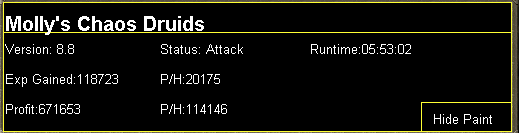
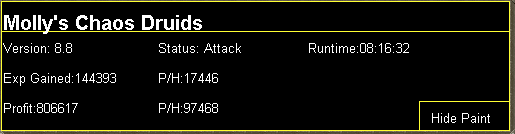
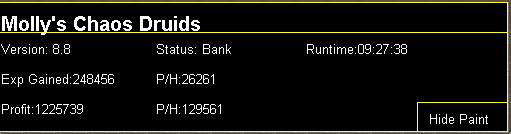 1 point
 -
1 point
-
1 point
-
yeah its 89 combat to stop the spiders agroing but the safe path "Should" avoid all agro from them but thats why i left some combat as the requirement, the max hit is only 5, they are alot less deadly than the voodoo things which is why thats the safer path rather than a straight line through the village1 point
-
The payoff is huge. It’s a high risk high reward thing. It’s meant for use after a fight, not during a fight.1 point
-
Altar;Law Route: Air balloon transport - Start at castle wars and use balloon to enter law alter requirements: Ring of dueling and englightened journey quest (easy requirements for the xp could gain via laws) the balloon transportation also opens another route to varrock right next to earth alter1 point
-
1 point
-
1 point
-
1 point
-
1 point
-
1 point
-
1 point
-
1 point
-
1 point
-
1 point
-
1 point
-
1 pointIf you're (rightfully) concerned about this stuff, i'd suggest: Asking for the source code, perhaps in the form of an online repo (github/gitlab/bitbucket/...) Perhaps build your own jars from said source code if you're confident you know how Decompiling the built jars that are sent to you before running them There are plenty of free decompilers available online, or alternatively you can install IDE plugins if that is your thing. Running the code by a scripter on here to double check GL! Apa1 point
-
1 pointgoogle java decompiler download it open .jar in it look at code see if it's safe1 point
-
1 point
-
1 point
-
1 pointits very simple program, you do it your self with mouse, lets say you do fletching logs for 10mins,the program will record your actions, then you just play replay and it do by it self...progam i use is "mouse and keyboard recorder" you can find it on piratebay cracked version1 point
-
1 point
-
1 point
-
1 point
-
1 pointstill with the minor buggs it is very fast, i ran it yesterday for like 7 hours with breaks and it got 1m profit and was still going strong. so ye I bought it. Greaat script man but it can still get better. get them little buggs out of there and it will be smooth a.f I am lovin it already tho1 point
-
1 pointMakes only like 150 - 200k per hour, not too bad and great.. thanks1 point
-
1 point1 point1 point1 point1 point1 point1 point1 pointYea, I pushed a fix, but a developer needs to update the SDN before changes are live. Usually done once a day1 point1 pointhow big is the profit per hour with recoils? ive never tried that, but if you wanted that youl probly need 6hour record that include loging in, il tell my craft method once i get 99 in 5-6 days1 point1 point1 point1 point1 point1 point1 point1 pointTo start OSBot through command-line, open up terminal/cmd on your operating system. Ensure your working directory in command-line is at the location where your OSBot jar is located. For instance if you are on Windows and the jar is on your Desktop, then you must type "cd Desktop" first. For instance: If you are looking to only start OSBot through command-line to see detailed output, please use the following snippet: java -jar "osbot 2.4.145.jar" -debug 5005 You must edit the information inside the quotes to what your jar file is named. If you are in the wrong directory or you typed in an incorrect filename, you will get an error: "Error: Unable to access jarfile osbot 2.4.145.jar".
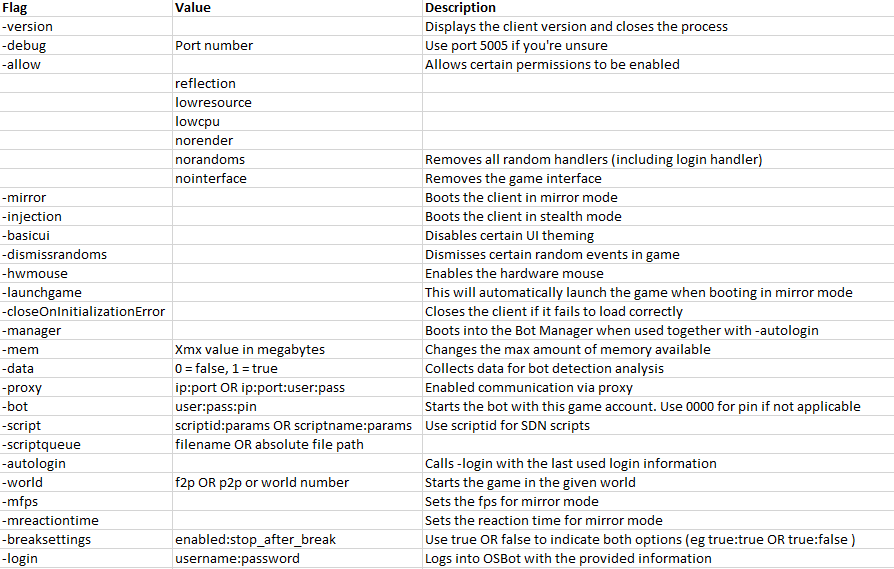 1 point


































Account
Navigation
Search
Configure browser push notifications
Chrome (Android)
- Tap the lock icon next to the address bar.
- Tap Permissions → Notifications.
- Adjust your preference.
Chrome (Desktop)
- Click the padlock icon in the address bar.
- Select Site settings.
- Find Notifications and adjust your preference.
Safari (iOS 16.4+)
- Ensure the site is installed via Add to Home Screen.
- Open Settings App → Notifications.
- Find your app name and adjust your preference.
Safari (macOS)
- Go to Safari → Preferences.
- Click the Websites tab.
- Select Notifications in the sidebar.
- Find this website and adjust your preference.
Edge (Android)
- Tap the lock icon next to the address bar.
- Tap Permissions.
- Find Notifications and adjust your preference.
Edge (Desktop)
- Click the padlock icon in the address bar.
- Click Permissions for this site.
- Find Notifications and adjust your preference.
Firefox (Android)
- Go to Settings → Site permissions.
- Tap Notifications.
- Find this site in the list and adjust your preference.
Firefox (Desktop)
- Open Firefox Settings.
- Search for Notifications.
- Find this site in the list and adjust your preference.