





Leaderboard





Popular Content
Showing content with the highest reputation on 12/04/16 in Posts
-
6 points
-
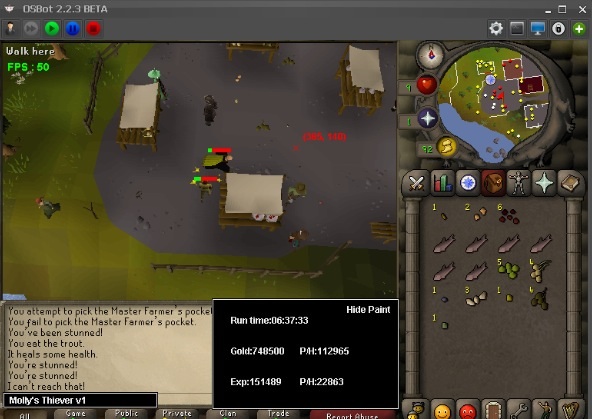
5 points👑CzarScripts #1 Bots 👑 👑 LATEST BOTS 👑 If you want a trial - just post below with the script name, you can choose multiple too. 👑 Requirements 👑 Hit 'like' 👍 on this thread5 points4 pointsThe issue: Problem: Apparently G-Sync monitors cause this tearing I know this issue effects a handful of members, so let me know for sure if this is completely accurate. Thanks to @cheifkeith69 for telling me his findings.4 pointsIf I've missed any, let me know and I'll add them. It seems like a lot of people are having problems with this, so I want to fix this up. It's a very simple thing that greatly improves the readability of your code Variables: All variable names should start with a lower case letter for the sake of clarity. Example: private long time = System.currentTimeMillis(); Another example: private Area area = new Area(1, 2, 3, 4); Notice how the names in both are lower case. If you want to make a variable with more than 1 word, you would capitalize the first letter of the second word. private Area theArea = new Area(1, 2, 3, 4); private long timeStarted = System.currentTimeMillis(); Note that methods follow essentially the same format. Examples: public int onLoop() { return 0; } Note that the first word is not capitalized, but the second word is capitalized. public void eat() { } The first word is also not capitalized. Simple, right? Constants This is used for values such as widget ID's - values that are final that never changed. All letters are upper case and instead of putting a capital letter to start a new word, instead put a _ to signify a space. private static final int SOME_ID = 57; public static final int TIN_ROCK_COLOUR = 53; Thanks to @@Transporter for reminding me to put this in Objects and class definitions Classes define objects, and their first letter is always capitalized so people know that a class is being referenced. Notice how we said: private Area theArea = new Area(1, 2, 3, 4); The 'Area' object has a capital first letter, so we know we're not referencing another variable, for instance the one we named just before called 'area'. If we are defining a class, we would do it like so: public class Thing { //attributes } *** Notice the upper case first letter! *** If we wanted to define a 'Thing', then we would say: Thing something = new Thing(); ^ capitalized ^ capitalized Enums If you're not familiar with what enums is, but you're still coding on OSBot, this will probably look familiar to you: private enum State { BANK, MINE, RUN_AWAY }; Notice that all letters are capitalized. This is how enums are named - exactly like the static IDs from before. This is a very simple task that takes about 5 seconds to learn. If you're not going to properly format your code, and you ask someone for help, you will come across as either very unknowledgeable or just lazy. If you have any questions, please feel free to ask . If I made any mistakes, tell me - I wrote this up in about 5 minutes.3 pointsLets fill these forums with trump memes. We use gifs to react to certain topics/posts, lets do it with trump gifs instead. i know i will you, you and you, and you uh-huh... uh-huh Agreeing with yourself Arguing with yourself (full) What? can't hear you MRW [insert something stupid here] not sure about this one weird head nodding trump dance Look up point up mildly impressed 1 moment cool slo-mo So, every one of you, say it with me! LETS MAKE OSBOT GREAT AGAIN! god damn, trump is a living meme. Now can i get some likes?3 points3 pointsjust broke up with my gf for 5 years... it came down to family problems her mother hating me this whole time and how she cant fight for me anymore... and sees me as a problem give me some feels3 pointsyes it will lower the average autism per thread , prevent new members to farm post count to 100 and scamquit and hopefully higher quality threads/posts3 points3 pointsmaldesto should give away free stuff to the most active person whose username starts with ez and has a 1 at the end of his name3 points3 pointsI didn't have time to make an entry, but the 2nd to last one should win. Hands down. Lots of entries, I like that.3 points2 pointsView in store ($3,99 for lifetime access) Features: Supports every location you would ever want to cook (anywhere missing? request it!) Supports almost every food item cookable on a range or fire (anything missing? request it!) Smart Target-oriented back-end stops the script when you have accomplished your desired goal Option to move mouse outside screen while cooking to simulate human AFKing Where Make-All isn't available, A Gaussian distribution based suffixed string generation algorithm randomises entered Make-X values Utilises a combination of WebWalking and recorded paths to ensure the script never strays from it's job Simple, intuitive GUI which auto-detects your food and location based on your inventory and minimap position Stable cooking & banking algorithms, tuned individually for each food item and bank Clean, informative, Anti-aliased, un-obstructive and fully movable self-generating paint Movable on-canvas scrolling console logger Efficient script logic ensures an EXP-optimised experience Normally distributed response times to simulate a human's reflexes Stops & logs out when out of food, saving your progress to the console and web Dynamic signatures allow you to track your progress as you use the script Handles obstacles and doors between the bank and the range to ensure door spammers cannot hinder your gains CLI is supported for all hardcore chef needs ... and many more ... Supported food: This script only supports cooking these food items on ranges/fires, it will not combine ingredients to make items such as Tuna potatoes or Pineapple pizzas. Shrimp Anchovies Sardine Herring Mackerel Chicken Beef Bear meat Rabbit Rat meat Sinew from Bear meat Sinew from Beef Trout Salmon Cod Pike Bass Rainbow fish Tuna Lobster Swordfish Monkfish Shark Dark crab Sea turtle Manta ray Anglerfish Karambwan Poison Karambwan Bowl of Water Uncooked pizza Potato Seaweed Sweetcorn Stew (new!) Curry (new!) Just ask for a new food item to be added! Supported locations: Rogues den Lumbridge Kitchen (new!) Catherby Nardah Tzhaar City Al-Kharid Zanaris Neitiznot Varrock East Hosidius Kitchen Gnome Stronghold Varrock Cooks' Guild Port Khazard Edgeville Mor Ul Rek Myths' Guild (new!) Just ask for a new location to be added! Why choose APA Scripts? As an experienced veteran scripter here on OSBot, I strive to give you the best user experience that I can by providing frequent updates and fixes. With over 40 cumulative 5 star reviews on the store, as well as my Scripter III rank, you know you're in safe hands. Want something added? Don't like something? Have an awesome proggie to share? Let me know! Example GUI: Starting from CLI: Gallery: _________________________________________________________________________________________ Credits:2 points2 pointsBefore buying, please ensure you check-out with the correct script. Swapping scripts is not possible. View in store $4.99 for lifetime access Features: All spawns - Supports every multi-crab spawn point both along the south coast of Zeah and Crab Claw Isle All combat styles - Supports Ranged, Magic and Melee combat training. The script will not bank runes of any type Saving GUI - Intuitive, re-sizeable and fully tool tipped GUI (Graphical User Interface) allowing you to tailor the script session to your needs, with configuration saving / loading Human replication - Designed with human simulation in mind - multiple options to replicate human behaviour available in the GUI Setup customiser - Inventory customiser allows you to visually see your trip setup CLI support - The script can be started from the command line All potions - Supports all relevant potion types (including divine potions!), multiple potion types simultaneously and varying potion ratios Healing in a range - Dual slider allows you to specify a range within which to consume food. Exact eat percentages are calculated using a Gaussian distributed generator at run time Healing to full at the bank - When banking, the script will eat up to full hit points to extend trip times Safe breaking - Working alongside the OSBot break manager, the script will walk to safe place approximately two minutes before a break starts to ensure a successful log out Anti-crash - Smart crash detection supports multiple anti-crash modes (chosen in the GUI): Hop worlds if crashed - the script will walk to a safe place and hop worlds until it finds a free one, at which point it will resume training Force attack if crashed - the script will fight back and manually fight pre-spawned sand crabs until the crasher leaves Stop if crashed - the script will walk to a safe place and stop Ammo and Clue looting - Clue scroll and Ammo looting system based on a Gaussian-randomised timing scheme All ammo - Supports all OSRS ammo types and qualities Spec activation - Special attack support for the current weapon to maximise your exp per hour Auto-retaliate toggling - The script will toggle auto-retaliate on if you forget Move mouse outside screen - Option to move the mouse outside the screen while idle, simulating an AFK player switching tabs Refresh delay - Option to add a Gaussian-randomised delay before refreshing the chosen session location, simulating an AFK player's reaction delay Visual Paint and Logger - Optional movable self-generating Paint and Timeout Scrolling Logger show all the information you would need to know about the script and your progress Progress bars - Automatically generated exp progress bars track the combat skills that you are using Web walking - Utilises the OSBot Web alongside a custom local path network to navigate the area. This means the script can be started from anywhere! Safe banking - Custom banking system ensures the script will safely stop if you run out of any configured items Safe stopping - Safely and automatically stops when out of supplies, ammo or runes Dropping - Drops useless/accidentally looted items to prevent inventory and bank clutter All food - Supports pretty much every OSRS food known to man. Seriously - there's too many to list! ... and many more - if you haven't already, trial it! Things to consider before trying/buying: Mirror mode - currently there appear to be some inconsistencies with behaviour between Mirror mode and Stealth Injection meaning the script can behave or stop unexpectedly while running on Mirror. I would urge users to use the script with Stealth Injection to ensure a flawless experience! Since Stealth Injection is widely considered equally 'safe' to mirror mode and comes with a host of other benefits such as lower resource usage, this hopefully shouldn't be a problem. Using breaks - the script supports breaks and will walk to a safe place ready to log out approximately two minutes before a configured break starts. However, upon logging back in, your spot may no longer be open. If you configure the crash mode to be either 'Hop if crashed' (default) or 'Stop if crashed', this will not prove to be a problem. However if using 'Force attack if crashed', the script will attempt to take back the spot by crashing the occupying player and manually attacking spawned sand crabs. Be aware that players have a tendency to report anti-social behaviour such as this! Avoiding bans - while I have done my utmost to make the script move and behave naturally, bans do occasionally happen, albeit rarely. To minimise your chances of receiving a ban, I would strongly suggest reviewing this thread written by the lead content developer of OSBot. If you take on board the advice given in that thread and run sensible botting periods with generous breaks, you should be fine. That being said, please keep in mind that botting is against the Oldschool Runescape game rules, thus your account will never be completely safe and you use this software at your own risk. Setting the script up - I have done my best to make the GUI (Graphical User Interface) as intuitive as possible by making all options as self explanatory as I could, however if you are not sure as to what a particular setting does, you can hover over it for more information. If that doesn't help, just ask on this thread! Web-walking - alongside a network of paths, the script moves around with the OSBot web-walking system, using it when in unknown territory. While it has proven very reliable, there are naturally some areas for which the web-walker may struggle. As a result, prior to starting the script, I would highly recommend manually navigating your player close to the sand crabs bank, however in practice, anywhere on Zeah should be fine. Script trials: I believe that trying a script before buying is paramount. After trying the script, hopefully you will be convinced to get a copy for yourself, but if not you will have gained some precious combat experience! If you're interested in a trial, please follow the instructions on my trials thread which can be found here. Gallery: Start up GUI (Graphical User Interface): Paint (optional, movable and self-generating): User screenshots: Recent Testimonials: Starting from CLI: This script can be started from the command line interface. There is a single parameter, which can take two (and only two) values: 'gui' or 'nogui'. 'gui' will start the script and show the gui, 'nogui' will skip the GUI setup and start the script using your save file as the configuration. To start from CLI with 'nogui', the script requires a valid GUI save file to be present - if you haven't already, start the script manually and configure the GUI to suit your needs. Then hit 'Save configuration' and in future starting from CLI will use these configured settings. The script ID is 886. Example CLI startup: java -jar "osbot 2.4.137.jar" -login apaec:password -bot apaec@example.com:password:1234 -debug 5005 -script 886:nogui2 pointsHe means he wants it cheap bc the purpose of it was a HC ironman, then they died and quit and have no use for the account2 pointsI think we can safely say already that @Unbound scammed three people including me. I will see what I can do for you as well @Saxon. I hope we can find a solution to all this and have Unbound banned indefinitely.2 points2 pointsur girlfriend is weak ur worth fiighting for u r number 1 u will pull thru u r better than her/ u will find gud woman 2 make sandwhichs and pull ur dick it will happen trust me op2 points2 pointsWebsite is having a over haul one of these days, alrdy got the design/base of pages done, just gotta make it functional. Going to have hiscores, live feed for drops and a users page so you can search a name and see what drops people have got ATM it is a 45 prayer minimum but in the next update, if the script notices u cant use some of the prayers it will use the lower level prayers. Will add Glad its going well! Will add trials in 1 moment2 points2 points2 points2 pointscould you possibly tie in mining rune essence, and then going to craft it?2 points1 pointWant to buy with OSGP? Contact me on Discord! Detailed feature list: - Account builder mode to level your firemaking to level 50 or even higher. - Equips pyromancer gear option - Chopping and burning logs (base Option) - Relights brazier - Fletch option - Fix brazier option - Make potion and heal pyromancer when down option - Tons of food supported - Brazier swicthing when pyromancer is down - Advanced game settings to skip games, smart caluclate points, afk at certain points, ... - Bank or Open crates - Dragon axe special attack - Fletch at brazier option - Chop in safespot option - Worldhopping - CLI support for goldfarmers Custom Breakmanager: - Setup Bot and break times - Randomize your break times - Stop script on certain conditions (Stop on first break, Stop after X amount of minutes, Stop when skill level is reached) - Worldhopping - Crucial part to botting in 2023! Script queueing: - Support queueing multiple script in a row - All Khal scripts support flawless transitions in between scripts - Start creating your acc in a few clicks from scratch to multiple 99's - Flawless CLI support - Learn more here: How to use CLI parameters: - Example Usage: -script 909:ScriptFile.BreakFile.DiscordFile SAVEFILE = Saved Filename BREAKFILE = Breakmanager Filename - SAVEFILE: Save file can be created in the GUI. Navigate to the tab you want to run and press "Save As CLI file". Please choose your filename wisely (No special characters) - BREAKFILE (Optional): Breakfile can also be create in the GUI, set the breaksettings you wish to use and press "Save new CLI BreakFile". Please choose your filename wisely (No special characters) - Final form (Note that with some bot managers you do not need to specify -script 909): -script 909:TaskList1.4515breaks (With breaks) -script 909:TaskList1.4515breaks.discord1 (With breaks & discord) -script 909:TaskList1..discord1 (NO breaks & discord) Proggies:1 point1 point#1 SOLD MAGIC SCRIPT #1 MOST FEATURES MAGIC SCRIPT ESC MODE, HOVER-CLICK, NEAREST ITEM CLICK, FLAWLESS JMod nearby and we still alive. Anti-ban and Optimal script usage Anti-ban: - Don't go botting more than 3 hours at once, take breaks! Otherwise the ban-rate is highly increased! - Bans also depend on where you bot, for the best results: bot in unpopular locations Banking-related spells are the lowest ban-rate (spells which require banking or can be casted near a bank, e.g. superheating, maybe alching, jewelry enchanting etc etc) since you can just go to a full world and blend in with other non-bots (humans), for example: world 2 grand exchange If casting spells on npcs, then unpopular locations reduce the banrate by alot, So make sure not to go to botting hotspots otherwise you may be included in ban waves. - Some good areas used to be (until some got popular): grizzly bear, yanille stun-alching, any overground tiles (upstairs etc) but once the areas are overpopulated, try to go to another location which is similar to the aforementioned locations. This is a very popular thread with many many users so if a new location is mentioned, the location will be populated very quickly so I can only suggest examples of good locations - Don't go botting straight after a game update, it can be a very easy way to get banned. Wait a few hours! If you ever get banned, just backtrack your mistakes and avoid them in the future: you cannot be banned without making botting mistakes. Keep in mind you can be delay-banned from using previous scripts, so don't go using free/crap scripts for 24 hours then switching to a premium script, because the free/crap previous script can still get you banned! For more anti-ban information, see this thread which was created by an official developer: http://osbot.org/forum/topic/45618-preventing-rs-botting-bans/1 point1 pointView in store $4.99 for lifetime access Key Features: Supports Bar smelting, Cannonball making and Item smithing Supports all tradeable bars for both smithing and smelting, with support for material-unique items (full list below) Supports the above activities in all locations you would ever want to perform them (full list below) Smart activity-based framework allows you to schedule tasks to be performed in succession (details below) Simple and intuitive start-up interface hosting the activity editor (Optional) Informative, concise, self-generating, recolourable and movable paint tracks useful run-time data (Optional) On-screen movable console logger to notify you exactly what the script is doing at any point in time Smart Gaussian-distribution derived Make-X value generator supporting letter scalar suffixes (Optional) Moves the mouse outside the game screen while idle Utilises the OSBot map web system with obstacle handling for inter-location traversal* (Optional) Ring of forging support for iron smelting ...and many more! *The OSBot web is very reliable however can occasionally (understandably) struggle with longer inter-location distances. As a result, I would highly recommend supervising the script while inter-location transitions take place. Supported Locations: Supported Bars: Bronze [1x tin ore, 1x copper ore] Iron (with & without Rings of forging) [1x iron ore] Silver [1x silver ore] Steel [1x iron ore, 1x coal ore] Gold [1x gold ore] Mithril [1x mithril ore, 4x coal ore] Adamant [1x adamantite ore, 6x coal ore] Runite [1x runite ore, 8x coal ore] Supported Smithing items: All generic material-independant items (e.g platebodies, knives, dart tips, etc...) Material dependant items: Bronze wire (bronze) Iron spit (iron) Oil lantern frame (iron) Studs (steel) Bullseye lantern (steel) Cannonballs (steel) Mith grapple tip (mithril) Activity based framework: The script features a fully-fledged activity system. This system allows you to completely customise each botting session and tailor it to the needs of your account. The system allows for 'activities' to be queued in sequence, whereby when started, the script will proceed to execute and attempt to fulfill each activity in turn. An activity is comprised of two parts - the task and the target. An example of a task may (arbitrarily) be 'Smelting gold bars at Edgeville' and an example of a target may be 'until level 70 Smithing achieved'. Both the task and the target can be fully customised to your needs, then saved and queued to the session activity manager. Task options: Smelting Bars (in a furnace) Making Cannonballs (in a furnace) Forging items (on an anvil) Target options: ... until out of supplies ... until level λ reached ... until λ experience gained ... until λ minutes passed (where λ is some inputted integer value) It is worth noting that by default all tasks are automatically considered complete if insufficient resources to perform the task are present. Setting up: Example paint: Gallery: Credits:1 point1 pointby Czar Now Added Divine potion making!! (Grinding chocolate bars gives no xp) Supports Amulet of Chemistry replenishment1 point1 pointMolly's Thiever This script is designed to quickly and efficiently level your thieving! Check out the features below. Buy HERE Features: - Capable of 200k+ per hour and 30k+ exp/ph on mid-level thieving accounts. - Quickly reaches 38 thieving to get started on those master farmers for ranarr and snap seeds! - Fixes itself if stuck. - Hopping from bot-worlds. - Stun handling so the bot doesn't just continually spam click the npc. - Drops bad seeds if inventory is full at master farmers. - Eats any food at the hp of your choosing. Supports: -Lumbridge men -Varrock tea -Ardougne cake -Ardougne silk -Ardougne fur -Kourend Fruit Stalls -Ardougne/Draynor master farmer -Ardougne/Varrock/Falador guards -Ardougne knight -Ardougne paladin -Ardougne hero -Blackjacking bandits as well as Menaphite thugs, this has limitations, click the spoiler below to see them Setup: Select your option from the drop down menu, it will tell you the location where the target is located. Fill out the gui and hit start. Simple setup! Proggies: Proggy from an acc started at 38 theiving:
 1 point1 pointWent to Ocho Rios Sandals resort for my honeymoon and man it is totally different than america lol. Also went Ziplining in the rainforest and bobsleding and all kinds of things. Wish i could gotten more pictures but cant bring your phone when you're in water.1 point1 pointGo cast your vote for this years Christmas logo! The entries are looking WAY too good, making it a very hard decision! I chose my favorite, have you? VOTE HERE: http://osbot.org/forum/topic/111231-xmas-logo-voting/1 point1 point1 pointSweet! Consider having the bot always prioritize setting up a new trap after picking up rope & net or checking the trap for a sally. This means there will never be a trap that isnt used, which is more humanlike. I hope you know what I meant here1 point1 point1 point1 point1 pointThat is one fucking naughty account. Fuck zulrah 99 RuneCrafting1 point1 point1 pointAround 50mil. And as long as the account isnt botted again for a year you'll be fine, then it gets quashed.1 point1 pointsupport. if we don't we'll end up like DG__ and other scrubs on powerboat.1 point1 point1 pointDid you just call the people here immature because they are looking for bots on a botting forum lol?1 point1 pointi acc like this 1 i like the water around him he floatin, dont understand how there can be a "worst" pet its cosmetic1 point1 pointmanually clicking they're all under my ip, so id get banned so fast if botting lol.1 point1 point1 point1 point1 pointim trying to powerfish tuna/swordies and i even make sure to power fish.. but when i get a full inv of fish it tells me going to bank but just stand there.. love the script been banned a couple of times. please fix1 point1 pointI have pushed a fix for arrow shaft fletching, it will be available when the SDN is next updated.1 point1 point1 pointAlek's post on private scripts applies to this. Opened.1 point1 pointI do expect Extreme Scripts to follow up and try to remedy the issues you are having; it would be very unbecoming of a Scripter 3 otherwise. Please allow him a week or two to try and catch-up (provided he is physically able to). If you are still having major issues, please contact me.1 point































Account
Navigation
Search
Configure browser push notifications
Chrome (Android)
- Tap the lock icon next to the address bar.
- Tap Permissions → Notifications.
- Adjust your preference.
Chrome (Desktop)
- Click the padlock icon in the address bar.
- Select Site settings.
- Find Notifications and adjust your preference.
Safari (iOS 16.4+)
- Ensure the site is installed via Add to Home Screen.
- Open Settings App → Notifications.
- Find your app name and adjust your preference.
Safari (macOS)
- Go to Safari → Preferences.
- Click the Websites tab.
- Select Notifications in the sidebar.
- Find this website and adjust your preference.
Edge (Android)
- Tap the lock icon next to the address bar.
- Tap Permissions.
- Find Notifications and adjust your preference.
Edge (Desktop)
- Click the padlock icon in the address bar.
- Click Permissions for this site.
- Find Notifications and adjust your preference.
Firefox (Android)
- Go to Settings → Site permissions.
- Tap Notifications.
- Find this site in the list and adjust your preference.
Firefox (Desktop)
- Open Firefox Settings.
- Search for Notifications.
- Find this site in the list and adjust your preference.