





Leaderboard






Popular Content
Showing content with the highest reputation on 09/28/16 in all areas
-
7 points
-
5 pointsWant to buy with OSGP? Contact me on Discord! Detailed feature list: - Account builder mode to level your firemaking to level 50 or even higher. - Equips pyromancer gear option - Chopping and burning logs (base Option) - Relights brazier - Fletch option - Fix brazier option - Make potion and heal pyromancer when down option - Tons of food supported - Brazier swicthing when pyromancer is down - Advanced game settings to skip games, smart caluclate points, afk at certain points, ... - Bank or Open crates - Dragon axe special attack - Fletch at brazier option - Chop in safespot option - Worldhopping - CLI support for goldfarmers Custom Breakmanager: - Setup Bot and break times - Randomize your break times - Stop script on certain conditions (Stop on first break, Stop after X amount of minutes, Stop when skill level is reached) - Worldhopping - Crucial part to botting in 2023! Script queueing: - Support queueing multiple script in a row - All Khal scripts support flawless transitions in between scripts - Start creating your acc in a few clicks from scratch to multiple 99's - Flawless CLI support - Learn more here: How to use CLI parameters: - Example Usage: -script 909:ScriptFile.BreakFile.DiscordFile SAVEFILE = Saved Filename BREAKFILE = Breakmanager Filename - SAVEFILE: Save file can be created in the GUI. Navigate to the tab you want to run and press "Save As CLI file". Please choose your filename wisely (No special characters) - BREAKFILE (Optional): Breakfile can also be create in the GUI, set the breaksettings you wish to use and press "Save new CLI BreakFile". Please choose your filename wisely (No special characters) - Final form (Note that with some bot managers you do not need to specify -script 909): -script 909:TaskList1.4515breaks (With breaks) -script 909:TaskList1.4515breaks.discord1 (With breaks & discord) -script 909:TaskList1..discord1 (NO breaks & discord) Proggies:5 points
-
5 pointsThis is a serious topic, no spamming or you will be warned and your post will be removed. Suggestions for Trial mod or CBA, specify which and you can nominate one for each if you would like. No more than 1 name for each. If you want to explain why you chose them, please do. No nominations of TWC members.5 points
-
5 points5 points5 points5 pointsWhen you walk 25 mins to college (slow walk) and you sweat like you just came out of a physical activity/P.E class. Then you know you're a fat fuk5 points5 pointsWe need a screenshot of his Skype ID as well with the conversation visible in the background and where he confirms that Skype. You can view his Skype ID by clicking on his profile picture. Edit: Nvm I IP banned him, he was also evading @Huho who was banned for scamming. He'll have to refund if he's willing to return. Sorry for your loss.5 points👑CzarScripts #1 Bots 👑 👑 LATEST BOTS 👑 If you want a trial - just post below with the script name, you can choose multiple too. 👑 Requirements 👑 Hit 'like' 👍 on this thread4 points4 points4 points3 points3 points3 pointsMod Weath Is on fire this week, he's obviously not liking how low gold prices are so banning everyone so he can make some profit on his gold farms....3 points2 pointsLooking for a Private Script? Add my discord! Juggles#6302 AIO Shop Buyer http://i.imgur.com/kzB7ZoA.png Have questions? For fast support and latest updates, join the Discord! https://discord.gg/pub3PEJ What it does: Supports 99% of shops with banking Automatically detects closest banks Automatically detects if f2p or p2p and hops worlds accordingly All bank booths supported Buys an item from the NPC Walks back to the shop after banking. Enable World Hopping Handles any obstacle in the way of you and the NPC Beautiful GUI Logs out when low on money Supports up to 1 different item! Now supports bank chests Coming Soon Tab: [Closed] This is where I will be custom coding specific spots that you can enable that do not fit into the general criteria. I will be taking requests for custom places to add once the script is uploaded to the SDN and when I have free time. List of Banks Supported Instructions on how to start the script **If there is an obstacles in the way such as a door, please start the script inside the shop at least 1 tile away from the obstacle** ** For best results, start the script in the center of the shop away from any walls by at least 1 tile. ** If you are doing F2P, make sure your world order has all the f2p worlds at the top or it will not properly. Required fields in red: * Everything must be typed exactly how it appears in RS including capitals*
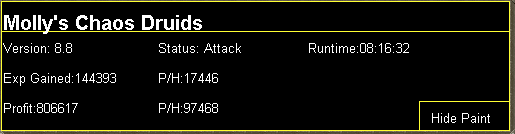
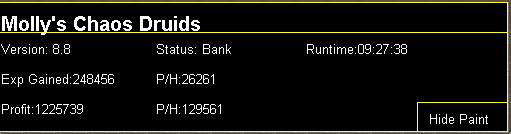
 2 points2 points'the intelligent choice' by Czar Want to buy the bot, but only have rs gp? Buy an OSBot voucher here2 points2 pointsjonny for trial mod. My name's decode and i'm mod hunting Hueeheeeeueeeeeee2 points2 points2 pointsTrial Mod = CBA = -> Fruity is active in the chat box, and a good lad.2 points2 points2 points2 points2 points2 points2 points2 points2 points2 points1 pointMolly's Chaos Druids This script fights chaos druids in Taverly dungeon, Edgeville dungeon and Ardougne. Profits can easily exceed 200k p/h and 60k combat exp/ph, this is a great method for training low level accounts and pures. Buy HERE Like this post and then post on this thread requesting a 24hr trial. When I have given you a trial I will like your post so you will receive a notification letting you know you got a trial. Requirements - 46 Thieving for Ardougne -82 Thieving and a Lockpick for Yanille - 5 Agility for Taverly(recommended) - No other requirements! Though I do recommend combat stats of 20+ as a minimum Features: - Supports eating any food - Hopping out of bot worlds - Recovers from deaths(respawn point must be lumbridge), includes re-equipping items on death - Potion support - Automatically detects and withdraws/uses Falador teleport tabs if using Taverly dungeon - Automatically detects and withdraws/equips/uses glories if using Edgeville dungeon - Supports looting bag Setup: Start the script, fill out the GUI, and be in the general area of where you want to run the script. CLI setup: Proggies: In the works: Known bugs: Bug report form, this is a MUST for problems to be resolved quickly: Description of bug(where, what, when, why): Log: Your settings: Mirror mode: Y/N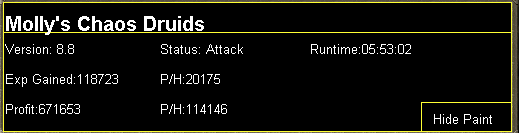
 1 point1 pointMolly's Hobgoblin Killer This script is designed to kill hobgoblins southwest of Falador for limpwurts, seeds, herbs and other various things. It works best on mid to high level accounts, and can be run for hours on end! This script is capable of a solid 120k+ an hour for members accounts and 50k+ an hour for mid level f2p accounts, as well as 30k+ xp/hr and 20k+ xp/hr respectively in the combat stat you decide to train. Buy HERE Features: - Loots all valuable items - Bot world hopping - Supports any food -Use of agility shortcut -Use of Falador teleport tabs Setup: Fill out the simple gui and start! Proggies: Submit your proggies!1 point1 pointDo you want to bot something that Instantly sells? Do you want to be able to gain magic Experience at the same time? Do you want to be able to make over 350k+ GP an hour? Are you looking for OSBots most featured and popular Orber? Shudsy's Orber is what you're looking for. Features Smart Walking system. Emergeny Teleport incase of PKers or low hp. Ability to use House tabs instead of glories if selected. Ability to use Clan wars to bank and restore HP/Energy. Clean paint which also lets you hide if wanted. Full item support with everything needed. World hops if attacked by PKer. Death walking/Death Teleporting World hopping to avoid PKers. Stamina Potion support. Requirements 66+ Magic is required. 40+ HP is recommended. Information If NOT using Castle wars to bank, have food in bank. If enabled, have Stamina Potions in bank. Have Unpowered orbs and cosmic runes in bank. Have several glories, ring of dueling or House tabs in bank. Click here to buy! Proggies 18 Hour proggy Dynamic Signature1 point1 pointso, we are allowed to spam in here? i don't get it -- nick for trial1 point1 point1 pointThanks! glad it's running well. As with all popular botting locations, extra care needs to be taken to avoid being detected. I would suggest being very generous with your breaks , after all a slightly slower xp rate is much better than having a banned account! When I use the script, I run it for maximum 3h per day (while testing), with usual ratios of maybe 30 minutes on and atleast 30 minutes off. So far i've not been banned since initial development, however I've heard that other people have been banned so be careful! For a more in-depth guide about botting bans as a whole, check out this link: http://osbot.org/forum/topic/45618-preventing-rs-botting-bans/ tc! ~apa1 point1 point1 point1 point1 point1 point1 pointSerious hardware, someone would have to be serious about the longevity of their operation to want it for 6 months-year. Would pref. month by month personally just cause methods can get destroyed and jagex miracles can happen.1 point1 pointCan I have a caged ogres trail please?1 point1 pointhey guys im buyin 30m between 1-1.1$/m add my skype if your willing to sell. looking to buy tonight cody.cmb1 pointperfect motherlodeI1 point1 point1 pointYou can try ramnode they have some pretty competitive prices depending on the resources you need. I also have some good plans but unfortunately I do not offer monthly services for vps services.1 point1 pointHi it's not premium it is a VIP script. And yes it skips over total skill worlds and deadman worlds1 pointQuest(s): Biohazard, Underground Pass, Regicide, Nature Spirit, Fairy Tale I, very first part of Fairy Tale II Minigame(s): Skill(s): Middleman or You going first?: Me Skype: PnuxSucks Duration expected: Next 2 weeks1 point1 pointAh the name change nice1 pointperfect agility1 point1 pointWhen it's reayd it will be ready Ya if people start acting this cocky it will take a few more days probably... So spare me those posts/messages It takes time to release quality, you don't rush it.1 pointCould I get a 24 trial for Perfect Runecrafter please?1 point





























Account
Navigation
Search
Configure browser push notifications
Chrome (Android)
- Tap the lock icon next to the address bar.
- Tap Permissions → Notifications.
- Adjust your preference.
Chrome (Desktop)
- Click the padlock icon in the address bar.
- Select Site settings.
- Find Notifications and adjust your preference.
Safari (iOS 16.4+)
- Ensure the site is installed via Add to Home Screen.
- Open Settings App → Notifications.
- Find your app name and adjust your preference.
Safari (macOS)
- Go to Safari → Preferences.
- Click the Websites tab.
- Select Notifications in the sidebar.
- Find this website and adjust your preference.
Edge (Android)
- Tap the lock icon next to the address bar.
- Tap Permissions.
- Find Notifications and adjust your preference.
Edge (Desktop)
- Click the padlock icon in the address bar.
- Click Permissions for this site.
- Find Notifications and adjust your preference.
Firefox (Android)
- Go to Settings → Site permissions.
- Tap Notifications.
- Find this site in the list and adjust your preference.
Firefox (Desktop)
- Open Firefox Settings.
- Search for Notifications.
- Find this site in the list and adjust your preference.