





Leaderboard
-

Czar
Global Moderator13Points23786Posts -
Deceiver
VIP C++12Points6986Posts -
Extreme Scripts
Trade With Caution12Points10702Posts -
Khaleesi
Developer12Points27843Posts




Popular Content
Showing content with the highest reputation on 02/23/16 in all areas
-
👑CzarScripts #1 Bots 👑 👑 LATEST BOTS 👑 If you want a trial - just post below with the script name, you can choose multiple too. 👑 Requirements 👑 Hit 'like' 👍 on this thread6 points
-
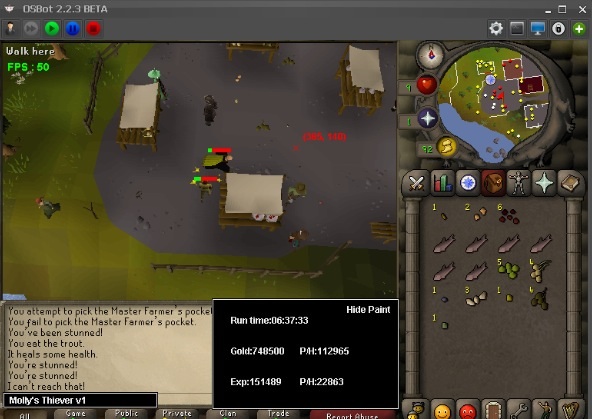
6 points6 points5 pointsThat GP on my main says fuk u too4 points3 points3 pointsMolly's Thiever This script is designed to quickly and efficiently level your thieving! Check out the features below. Buy HERE Features: - Capable of 200k+ per hour and 30k+ exp/ph on mid-level thieving accounts. - Quickly reaches 38 thieving to get started on those master farmers for ranarr and snap seeds! - Fixes itself if stuck. - Hopping from bot-worlds. - Stun handling so the bot doesn't just continually spam click the npc. - Drops bad seeds if inventory is full at master farmers. - Eats any food at the hp of your choosing. Supports: -Lumbridge men -Varrock tea -Ardougne cake -Ardougne silk -Ardougne fur -Kourend Fruit Stalls -Ardougne/Draynor master farmer -Ardougne/Varrock/Falador guards -Ardougne knight -Ardougne paladin -Ardougne hero -Blackjacking bandits as well as Menaphite thugs, this has limitations, click the spoiler below to see them Setup: Select your option from the drop down menu, it will tell you the location where the target is located. Fill out the gui and hit start. Simple setup! Proggies: Proggy from an acc started at 38 theiving:
 3 points3 points1. Find a off-site download of Cinema 4D, I currently have R16 2. Download a 'lightroom' from Youtube or just google "c4d lightroom download" 3. You can use the one I provide here. When you open it up with C4D, your screen should be like: Now since we want some text, go the top menu bar and go to "MoGraph" and click "MoText": To the right, you should see this area when you click on your text: Here you can change the depth (thickness), font, size, spacing, and so forth. Change to whatever font you want and the depth to 40-60. What I have (font is: Big John): To see how it looks (and other quick controls): Now, if we want to add some pizazz, we can add some materials, in the ones you see at the bottom, there is a grand amount of materials to choose from. If you have a few in mind, just drag it into the layer that says "MoText" or you can drag it onto your text: Now we can do a quick render to see if we like it: Could be better but for the sake of showing it, there it is! Now with this light room, do not feel like you have to keep the text in that spot. For example, you want all your text 'jumbled and random', just repeat the above process, you can copy and paste the original motext (ONE LETTER) then paste it for a new letter and scale/rotate to your liking and repeat again. Once satisfied, click the 'full render' button and it will render (give time depending on your system), then right click the title on the right hand side and a box will pop up: MAKE SURE "Alpha Channel" is CHECKED, this will allow the image to be transparent (no background), keep it PNG and 8bits is fine. Keep DPI at 72. Click OK, name your file, and save it where you want. Upload to anywhere, and congrats, u made some bomb ass 3d text. **post help or ideas or explanations if you need any3 pointsDecided I would share my solutions for Banking to help beginners as well as to receive critiques to improve my code. Firstly, I typically do two things before I start banking. I generate a list of items that I DON'T want to be deposited (Banking Exceptions) & a list of items that my character will need to withdraw from the bank (Needed Supplies). Here is my method to generate the Deposit Exceptions: public LinkedList<String> getDepositExceptions() { LinkedList<String> neededItems = new LinkedList<String>(); if (Config.enableAttPot){ neededItems.add("Attack potion(4)"); } if (Config.enableStrPot){ neededItems.add("Strength potion(4)"); } if (Config.enableSupAttPot){ neededItems.add("Super attack(4)"); } if (Config.enableSupStrPot){ neededItems.add("Super strength(4)"); } if (Config.enableCombatPot){ neededItems.add("Combat potion(4)"); } neededItems.add("Lobster"); return neededItems; } Explained: So I'm creating a list of items which I do not want to deposit into my bank. This list will be used later when I want to deposit all of the items in my inventory (except for those found in this list). I'm using if statements for some items because the items may not be relevant for all users. This is handy if you have a GUI for your script where not everyone will have the same banking exceptions. Then for items which will be universal for your script (in this example, Lobster) you can simply add them to the list. My method to Deposit All items (with the exception of those found in the getDepositExceptions() method above): public void depositUnwanted() throws InterruptedException{ for (Item i : S.getInventory().getItems()) { if (i != null && !getDepositExceptions().contains(i.getName())) { S.log("Banking: " + i.getName()); i.interact("Deposit-All"); Script.sleep(Script.random(350,500)); } } } Explained: This will simply create a for loop which will look through all the items found in your inventory. If the item isn't an item found in the list generated by getDepositExceptions, it will deposit all of that item. May be beneficial to use a conditional sleep after the deposit instead of my way. My method to generate a list of Needed Supplies: public Entry<String, Integer> getNeededSupplies() { LinkedHashMap<String, Integer> neededItems = new LinkedHashMap<String, Integer>(); if (Config.enableAttPot && (!S.inventory.contains("Attack potion(4)") || (S.getInventory().getAmount("Attack potion(4)") < Config.attAmt) )){ neededItems.put(Constants.ATTACK_B[0], (Config.attAmt - (int) S.getInventory().getAmount("Attack potion(4)"))); } if (Config.enableStrPot && (!S.inventory.contains("Strength potion(4)") || (S.getInventory().getAmount("Strength potion(4)") < Config.strAmt))){ neededItems.put(Constants.STRENGTH_B[0], (Config.strAmt - (int) S.getInventory().getAmount("Strength potion(4)"))); } if (Config.enableSupAttPot && (!S.inventory.contains("Super attack(4)") || (S.getInventory().getAmount("Super attack(4)") < Config.supAttAmt))){ neededItems.put(Constants.SUPER_ATTACK_B[0], (Config.supAttAmt - (int) S.getInventory().getAmount("Super attack(4)"))); } if (Config.enableSupStrPot && (!S.inventory.contains("Super strength(4)") || (S.getInventory().getAmount("Super strength(4)") < Config.supStrAmt))){ neededItems.put(Constants.SUPER_STRENGTH_B[0], (Config.supStrAmt - (int) S.getInventory().getAmount("Super strength(4)"))); } if (Config.enableCombatPot && (!S.inventory.contains("Combat potion(4)") || (S.getInventory().getAmount("Combat potion(4)") < Config.combatAmt))){ neededItems.put(Constants.COMBAT_B[0], (Config.combatAmt - (int) S.getInventory().getAmount("Combat potion(4)"))); } if (S.getInventory().getAmount("Lobster") < Config.foodAmt){ neededItems.put(Config.foodName, (Config.foodAmt - (int) S.getInventory().getAmount("Lobster"))); } final Set<Entry<String, Integer>> values = neededItems.entrySet(); final int maplength = values.size(); final Entry<String, Integer>[] test = new Entry[maplength]; values.toArray(test); if (test.length > 0){ return test[0]; } else return null; } Explained: So here I am creating a Linked Hash Map (From my understanding, this is similar to a List). I've done this so that I can store the Item name & the amount that should be withdrawn in the same grouping to be used for later. This time, it is best to use an if statement for EVERY item because we need to check if your inventory doesn't already contain the item. We're also doing some math to determine the correct amount to withdraw by subtracting the current amount in inventory from the maximum amount you should have. For me, I store the maximum in a Config class which grabs the data from my GUI (IE. config.attAmt) My method for withdrawing item(s): private void withdraw(String itemName, int amt) throws InterruptedException { Item item = this.S.bank.getItem(itemName); if (S.getBank().contains(itemName)) { S.getBank().withdraw(item.getName(), amt); Script.sleep(Script.random(350, 600)); } else { S.log("Ran out of " + itemName + ", stopping."); S.stop(); } } Explained: A simple method with 2 parameters, the name of the item, and the amount to be withdrawn. If the bank contains your item, it will withdraw the amount given. If the bank does not contain your item, it will print into the Logger that you have run out of the item name, and will end your script. Again, it may be useful to add a conditional sleep instead of this random integer sleep. My method to open the nearest bank: private void openBank() throws InterruptedException { S.getBank().open(); new ConditionalSleep(5000) { @Override public boolean condition() throws InterruptedException { return S.getBank().isOpen(); } }.sleep(); S.log("Banking"); } Explained: Will simply open the nearest bank, and have a 5-second conditional sleep which will wait 5 seconds if the bank is not open, or will cut the sleep off short when it sees that the bank is, in fact, open. Putting it all together: if (S.getBank() != null) { if (!S.getBank().isOpen()) openBank(); else { //Deposits all items except bank exceptions for (Item i : S.getInventory().getItems()) { if (i != null && !getDepositExceptions().contains(i.getName())) { S.log("Banking: " + i.getName()); i.interact("Deposit-All"); Script.sleep(Script.random(350,500)); } } if (getNeededSupplies() != null){ S.log("Need to withdraw: " + getNeededSupplies().getKey() + ", " + getNeededSupplies().getValue() ); //.getKey() will return our LinkedHashMap String / itemName //& .getValue() will return our Integer / Amount to withdraw withdraw(getNeededSupplies().getKey(), getNeededSupplies().getValue()); } } } Explained: This is essentially a fully working Banking Class now. It will open the nearest bank if it's not already open. Then it will deposit all the items found in the inventory which aren't needed / desired. Then it will withdraw all of the items / supplies which will be needed for the task. Hopefully, this is useful to you guys. I'm looking to improve my knowledge as well so if you see anything in this thread that can be optimized / improved, I would love to hear it!2 points\ added dynamic sig 03/19/16 Current active testers: rk9 progamerz piamia lukey372 dutchxxje gojordygo Progress pictures Core Osbot Web walker w/ Conditional Walking (Low health, etc) Anti-Ban Randomized Actions (Randomized eating etc.) Mirror Mode Support Range/Magic/Melee Support World Hopping Dragons [Started | Done | Not Done] Features Mirror client support Supports shortcut for those with >=70 agility Supports dusty key Safe spot support for those who use magic/ranged Eats any food selected Potion support - attack, strength, super attack & super strength, ranging Antifire potion support Special attack support (Dragon Scimitar, dragon longsword, whip) Object handling (climbing wall, ladder, gates) Loots dragon bones, Dragon hide, Ranarr Weed, Rune items, Ores, Equipment, Runes, Clue scrolls + Rare table World hopping - hopping world when there are more than X players at dragon locations or safespot! Randomly attacking new dragon before looting (ANTI-PATTERN) Camera movements while fighting dragons (ANTI-PATTERN) Random mouse movements while fighting dragons (ANTI-PATTERN) Randomly examining other players (ANTI-PATTERN) Randomly Eats At # w/ Randomizer (ANTI-PATTERN) Instructions GUI Update log2 points2 points2 points2 points2 pointsI hear people are dying to get in there ;).2 points2 points2 points2 points2 points1 pointMultiple Potion Support! Prayer ✓ Restore ✓ Overloads ✓ Absorptions ✓ Ability to set custom random higher/lower boundaries Ranging ✓ Super and Normal Magic ✓ Super and Normal Imbued Heart ✓ Super Attack, Strength & Defence Potions ✓ Special attack support ✓ Custom Dream Settings ✓ Ability to chose whether you want the character to re-enter a dream when it dies Ability to chose what position the player stands in Ability to set dream type Normal Hard Customisable - normal Customisable - hard Ability to chose a dream preset MTD Tree Gnome village Lost City Vampire Slayer Fight Arena Mountain Daughter Guthans Tree Gnome Village Lost City Vampire Slayer What Lies Below Haunted Mine Demon Tree Gnome Village Lost City Vampire Slayer Fight Arena The Grand Tree Custom The ability to set your own bosses in-game and the script will not change anything. Enable or Disable Power-Ups Zapper Recurrent Damage Power Surge Requires a Special weapon to be set within the GUI Magic Support ✓ Select any ‘Normal Spellbook’ combat spell to train with Rune pouch support Barrows Repairing! ✓ Uses 'Lumbridge Home Teleport' to get to lumbridge, requires standard spell book. Uses the Minigames teleport to travel back to Nightmare Zone Recharging rechargeable! ✓ Blowpipe Tome of Fire Purchase Your Daily Herb Boxes! Option to only purchase when you have over 'x' Points Option to either Bank or Open the Herb Boxes Rock Cake & Locator Orb Support ✓ Ability to set chose if you want to pre-dream rock cake outside the dream Ability to chose at what HP value you start to rock cake Custom Idle Activities ✓ Random Camera Movements Random Tab Changes Random Mouse Clicks Ability to have mouse exit the screen whilst idle Custom Prayer settings ✓ Enable/Disable ‘Boost Prayers’ Defence: Thick Skin Rock Skin Steel Skin Strength: Burst of Strength Superhuman Strength Ultimate Strength Attack Clarity of Thought Improved Reflexes Incredible Reflexes Ranged: Sharp Eye Hawk Eye Eagle Eye Rigour Magic Mystic Will Mystic Lore Mystic Might Augury Others Piety Chivalry Enable/Disable Protect Prayers Protect From Melee Protect From Magic Protect From Missiles Informative Script UI ✓ Colour coded skills painted XP Gained Current XP/Hr Percentage till level Time till level Status display Customisable Stop/Break Handler ✓ Ability to stop the script at the following benchmarks: Stop randomly between 'x' and 'x' minutes of runtime. Stop randomly between 'x' and 'x' dreams completed. End dream by idling Enable/disable logout on exit. Ability to use a custom made break handler. Break random every 'x' and 'x' dreams completed. CLI Support ✓ -script "698:profile=Test hours_limit=10 dreams_limit=5" profile = saved profile name, if you've been using CLI to run the script, this will need to be updated to suit. hours_limit = Complete after 'x' run hours. dreams_limit = Complete after 'x' dreams completed Misc. Options ✓ Hop worlds between dreams Leave dreams at maximum points Ability to save/load multiple custom presets This is not a thread for asking for trials, as a whole, i don't offer trials for my script. Instead if encourage you to ask all the questions you have before purchasing any of my (or anyones) script to be sure the script does exactly what you would like it too. Please note, 1 purchase of FruityNMZ is a lifetime auth for as many accounts as you can run On OSBot, we do not limit the amount of instances you can run with a single script! If you'd like to purchase FruityZulrah using OSRS GP, SEND ME A PM and i can give you my current $$:GP Rates! Discord Community: https://discord.gg/WzXRk2bWTV Trial bot has been implemented (100 post count required if you're not VIP/Sponsor!) @fruityscripts on Discord!1 point1 pointNEW CURRENT RECORD: 294 HOURS RUNTIME! Shoutout to @Ruutihattu NEW: Sandstone mining + hopper support Humidify/water circlet/bandit unnote Ardy cloak tele support Setup Screen Preview Results 84 HOURS ON NEW LEVEL 20 ACCOUNT Suicided account with mirror mode near rock crabs, 81 mining! I will probably go for 99 Even supports Ancient Essence Crystal mining! Preview: Mine 1 drop 1 item drop pre-hover feature:1 point1 pointWant to buy with OSGP? Contact me on Discord! Detailed feature list: - Supports all Normal and Lunar tablets - Supports all lecterns - Multiple Banking-butler methods Rimmington - Unnote clay Edgeville banking - Mounted glory Castle wars banking - Ring of dueling Butler (Advised option for max profits) Demon butler (Note when using butler, have Noted soft clay and coins in your inventory) - When NOT using a butler Use a friends house by name Use the advertisement house Use your own house - Worldhopper - CLI support for goldfarmers Custom Breakmanager: - Setup Bot and break times - Randomize your break times - Stop script on certain conditions (Stop on first break, Stop after X amount of minutes, Stop when skill level is reached) - Worldhopping - Crucial part to botting in 2023! Script queueing: - Support queueing multiple script in a row - All Khal scripts support flawless transitions in between scripts - Start creating your acc in a few clicks from scratch to multiple 99's - Flawless CLI support - Learn more here: How to use CLI parameters: - Example Usage: -script 671:ScriptFile.BreakFile.DiscordFile SAVEFILE = Saved Filename BREAKFILE = Breakmanager Filename - SAVEFILE: Save file can be created in the GUI. Navigate to the tab you want to run and press "Save As CLI file". Please choose your filename wisely (No special characters) - BREAKFILE (Optional): Breakfile can also be create in the GUI, set the breaksettings you wish to use and press "Save new CLI BreakFile". Please choose your filename wisely (No special characters) - Final form (Note that with some bot managers you do not need to specify -script 671): -script 671:TaskList1.4515breaks (With breaks) -script 671:TaskList1.4515breaks.discord1 (With breaks & discord) -script 671:TaskList1..discord1 (NO breaks & discord)1 pointDAY 80/120 Main Goals Create 12 maxed accounts to farm corpreal beast farm corp beast with 12 maxed accounts (will use a mate, 6 accounts each) All Sigi's Drops (Acrane, Spectral & Elysian) Make 10,000$ from corp beast only Mini Goals Create 12 accounts & finish island Get 60 60 60 melle stats Get 90 90 90 melle stats Get 43 prayer Get 90 mage Get all NMZ quest stats (listed below) Complete all NMZ quests (listed below) Kill a corporeal beast Progress Rewards Total progress table Timescale FAQ Supporters If you like this thread click the like button below1 point1 point1 point1 pointcan i try the czar theiver please? thanks czar your scripts are great!1 point1 pointVersion 0.82 - Cannon world hop is now re-introduced. update will be live within a few hours max, once the update is registered, just enable the 'World hop' option and it will hop as soon as a cannon is found in your side of rock crabs In regards to the waterbirth bot, it may take a few more days because the SDN manager has been fired unfortunately so the sdn manager is handled by the admin Trust me the bot is worth it, made sure it was perfect before uploading it1 point1 pointperfect woodcutter1 point1 pointTrial of tab maker pls mate?1 point1 point1 pointCould i have the motherlode trail please? thnx1 point1 point1 pointHey man its me again the one who keeps helping you out. I would really like to buy the script but got banned on my accounts with all my rsgp. I have some more test accounts I can help you out and get rsgp for script Could I get a script trail script: Motherlode1 pointEnjoy!1 pointConfirm talking on skype, starting your order [EDIT] Finished his order1 pointCould I get a range guild trial please? thanks1 point1 pointHi, I already use your rangeguitt bot, works perfect. I would like to try the thiever now please1 point1 pointThx for supporting me! Farming scripts are pretty hard after the update on farming a few months ago. Aren't there enough hunter scripts yet? ^^ Khaleesi1 point1 point1 point1 point1 pointNo no no you're doing it wrong its like this And then I am supposed to be like https://www.youtube.com/watch?v=9KVx2USJGJs1 point1 point1 pointshame GE limits mean you can't stand at GE all day and do it 24/7 looks like a nice script idea tho well done1 point1 point1 pointI would still prefer the most readable solution of all: bank.getItem(new ContainsNameFilter<>("Amulet of glory")); It reads nicely like a sentence and is equal in performance when rounded to nanoseconds. @OP Nice script1 point1 point


























Account
Navigation
Search
Configure browser push notifications
Chrome (Android)
- Tap the lock icon next to the address bar.
- Tap Permissions → Notifications.
- Adjust your preference.
Chrome (Desktop)
- Click the padlock icon in the address bar.
- Select Site settings.
- Find Notifications and adjust your preference.
Safari (iOS 16.4+)
- Ensure the site is installed via Add to Home Screen.
- Open Settings App → Notifications.
- Find your app name and adjust your preference.
Safari (macOS)
- Go to Safari → Preferences.
- Click the Websites tab.
- Select Notifications in the sidebar.
- Find this website and adjust your preference.
Edge (Android)
- Tap the lock icon next to the address bar.
- Tap Permissions.
- Find Notifications and adjust your preference.
Edge (Desktop)
- Click the padlock icon in the address bar.
- Click Permissions for this site.
- Find Notifications and adjust your preference.
Firefox (Android)
- Go to Settings → Site permissions.
- Tap Notifications.
- Find this site in the list and adjust your preference.
Firefox (Desktop)
- Open Firefox Settings.
- Search for Notifications.
- Find this site in the list and adjust your preference.