






Ayayron
Members
-
Joined
-
Last visited
Everything posted by Ayayron
-
Using Mirror Mode sometimes it banks and doesn't put Coal in the bank, runs close to the bag, stands a bit then runs back to the bank - looks a bit obvious
-
Yes, using Mirrored. It sits for a while and actually got stuck once until I corrected it.
-
@KhaleesiCan you please make the script not take long pauses when doing stuff such as after mining a rockfall? Also can you add in an option to have it drop gems?
-
Could I get a trial to this?
-
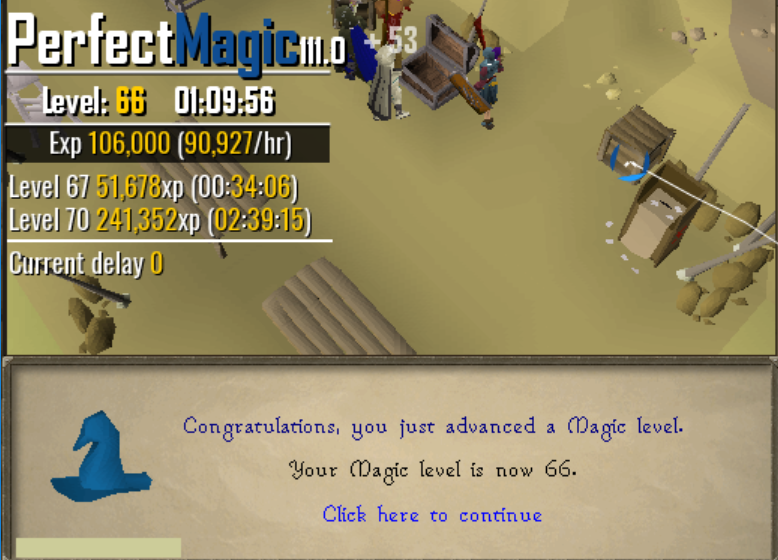
Insignificant progress report
-
-
Yeah I tried using it but it kept clicking on the rock when it was depleted
-
Only been around like ~a week so I never spoke to you or even knew you existed, but take care.
-
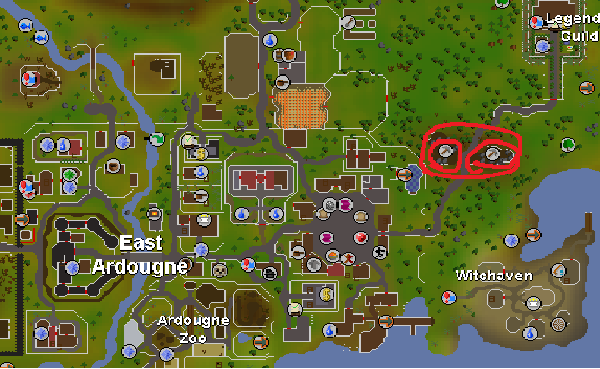
@czar Could you add support for power mining at the Mining Site near the Legend's Guild?
-
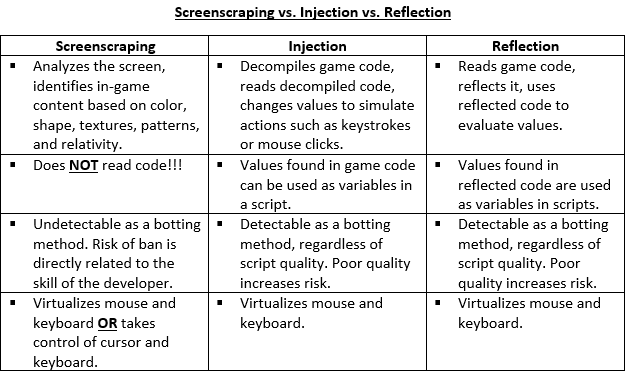
Injection is Injection but Mirror is basically reflection most likely. This may be of help in differences.
-
I forgot it only ate, I'm retarded. And it's not really ruining EXP rates but it's so consistent I'd report someone for botting, personally if I seen that happening every time they failed.
-
Yes, there is they're just from devs I've never heard of, thanks anyway
-
No, it doesn't click the maples, it runs towards them but then clicks the wall and runs round the wall where you fall off, each time you fail it does this. I'll try record a video of it and DM you it. And yes, Summer Pies do have an Eat option, although I'm not sure why it ignores half summers, I had 2 Summer Pies in my inventory then came back an hour later to two "Half Summer Pies" but none were fully eaten despite Agility level unboosting back to default
-
Does this work at Blast Furnace?
-
Can you fix the fail in Seers from the first obstacle after getting up (The jump to roof with the rope) as when it falls it clicks to the Maples then corrects itself and looks very botlike.. Also, it eats Summer Pies but doesn't eat Half Summer Pies
-
I renamed it to Runelite and threw it in deepwindows for whatever reason, seemed to work when cheating on CSGO so may as well try lmaoo, and yeah I guess you're right. Been going for an hour 16 rn so hopefully get all my marks and never need to do the agility grind again until questing haha, ty
-
Seems to work outside of Mirror, how long would you say is best to go with this script as I went 2 hours with a previous client and it got me banned at Canafis, yours seems similar in the fact it doesn't move camera and perfect clicks the minimap to get to the next obstacle when finishing Seers
-
Understandable, reason I use mirror is due to already having a recent ban on my account I’m trying to ensure I don’t get another haha, I used another client and got the ban so really trying to keep it as long as possible. I’ll try Stealth again though.
-
Doing Seers and it ignored a Mark of Grace whilst in Mirror mode..I'm using OSBuddy as the RSClient.

