Leaderboard
-
Khaleesi
Developer2Points27843Posts -
skillerkidos1
Java Lifetime Sponsor2Points1616Posts -

Lunar
Members2Points164Posts -

Fruity
Scripter II1Points4966Posts


.thumb.gif.47695824303ed6357e0a79871a2dda25.gif)

Popular Content
Showing content with the highest reputation on 06/04/21 in all areas
-
2 points
-
1 pointWant to buy with OSGP? Contact me on Discord! Detailed feature list: - Account builder mode to level your firemaking to level 50 or even higher. - Equips pyromancer gear option - Chopping and burning logs (base Option) - Relights brazier - Fletch option - Fix brazier option - Make potion and heal pyromancer when down option - Tons of food supported - Brazier swicthing when pyromancer is down - Advanced game settings to skip games, smart caluclate points, afk at certain points, ... - Bank or Open crates - Dragon axe special attack - Fletch at brazier option - Chop in safespot option - Worldhopping - CLI support for goldfarmers Custom Breakmanager: - Setup Bot and break times - Randomize your break times - Stop script on certain conditions (Stop on first break, Stop after X amount of minutes, Stop when skill level is reached) - Worldhopping - Crucial part to botting in 2023! Script queueing: - Support queueing multiple script in a row - All Khal scripts support flawless transitions in between scripts - Start creating your acc in a few clicks from scratch to multiple 99's - Flawless CLI support - Learn more here: How to use CLI parameters: - Example Usage: -script 909:ScriptFile.BreakFile.DiscordFile SAVEFILE = Saved Filename BREAKFILE = Breakmanager Filename - SAVEFILE: Save file can be created in the GUI. Navigate to the tab you want to run and press "Save As CLI file". Please choose your filename wisely (No special characters) - BREAKFILE (Optional): Breakfile can also be create in the GUI, set the breaksettings you wish to use and press "Save new CLI BreakFile". Please choose your filename wisely (No special characters) - Final form (Note that with some bot managers you do not need to specify -script 909): -script 909:TaskList1.4515breaks (With breaks) -script 909:TaskList1.4515breaks.discord1 (With breaks & discord) -script 909:TaskList1..discord1 (NO breaks & discord) Proggies:1 point
-
1 pointBrought to you by the #1 most sold script series on the market. Come and see why everyone's choosing Czar Scripts! This is the most advanced Agility bot you will find anywhere. BUY NOW $9.99 NEW! Added Both Wyrm Courses! SCRIPT INSTRUCTIONS Optimal Setup for the bot: Please set the mouse zoom to far away (to the left, like below) so that more obstacles can be seen in the view, and so the script can be more stable and reliable Also, make sure to have roofs toggled off (either go to settings tab or type ::toggleroof) for optimal results1 point
-
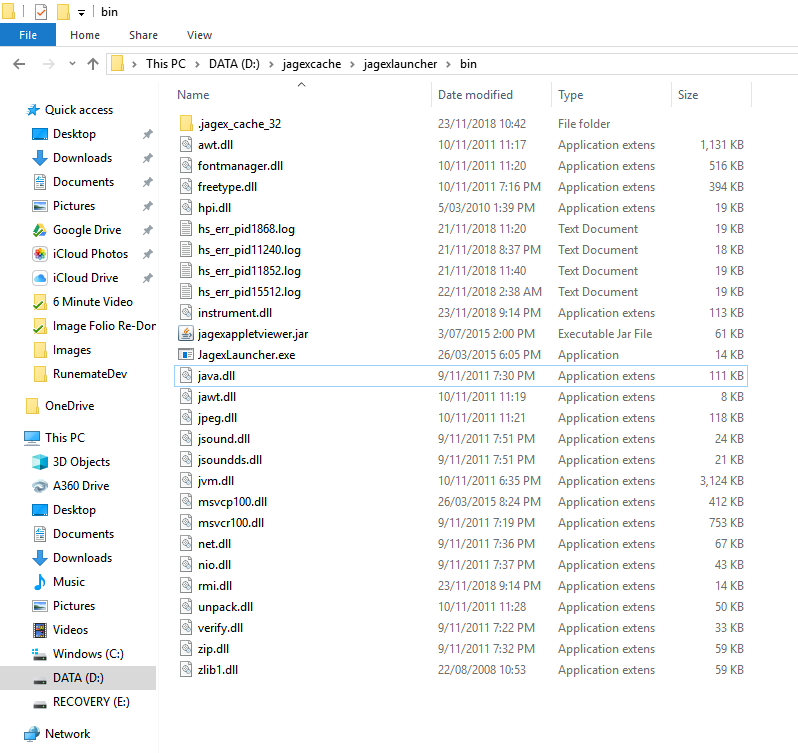
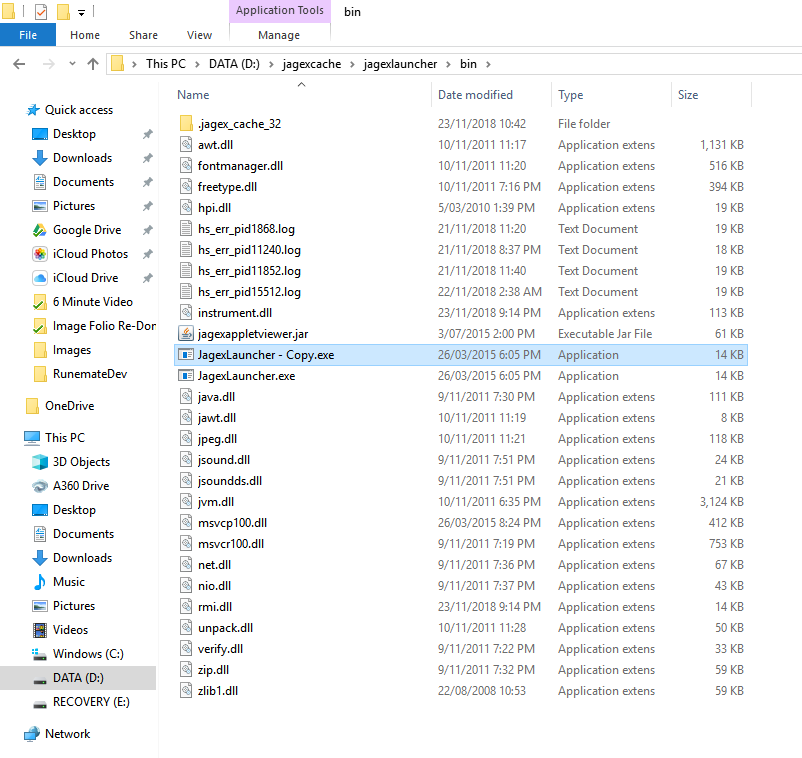
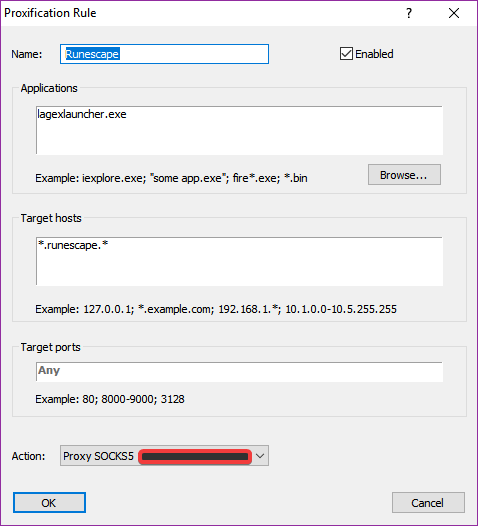
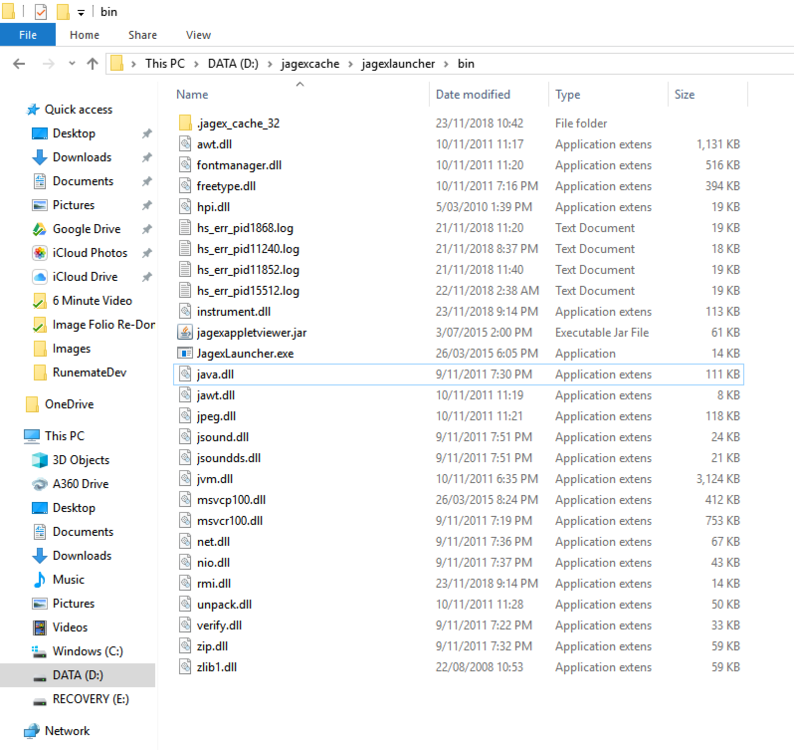
There's two methods to this tutorial. Method 1. Okay so we all know how to use one proxy on one machine using proxifier, but that affects all runescape clients on the machine not just one. This tutorial will show you how to use a different proxy for EVERY client you run on your PC. Okay first of all, make sure you have a proxy for each account you want to run added to proxifier Next Add a Proxification rule with the following info Ensure that you set the action to use whichever proxy you want to use for that client The Important part is the jagexlauncher.exe as this is what will be differentiating your clients. Next Navigate to your jagexcache directory ..\jagexcache\jagexlauncher\bin Copy JagexLauncher.exe Personally I'll rename the new one to JagexLauncher1.exe You can make as many copies as needed for each proxy you will use. Ie. JagexLauncher1.exe, JagexLauncher2.exe, JagexLauncher3.exe ... Now Locate your OldSchool RuneScape shortcut, it should be in a similar path to the following: C:\Users\...\AppData\Roaming\Microsoft\Windows\Start Menu\Programs Copy the Shortcut and paste it wherever, I typically keep them on my desktop but you will need to be able to access them. Rename the Copied one to reflect the jagexlauncher it will open, ie, I will rename "OldSchool RuneScaoe - Copy" to "OldSchool RuneScape1" Now Rightclick the new shortcut and click properties Change "JagexLauncher.exe" to your new launcher name, ie. "JagexLauncher1.exe" Eg. Change the Target path from: ..\jagexcache\jagexlauncher\bin\JagexLauncher.exe oldschool To: ..\jagexcache\jagexlauncher\bin\JagexLauncher1.exe oldschool Click Apply and then click Ok Now Return to proxifier and duplicate your original rule for runescape using the clone button Edit the Copied Rule: Change the name to your new jagexLauncher name number so you can keep track of it easier ie, JagexLauncher1 -> Runescape1 etc. Change the Application from "JagexLauncher.exe" to the new name ie. "JagexLauncher1.exe" (Additionally you can search for the file using the browse button) Keep the Target hosts still as *.runescape.* Change the action to your other proxy Click Ok on both windows. And you're done with method 1. Personally, I prefer to rename the desktop shortcuts to their respective accounts so I never get confused on which proxy belongs to which account. Make sure you always do these one at a time so you don't accidentally use the wrong account with the wrong proxy. Method 2. Right-click the jagex launcher and select the proxy you want through the proxifier dropdown. This is easier, but you run the risk of confusing accounts with proxies. Any further questions feel free to ask,
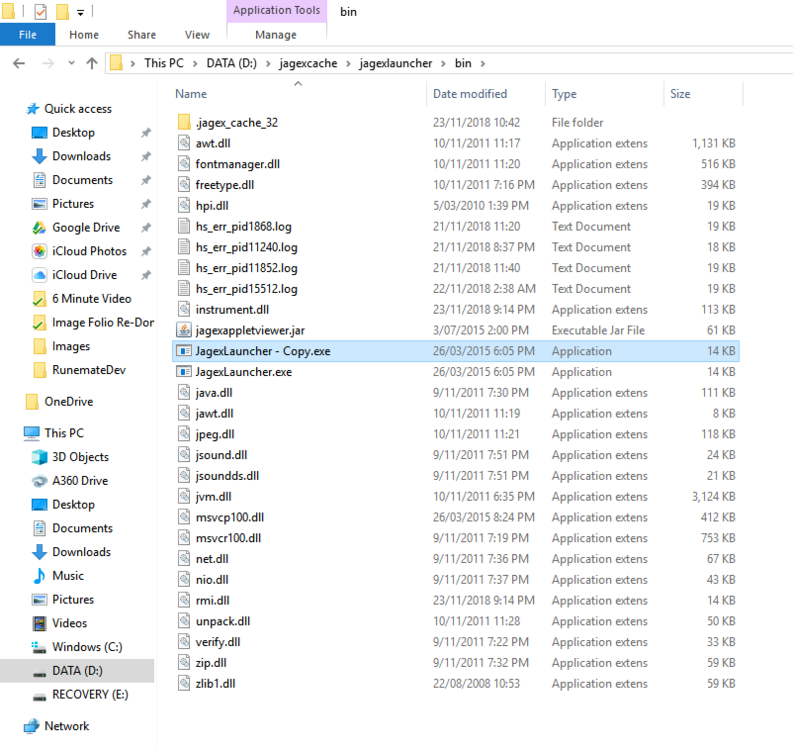
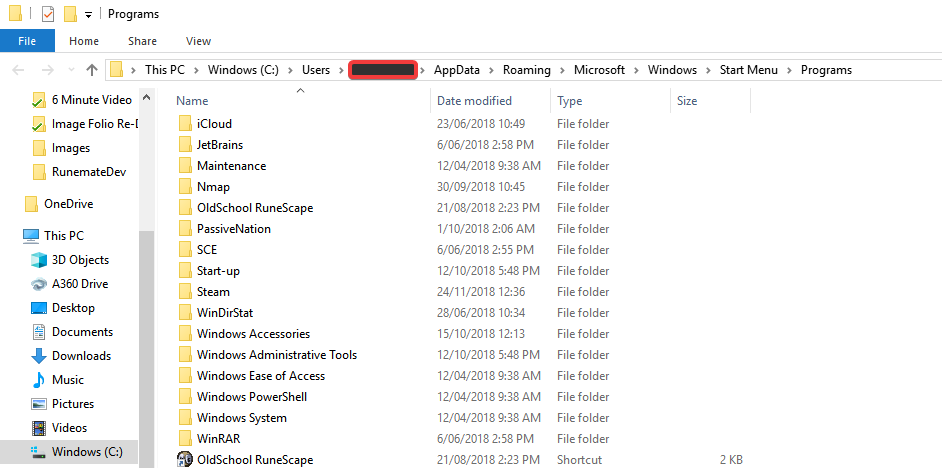

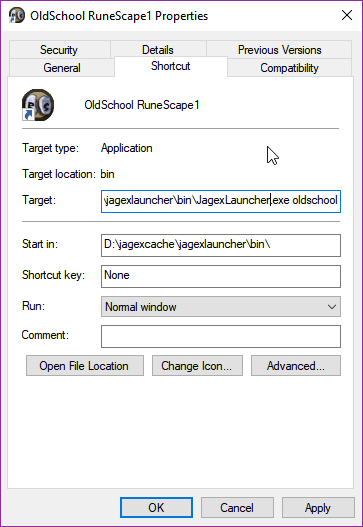
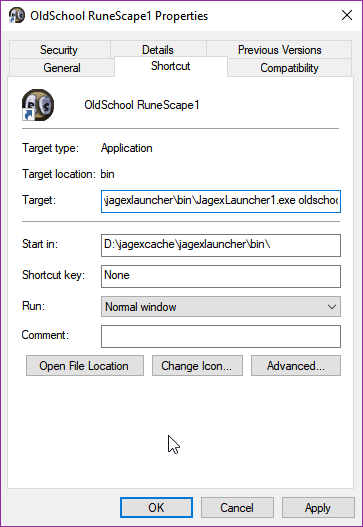
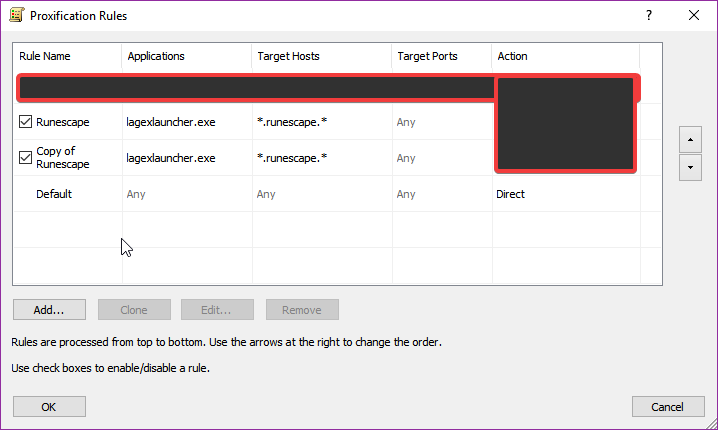
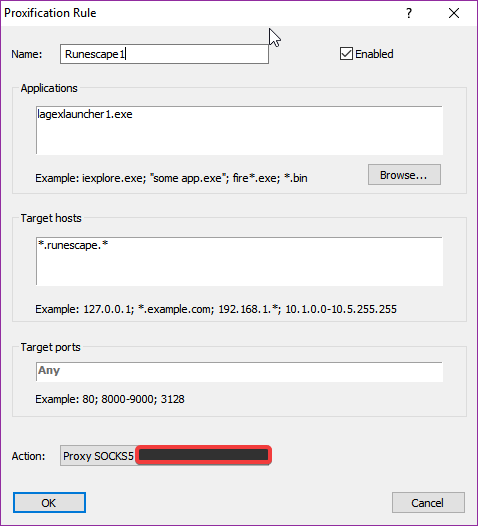
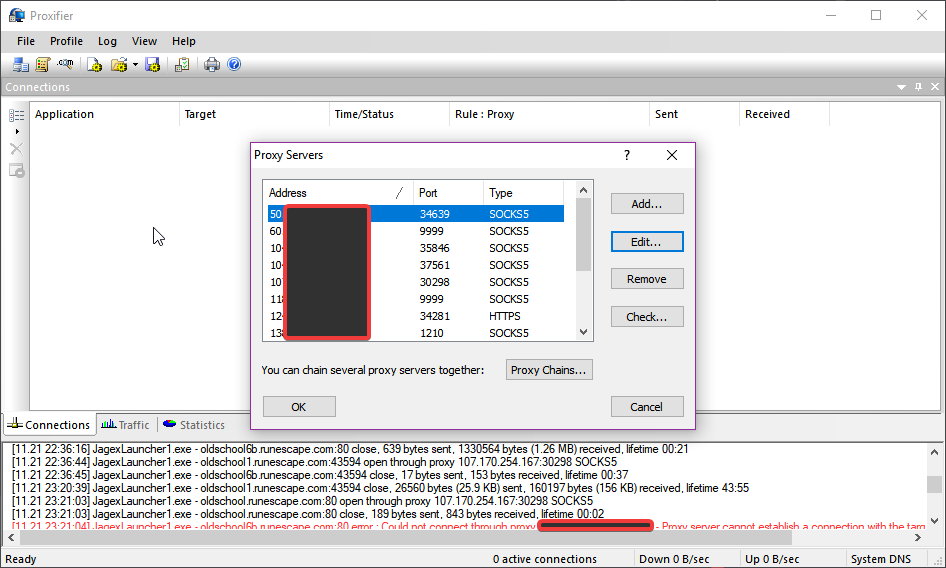 1 point
 -
1 point** $14.99 - 24 hour trials available - like and comment on this thread Don't pm me on OSBot or Discord to ask for a trial. Loot anything, anywhere, with this highly customizable script! PvP worlds, waiting on loot piles, drop parties across Gielinor, even popping balloons in the party room! Buy The Script Here Check out these videos on using Fury AIO Looter to make money! [OSRS] Botting To Ban #7: Looting ! Crazy Profit [OSRS] Botting To Ban #8: F2P Looting FAQs: What does x setting on GUI mean? Look in the GUI spoiler below for a detailed explanation of what each option does. What settings should I use? WHATS THE BEST??? Whatever works for you, try new things until you find something thats good. I made it as customizable as possible for a reason 😉 There is no "best" settings before you ask me. lol. If I told everyone the ""best"" settings then everyone would do that and it would no longer be the best. Experiment and see what works for you Where should I run the looter? Anywhere there is loot on the ground. Experiment. See whats making money. Known locations would be GE drop parties in highly populated worlds. PVP worlds in active areas (ge, lumbridge, varrock, etc). ZMI. Wintertodt. Skillers that drop their inventory like barbarian village fishers, rimmington mine iron ore droppers etc. It will even work in the party room to pop balloons 😛 GUI: CLI: Discord Server: POGRESS REPORTS:1 point
-
1 point
-
1 point
-
1 point
-
1 point
-
1 pointIt let's you start bots from a terminal window so you don't have to manually open a ton of OSBot clients. Usually used when you're starting up a lot of accounts at once. Skiller gave a great guide on it!1 point
-
You can still bot more accounts on your home IP after you get banned, same goes for proxies. I've been banned on my home IP, and my proxies quite a bit, still bot though.1 point
-
1 point1 point1 pointgot account with 73 agility, 56 runecrafting, unregistered level 3 + agility pet but had 2d ban expired if intrested contact me1 point1 point1 pointvery nice script, very nice scripter. very open to idea's from the community. even tho the script already works great he is more then willing to improve/add even more features. big UP for Perfect Blasterfurnace. great script if you are looking for a automated gold farm. started my account from lumbridge spawn untill the next morning and woke up with some millions with 1 click1 point1 pointonGameTick isn't supported in Mirror Mode. I think MGI said he won't be adding support either because of detection or something, I don't really know why. https://osbot.org/api/org/osbot/rs07/event/interaction/MouseMoveProfile.html getBot().getMouseMoveProfile().setSpeedBaseTime(0); // What controls how fast the mouse is. Lower is faster getBot().getMouseMoveProfile().getSpeedBaseTime(); //Get also get the value so you can see the base settings. getBot().setMouseMoveProfile(new MouseMoveProfile() .setNoise(0) .setDeviation(0) .setOvershoots(0) .setSpeedBaseTime(0) .setFlowSpeedModifier(0) .setMinOvershootDistance(0) .setFlowVariety(MouseMoveProfile.FlowVariety.MEDIUM) .setOvershoots(0) ); New mouse has to be enabled to use this ^1 point1 pointWould be awesome if it showed xp gains also while on break, so you dont have to look on hiscores to know how its going😁1 point1 pointBest script ever. After a little practice and time, writing basic scripts is easy (coming from someone who doesn’t spend much time on the pc and has no idea about coding) managed to make simple scripts for fishing/mining/thieving and whatever else I’ve done. But the best thing is the GUI walker. One click on the map and your character will walk to that destination, this is so handy and has left me completely not worrying about teleports. And then the other bonus is the community, so many people willing to help you figure things out or teach you something, seems to be full of really good people who are more than happy to share information and tell you what you need in your script. Oh and I almost forgot, all the community scripts coming out seem to be epic, there’s some gems in there and it’s only getting better. I haven’t even brought the expansion, and that has some crazy scripts. Overall this one script can replace most of the premium ones (once you learn) but even if you don’t bother, there’s enough community scripts to keep you busy and save you spending money elsewhere on scripts. Best investment yet and do not regret this purchase.1 pointcan i try the fighter please1 point1 point0 pointsThis script will get you banned in less than an hour quaranteed... I tried 2 other accouts, banned before reaching 40 construction, what the f....0 points