Goopie1051
Trade With Caution
-
Joined
-
Last visited
Everything posted by Goopie1051
-
UPDATE! 03/22/2023 😮 It looks like Jagex is making everyone download their new Jagex Launcher software whether you want to use it or not to play on the original game client. I suggest downloading it but not even opening it, here is the download link: https://cdn.jagex.com/Jagex Launcher Installer.exe#_ga=2.1614455.790842298.1679490060-1314569292.1678837798 ---‐---------------------------‐------------------------ As for Account Builder scripts, the only one I know that's out and recently updated would be the one BH gives you when you buy the Bot Manager. I'll be straight up about it, I bought their stupid software, and have the Account Builder script myself. I don't even use it.. I tried like twice and it did not seem like anything special. For Account Building, it depends on what you're trying to build honestly. In my opinion, you're better off building them with the various scripts for sale across the SDN. The majority of my scripts are from Khal, and a few good ones from Czar. Break the pattern and routine, especially for one script that would be like that such as BH Scripts. If you're looking for a single script for building though, I recommend getting Script Factory if you don't own it yet. There's Many scripts across it that do some type of build. Use them all to make the build you want. If you want to hit me up on Discord to go into further detail about things, and let me know what builds you're interested in, I can do my best to help!
-
*UPDATED Information on Post Today* *Currently have the Ultimate Botting Guide in the works on how to properly use some of the scripts without bans, how to properly run a bot/farm, proxies and how to use them, the ban/appeal process, etc. This guide WILL include the break times I have gotten perfected with the Excellent Vorkath script, and almost All of Khaleesi's scripts (Khal)* Hit me up if interested ##**UPDATE**## Jagex has launched their new client launcher program which is named "Jagex Launcher" which is ironically the same name as the original programs .exe file. It will NOT work with this program!!! You need to be using the old original OldSchool RuneScape game client software. Here is a picture of the new program to NOT USE! The icon for the game client to use SHOULD LOOK like THIS! *ProjectPact's Tool for Random.dat Removal Added* Here is a tool that you can use to automatically remove the .dat files Jagex stores on your computer which leads to bans/chainbans. I apologize that I won't be going into full depth and detail on how to get the best use out of it possible, but that will be located in my Guide that's in progress for whoever is interested. Here is the link for the tool: https://osbot.org/forum/topic/129927-projects-randomdat-remover-tool/ Here is the direct download link: https://www.runescape.com/a=870/downloads/oldschool.msi#_ga=2.217045846.1732966497.1678837800-1314569292.1678837798

-
@TyraelNice guide man! I've been meaning to rewrite my guide that's out here. With the host I've decided to add their new jagex URL as well since that's how they did their little update to try and mess things up for us. So now I do: *.runescape.*;*.jagex.*
-
-
Using Windows, the new updates are having The stream library labeled as a threat, think a Trojan or something, you need to open Windows Security when you try to open osbot, it will show you the threat and allow it. Once you allow it, close osbot and restart it and it should work Are you using SOCKS5 proxy type and port, not HTTP? Some providers use the same port number, others have a different port number for each type.
-
Hey, love the script! Great f'in job!!!! Do you plan on adding Serpentine Helm support for it? So that could get rid of the antidote's for some extra inv space? Also maybe have it prioritize the better artifacts and drop the lower/cheaper ones? I could be wrong but I see it dropping random ones instead of keeping Stone and dropping Pottery to open up inventory space for Sarcophagus and Gold Chests?
-
-
Not sure if it's the updated client itself, or the scripts... But I've had issues with atleast 3 or 4 scripts now since I updated.
-
Most likely Windows Security blocking it thinking it's a virus. Had the same issue last month
-
-
-
Sent you a message on discord.
-
Trying to sell my DS2 account. Curious to what I could get for it and open to offers! -Elite Void with Range & Mage Helms -Barrows Gloves -Rune Pouch -Salve ei -Vorki Pet -Rigour Unlocked OG Email account included!
-
Thank you for referring my guide
-
Hey can I get a trial of the Herblore script please?
-
Disputed member: ironore#8915 ID: 929594456892653658 Thread Link: Explanation: I can't find what his OSBot username is but his discord is ironore#8915 and his discord We had come to an agreement that I would build up two RC accounts and he would sell them to the buyer he had set up. He had created two accounts and given me the logins, fresh level 3 accounts off tutorial island, no membership. I had bonded both accounts and slowly but surely was building the accounts up. Right before completion, one of the accounts had been banned. When the other account reached completion, something seemed off and I told him that I wanted some type of payment before giving the account back. I had paid for the account's membership and done all the work. He went to try and take back ownership of the account, but I had beat him to it and registered an email and changed the password. Some time went on and I continued to build the account for the hell of it hoping to find a buyer. Original build was supposed to be Blood RC account; 77 RC, 73 Agility, 100% Arceuus Favour, 38 Mining and Crafting I ended up unlocking full GOTR outfit, Abyssal Needle and created Colossal pouch, Abyssal lantern and got 90 FM for redwoods. We decided to try and work together again, since he had better experience selling accounts and had found a buyer for $145. I unfortunately had been busy for a couple days and missed that opportunity, and he messaged me saying do I want $50 for the account. I know the account was worth well more than that, but I was willing to be reasonable so we both could eat and told him all I wanted was $75 for the account. I needed the money as well. Apparently someone had already bought the account for $60 and it was pending in his wallet. He had told me I had to wait 5 days. I had waited over 5 days and when I went to message him he had me blocked. This dude's a jerk and scamming people. I know for a fact that he uses OSBot for his botting as well. He deserves to be banned from here the least. Evidence: https://imgur.com/a/PTOwzQI [img]https://i.imgur.com/O4oxM2w.png[/img] [img]https://i.imgur.com/bArxOK7.png[/img] [img]https://i.imgur.com/XsE61BC.png[/img] [img]https://i.imgur.com/oLBahES.jpg[/img] [img]https://i.imgur.com/wBQjIo3.jpg[/img] [img]https://i.imgur.com/a6k6ase.jpg[/img] [img]https://i.imgur.com/w8CMXgd.jpg[/img] [img]https://i.imgur.com/Y3ftMDm.jpg[/img] [img]https://i.imgur.com/Z9n4ez2.jpg[/img] [img]https://i.imgur.com/6P56UBZ.jpg[/img] [img]https://i.imgur.com/NLHPNH4.jpg[/img] Gif of discord UID: [img]https://i.imgur.com/GK0Lm0r.gif[/img]
-
-
It all depends on what you're interested in doing and what your budget is. It Takes Money To Make Money.
-
It is Soooo bright!! AHH my eyes! They're burnin!
-
Oh alright, it shouldn't be getting that many deaths
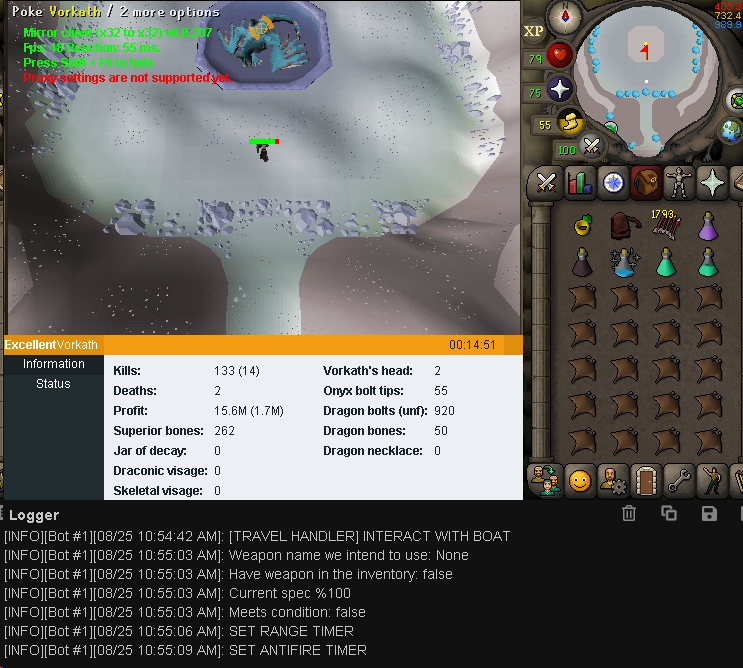
- 1037 replies
-
- premium
- moneymaking
- combat & slayer
- ranged
-
Tagged with:
-
Your fps stays at a solid 50 the entire duration? No. It does not, those are not ideal This is what is uses. Where does it get stuck in lumbridge after death? At the bank? I had him implement a 15 minute failsafe timer to logout if it gets stuck anywhere
- 1037 replies
-
- premium
- moneymaking
- combat & slayer
- ranged
-
Tagged with:
-
-
@PatrickCan I get a trial please
-
-
@Tokenhey man, I just wanted to let you know that the breaking system isn't breaking at what I set it for. I believe I saw the same situation with your Stealth NMZ, I'll have to double check on that one though. The builder was set to break for 15-30 Minutes and took a 43 minute break. Just wanted to let you know, unless I did something wrong, but this is the first time today noticing it.