Skip to content
View in the app

A better way to browse. Learn more.

OSBot :: 2007 OSRS Botting

A full-screen app on your home screen with push notifications, badges and more.

To install this app on iOS and iPadOS
  1. Tap the Share icon in Safari
  2. Scroll the menu and tap Add to Home Screen.
  3. Tap Add in the top-right corner.
To install this app on Android
  1. Tap the 3-dot menu (โ‹ฎ) in the top-right corner of the browser.
  2. Tap Add to Home screen or Install app.
  3. Confirm by tapping Install.

mond

Members
  • Joined

  • Last visited

Everything posted by mond

  1. mond replied to pigeons's topic in Goals
    nice account
  2. i seems the account banned pretty fast...
  3. mond replied to s0x's topic in Runescape
    lol...
  4. got a ban from agility in 2 days 3 hours a day.
  5. mond posted a topic in Requests
    Looking for someone to get me Rogue equipment. thanks
  6. mond replied to mond's topic in Price Check
    ok thanks
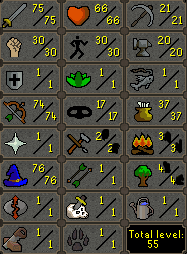
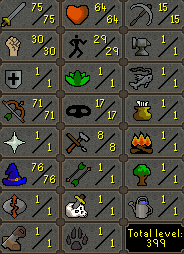
  7. how u got those levels without even mirror mode??
  8. just botted agility for 2 days about 4 hours a day with breaks and god banned
  9. Hey. how much u think its worth?
  10. party room script. but should be VIP or premium script
  11. ty for the script is it high ban rates? someone got a ban from it?
  12. hey. can u pm me the rates please? might buy a 5$ or 10 $ voucher. thanks
  13. 16 hours great script!
  14. tyvm
  15. Hey, im training at seagull and set the script to bank and withraw 28 super attack (4) when out of potions. The script taking 1 dose of potion, then going to bank (still full inv of potions), depositing the drunk potion and standing with the bank open.
  16. mond replied to Tom's topic in Combat & Slayer
    hey, can i have a trail please?
  17. mond replied to mond's topic in Price Check
    ty for the help
  18. mond replied to mond's topic in Price Check
    its for pking not for tbing. can hit very high and the staff adding toxic.
  19. mond posted a topic in Price Check
    Hi. Need a price check for this Staff of the dead pure please. ty
Account

Navigation

Search

Search

Configure browser push notifications

Chrome (Android)
  1. Tap the lock icon next to the address bar.
  2. Tap Permissions โ†’ Notifications.
  3. Adjust your preference.
Chrome (Desktop)
  1. Click the padlock icon in the address bar.
  2. Select Site settings.
  3. Find Notifications and adjust your preference.