






Alek
Ex-Staff
-
Joined
-
Last visited
Everything posted by Alek
-
Just Google "Java 8 4k dpi aware"
-
Ask the scripter on their thread, under Official Scripts. I'm sorry but this section is reserved for scripting help, not how to use scripts.
-
Run OSBot in debug mode, it will print out the full error.
-
Oh god not this again, no Slayer threads are allowed - not even as a joke. Sick of these threads. PM me with a video of 5 consecutive Duradel tasks being completed and I'll allow this thread and give you expedited scripting permissions.
-
Do you have other SDN scripts, are they showing?
-
Its easy to detect a proxy, there's a chance you run that your proxy is more dangerous to bot on.
-
-
-
Install Webwalking issue should be resolved!
-
Cant believe nobody reported this yet, thanks for letting me know Ill resolve this soon.
-
Download: http://osbot.org/devbuilds/osbot 2.5.7.jar Changelog: -Patched bank scrolling, please give feedback -Patched web walking exceeding threshold limit in certain areas with teleports on -Patched threading issue with script executor -Added support for game ticks -Plugin selector GUI under development, currently doesn't work - not a bug -Deprecated needToScrollDown -Deprecated needToScrollUp -Deprecated needToScroll -Deprecated getMaxScrollHeightNeeded -Deprecated getMinScrollHeightNeeded
-
Ah okay I didnt know this was a feature on Debian. Alright and you said the only client that had this issue was OSBot? Ill ping Zach about this.You said this was a linux serverWhat are you using to show ram usage?Show the top for both clientsThe simple test would be starting one OSBot client and one REGULAR (NOT OSBUDDY/RUNELITE/XYZ) client overnight. Do NOT start scripts, do NOT log in, just simply bring them both to the login screen. Look at the differences between them when you wake up in the morning. Obviously OSBot WILL use more memory because it has to load a lot more things, but both clients should be under 1GB. Otherwise we dont know if its the game or the client.WOWWant me to add a CLI command for this? Edit: If anyone has a solution that already exists please post before I write redundant code.OSBot has a Script method called getScriptResourceAsStream; its purpose is to write code once no matter if the script is in a jar, zip, class files, local, or on the SDN. Namely, this topic will show you how to set up your packaging for compatibility between local and SDN resource loading. Since the SDN requires a specific package structure, your local project will need to be the same. The format is: ModuleName/src,resources/files For instance: MacroSlayer/src/Main.java MacroSlayer/resources/image.png For instance, this is what it should look like: Now the InputStream returned from getScriptResourceAsStream should be of the following format: getScriptResourceAsStream("resources/image.png") For instance, this user's script has this code which works both locally and on the SDN: Using this method will simplify your development process when using resources.
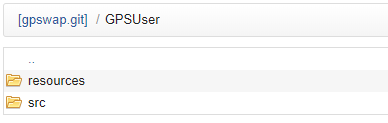
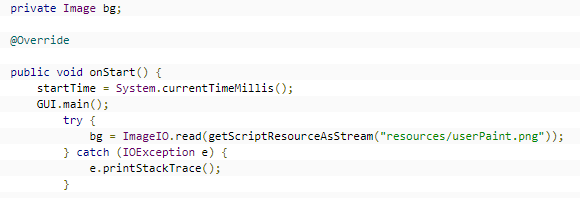 Can you please show the complete code as it currently is, I promise nobody will want to steal it.How are you running 50+ clients without VIP?Should really be Zach's avatar, but I'll take the praise.As of now, no. I'm toying around with the idea of allowing multiple plugins to be ran at the same time.No, its more like RuneLite.



