
Mac
Members
-
Joined
-
Last visited
Everything posted by Mac
-
-
If this is still needed then drop me a message, guaranteed to be quicker than anyone here my price is 9.5m skype: Mac.services@mail.com
-
This is completely wrong lol It looks to be worth ~35m
-
dh will be faster and with your stats you can expect ~110k xp/hr
-
Well if you want the maximum combat xp per hour then just roll with nmz
-
Any kind of dragon would be fairly decent money/exp, slayer is also steady money but not really great at lower levels, at 72 you could do wyverns you would get around 500k/hr + decent combat exp
-
youre willing to do 18-61 wc for 1.65m?
-
Still needed? Feel free to hit me up Skype: mac.services@mail.com
-
id price these accounts to be worth around 30-35m each as they stand
-
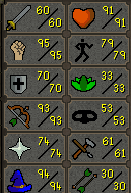
after making all different types of pking accounts i can honestly say that this is the favourite one i have ever done by far, it destroys people, 99 combat so its good fun in pvp worlds
-
get 75 attack, 90 str, 90 range, 52 prayer, then slowly work on maxing it. 75 attack is so much better than 60 for a zerker build
-
can do this for 4m
-
Okay can do all for 12m
-
Can do this for you, price depends on stats skype: mac.services@mail.com to discuss
-
if your account gets banned whilst youre logged in it will dc you and log out you out asap
-
If this is still needed I could make you an account up real quick if you provide it, skype: Mac.services@mail.com
-
Can do this for you now price depends on stats Skype: mac.services@mail.com
-
Had an issue whilst running it at the pollnivneach course, left it running whilst i was out for 10 hours with breaks and it only showed 50% of what xp id usually get, it was on a break when i saw it so just turned it straight off. Logged in a bit later on osbuddy and i was inside a room and somehow the door had closed behind me and ended up trapping inside and it seems to have sat in the room for about 4 hours with breaks on still clicking as it would, i guess it wasnt able to open the door back lol we will see if the ban hammer hits D: I dont know if it could be fixed so just thought id post on it! This was the logger and this is where i logged in Apart from this happening the script is amazing and ive ran it for 6-10 hours a good few times with no mess ups what so ever Thanks!
-
Full regicide line can be done for 8.25m Skype: Mac.services@mail.com / PM if interested
-
8.25m can do. skype: mac.services@mail.com / PM if interested will be done fast af!
-
Can knock out the regicide line for 8.25m
-
Ideally what are you looking for? Could make one up for you real quick
-
Can do Skype: Mac.services@mail.com
-
Hope you know atleast 1m/$1 has to be spent to receive fb
-
I can do it right now bro if you want