





Leaderboard
-
Maldesto
Administrator12Points19230Posts -
Gilgad
Do Not Trade12Points4824Posts -
Swizzbeat
Members12Points7986Posts -
BottersLyfe
Members7Points3580Posts




Popular Content
Showing content with the highest reputation on 01/01/14 in Posts
-
5 pointsDo we have to wait another 3 months for Osbot 2? Or Was Osbot 2 a Lie?5 points
-
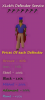
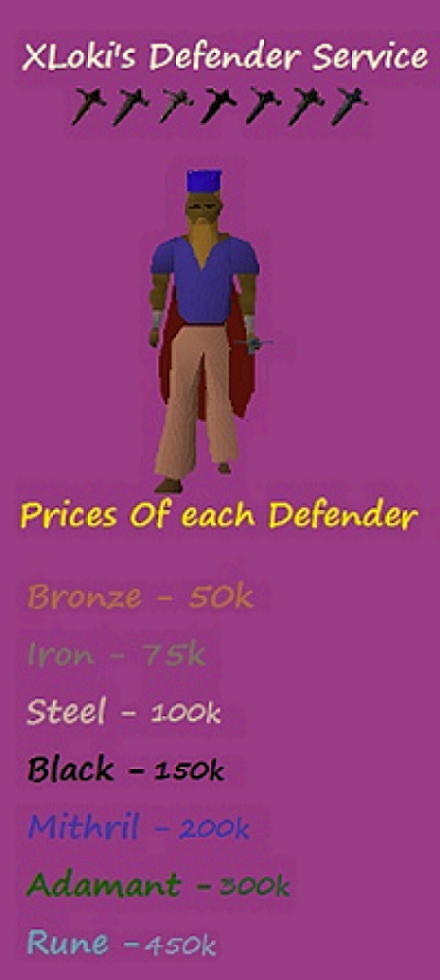
4 points2 pointsIf I seriously have to sit there and constantly have people advertising/talking about their services I'm going to kill myself. Please put a rule in place that limits service talk, such as a set time limit of 10 or so minutes to post about your service.2 pointsVouch for violent and divica, sold them 775M 07. Very quick trade2 points2 pointsI'm pretty sure you've heard this too many times on Facebook... but.... Happy New Year.2 points2 pointsIts so annoying.. Chatbox is a place to talk and chill etc.. not a place to advertise your service..2 pointsYou were annoying and constantly calling people peasents even after being told not to. Please stop your spamming. Not to mention comes back with a false acc to spam some more. http://puu.sh/65how.png * User Suspended for spam/Banned from chat. * User has also Ban Evaded, Complete Ban. * Locked.2 pointsGilgad’s Account Making Guide! Contents Requirements for the Guide: List of all the Pures: NOTE: I do not list accounts that are deemed “Failures” in my books, sorry if your account is not listed. The Rushers The Tanks The Maulers (Tzhaar-Ket-Om) The Rangers The Initiates Melee Pures List of Packages For those of you that don’t know the most basic principal of questing/account making, it is packages, quest packages, item packages. EG: Mithril gloves package Desert Treasure package Attack Package Etc etc etc etc Anyway, I’ll be explaining each package up here that I will be using in my guide, and then I’ll just say under the account creation section “Mithril Gloves Package” It means go to the explanation of mithril gloves under the package section and do that. Starter Kit Attack Package Mithril Gloves Package Desert Treasure Kit Customising your own Account! Prayer How to make the Pures on the List Other Pures coming soon….. Secret Training Methods/Training Spots/Money Making Methods If you would like anything added or more info on anything, please post and I’ll see what I can do, I’ll admit this is a rough guide. ~Gilgad1 point1 pointUpdated for OSBot 2's API! Hello again everyone! I hope you enjoyed my first tutorial, and I hope you'll enjoy this on as well. All feedback is appreciated, so feel free to post your thoughts! This tutorial will use some of my methods for simple banking and path walking! We’ll expand upon our script we were working on last time, so you'll need the source. Step I: Converting to a Banking Script Now as we all know, this script isn’t only boring, it will keep trying to click the rocks after we mine them, even if that vein isn’t ready! To remedy this, we’ll be searching for the rocks using object IDs instead of names. Since we’ll be using specific IDs, we have to choose what and where we’ll be mining! For this second tutorial, we’ll make a script that mines tin in the mines south-east of Varrock: Finding Object IDs Finding object IDs in OSBot is very simple, stand near the object you want the ID of, press Settings: Then press Advanced Settings: Then finally press Object Info: This will lag your client a lot, but don’t worry, you can shut it off as soon as you get the IDs. To get the ID, just look for the number near/on the object you’re looking for: Note: Some objects and NPCs in Runescape have deviations of themselves (like tin), so the same object/NPC may have different IDs (make sure to get all the IDs of whatever you’re using). Now that we have tin’s ID, we’ll make a constant in our script: private static final int[] TIN_ID = { 7140, 7141, 7142 }; We’ll put this line right after this: public class BasicMiner extends Script { Now that we have the object ID found and defined, let’s change our original code to use the ID instead of a name, simply by changing this line: RS2Object vein = objects.closest("Rocks”); to this: RS2Object vein = objects.closest(TIN_ID); Step II: Area Based State For this script, we’ll see which state we should be in with the help of OSBot’s Area class, which is defined as Area(int x1, int y1, int x2, int y2). Simply stand on two opposite corners and fill in the x and y. For the areas, put this after our path variable: private static final Area MINE_AREA = new Area(3277, 3358, 3293, 3371); private static final Area BANK_AREA = new Area(3250, 3419, 3257, 3423); Step II: Path Making The first step to path walking, would be path making! We’ll be making a path by enabling the “Player Position” setting (same place we enabled Object Info): Now, I like to open notepad, or some other text editor while finding my path, so do that now. Alright, finding a path to the bank is pretty simple, but can be slightly confusing at first. Start at the tin veins, and add the position you’re current at (this will be used when we reverse the path to walk from the bank back): Then act like you’re walking to the bank, but only press ONCE on the minimap. Let your player walk to that position and stop, then write down your first position to that path. Then keep doing that until you’re in the bank, here’s what I got: 3283, 3363 3290, 3374 3292, 3386 3290, 3374 3291, 3401 3287, 3413 3282, 3427 3270, 3429 3256, 3429 3254, 3421 To turn this path into something we can use in our script, we’ll be using an array (collection of a type of variable). We’ll put this line of code right after where we defined TIN_ID: private Position[] path = { new Position(3283, 3363, 0), new Position(3290, 3374, 0), new Position(3292, 3386, 0), new Position(3290, 3374, 0), new Position(3291, 3401, 0), new Position(3287, 3413, 0), new Position(3282, 3427, 0), new Position(3270, 3429, 0), new Position(3256, 3429, 0), new Position(3254, 3421, 0) }; Yay! We now have a full path from the mines to the bank, which we’ll reverse to go from the bank to the mines (saving us a step)! Step IV: Path Walking Now that we have a path, let’s put it to use! First of all, let’s change our enum by removing the DROP constant, and adding WALK_TO_BANK, BANK, WALK_TO_MINES: private enum State { MINE, WALK_TO_BANK, BANK, WALK_TO_MINE }; Now it’s time to change our getState() function to return what exact state we should be in: private State getState() { if (inventory.isFull() && MINE_AREA.contains(myPlayer())) return State.WALK_TO_BANK; if (!inventory.isFull() && BANK_AREA.contains(myPlayer())) return State.WALK_TO_MINE; if (inventory.isFull() && BANK_AREA.contains(myPlayer())) return State.BANK; return State.MINE; } Now that the script knows what state we should be in, let’s handle the actual path walking, with a pretty simple method to traverse the whole path: private void traversePath(Position[] path, boolean reversed) throws InterruptedException { if (!reversed) { for (int i = 1; i < path.length; i++) if (!walkTile(path[i])) i--; } else { for (int i = path.length-2; i > 0; i--) if (!walkTile(path[i])) i++; } } You can put this method after getState() if you’d like, and the walkTile(path) will be underlined red, because we’re about to make that method too! I’ll explain this method, as it may look confusing: If the path isn’t reversed, we’ll iterate through the path starting at position 1 (note that arrays start at 0, but remember, our 0 is in the mine) until we end in the bank. If the path is reversed, we’ll simply do the opposite! We’ll start at the 2nd to last position (path.length - 2) and continue to decrease through the path until we end up back in the mine! The reason we aren’t using OSBot’s walk() method is because, well, it doesn’t work nicely at all. It tends to continue clicking the position til you’re there, and many other problems can happen. So here’s the walkTile(Position p) method, put this after the traversePath() method: private boolean walkTile(Position p) throws InterruptedException { client.moveMouse(new MinimapTileDestination(bot, p), false); sleep(random(150, 250)); client.pressMouse(); int failsafe = 0; while (failsafe < 10 && myPlayer().getPosition().distance(p) > 2) { sleep(200); failsafe++; if (myPlayer().isMoving()) failsafe = 0; } if (failsafe == 10) return false; return true; } Simply put, we move the mouse to where the tile is on the minimap, then press the mouse button. After that, we’ll sit around and wait until we’re pretty close to the tile we’re walking to. I also implemented a simple failsafe here, just incase we misclicked or something, that will reclick the same position until we're actually near that position. Step V: Preparing for Banking Now let’s actually make the walking states actually walk, by changing our onLoop() to this: @Override public int onLoop() throws InterruptedException { switch (getState()) { case MINE: if (!myPlayer().isAnimating()) { RS2Object vein = objects.closest(TIN_ID); if (vein != null) { if (vein.interact("Mine")) sleep(random(1000, 1500)); } } break; case WALK_TO_BANK: traversePath(path, false); sleep(random(1500, 2500)); break; case WALK_TO_MINE: traversePath(path, true); sleep(random(1500, 2500)); break; } return random(200, 300); } Step VI: Banking Now that we’ve managed to walk to and from the bank, let’s actually do some banking! If we’re in the bank state, that means we’re already in the bank! Now, let’s add this case to our onLoop() function (as seen above), by simply adding this after the last “break;” and before the ‘}’: case BANK: RS2Object bankBooth = objects.closest("Bank booth"); if (bankBooth != null) { if (bankBooth.interact("Bank")) { while (!bank.isOpen()) sleep(250); bank.depositAll(); } } break; This looks for the bank booth, if it isn’t null and if we actually managed to click on it, we’ll wait til it’s open, then deposit everything except our pickaxe, which is hardcoded so you’ll have to change this to whatever pickaxe you’re using. We’ll automatically detect which pickaxe we’re using in the next tutorial. Conclusion If you managed to get through this whole tutorial without error, congratulations! If not, you can find the full source here. I hope you've learned something from this, and if you didn’t, don’t worry! Programming takes time to learn, look this over a few times, I promise you’ll get it! Thanks for viewing my second tutorial, stay tuned for future tutorials!1 point1 pointpublic static int[] WORLDS = {301, 302, 303, 304, 305, 306, 308, 309, 310, 311, 312, 313, 314, 316, 317, 318, 319, 320, 321, 322, 326, 327, 328, 329, 330, 333, 334, 335, 336, 338, 341, 342, 343, 344, 345, 346, 349, 350, 351, 352, 353, 354, 357, 358, 359, 360, 361, 362, 365, 366, 367, 368, 369, 370, 373, 374, 375, 376, 377, 378}; And to hop to a random one: new WorldHopper(MethodProvider).hopWorld(WORLDS[random(WORLDS.length)]); Had to make this last night and might save someone a couple minutes This list CONTAINS F2P worlds: 308, 316 This list DOES NOT CONTAIN PvP worlds: 325, 3371 pointIF YOU WANT THE SHITTIEST SERVICES ON OSBOT YOU HAVE COME TO THE RIGHT PLACE MILO DOES ABSOLUTELY NOTHING FOR YOU!!!!!!!!!!! IF YOU HIRE MILO U GET 99.9999% OFFFF EVERYTHINGGGGG!!!!!!!!!!!! "Why the fuck would u hire this piece of shit, sorry excuse for a services company" - Milo1 pointService request form xLoki's and Tomgochee's Aio Service: (Read Everything Carefully, Please and Thank you) (Everything we do is Legit unless you tell us we can Bot it) xLoki- ( I Accept vouchers and 2007 gp) ( I do Defenders, Void, powerleveling, and short Quest) (ALL prices are estimated and depend on stats) I will do all defenders or just one defender! 1. Bronze 2. Iron 3. Steel 4. Black 5. Mith 6. Addy 7. Rune If you want multiple defenders (Rune), let me know and we can work a deal out!@! Price's for Defenders I will do all the tokens and everything to get the defenders. Lets make it happen guys!! PM ME or I will be in the chat room! Tomgochee- (ALL prices are estimated and depend on stats) (Tom Accepts Eoc Gold 100k = 800k on Eoc, 1:8 Ratio) Tom will be doing Quests, Void, Powerleveling (So will I) and also will make pures for you! Prices Terms Of Service *potential customers must read* Service lists WAITING LIST IN SERVICE COMPLETED
 1 point1 point1 point1 pointin this case it's alright but for more complicated stuff you're correct might as well use the oldschool1.runescape.com/jav_config.ws for easier parsing @OP: Find the java.awt.Canvas source code in your src.zip included with your java installation. Copy this to your IDE (be sure to put it in the package java.awt!). Change whatever you want to change, make a jar of it. Launch java with the -Xbootclasspath/p:changedcanvas.jar and it'll use your own implementation of the class.1 point1 pointsorry Xavier not showing disrespect but you have some bad reviews, im probably am going to buy voucher. thanks guys1 point1 point1 point1 point1 pointI agree, sometimes (read: almost all the time) the chat box turns into a mini marketplace, and everyone gets offended when you ask them to stop posting services >.> Edit: okay i join chat and there's a service war going on, personally I'd say no service talk in the chat box, every single time I'm in there there're people bitching at each other.1 point1 point1 point1 point1 pointoh rip & yea, royalty was kind of, different.. i really liked his freaks & geeks ep as well :x1 point1 pointJust as a suggestion you should use regex for finding the parameters. It's a whole lot less code and in general more effective and easier to maintain. //finds the gamepack jar Pattern aPattern = Pattern.compile("archive=(.*) "); //first group represents the parameter name and the next is the value Pattern pPattern = Pattern.compile("<param name=\"?([^\"]+)\"?\\s+value=\"?([^\"]*)\"?>"); Then use the Matcher class to find matches in the page source.1 point1 point1 pointYou gain no postcount posting in the spam section. Nice try but no.1 point1 point1 point1 pointWelcome to my graphic shop! This is my grand opening of my graphic shop where I provide quality graphics for OSBot! Prices (all prices are in OSRS gold) Avatar - 500K Signature - 1500K Skype celestial.osbot Portfolio1 point1 point1 pointNice job Czar, finally someone doing something fresh and not remaking someone's elses script.1 point1 point1 pointFixed it right after I changed it :p it's 2 in the morning my brains a little loopy!1 point1 pointHe's a scammer! Dont do it!!! Nah in all seriousness, Good luck Loki!! ^_^1 point1 point1 point
 1 pointPlease use the provided template next time. Also, please provide any information/proof that the service was actually ordered (skype chats, etc.).1 point1 pointUsing the link above, I'm guessing it still works haha.1 pointwill get onto making new ones taken a short break from the whole rs scene1 pointDw they are on long vacation eating cheeseburgers and buying spins, they will ban thousands of bots next week :L1 point1 point1 point1 point1 point1 pointIf YuGod so requests it I can fix any bugs that are present and send it to him for resubmission, but I won't do this without explicit permission as after all it is his script.1 point


























Account
Navigation
Search
Configure browser push notifications
Chrome (Android)
- Tap the lock icon next to the address bar.
- Tap Permissions → Notifications.
- Adjust your preference.
Chrome (Desktop)
- Click the padlock icon in the address bar.
- Select Site settings.
- Find Notifications and adjust your preference.
Safari (iOS 16.4+)
- Ensure the site is installed via Add to Home Screen.
- Open Settings App → Notifications.
- Find your app name and adjust your preference.
Safari (macOS)
- Go to Safari → Preferences.
- Click the Websites tab.
- Select Notifications in the sidebar.
- Find this website and adjust your preference.
Edge (Android)
- Tap the lock icon next to the address bar.
- Tap Permissions.
- Find Notifications and adjust your preference.
Edge (Desktop)
- Click the padlock icon in the address bar.
- Click Permissions for this site.
- Find Notifications and adjust your preference.
Firefox (Android)
- Go to Settings → Site permissions.
- Tap Notifications.
- Find this site in the list and adjust your preference.
Firefox (Desktop)
- Open Firefox Settings.
- Search for Notifications.
- Find this site in the list and adjust your preference.