
ProjectPact
Script Factory Developer
-
Joined
-
Last visited
Everything posted by ProjectPact
-
If you're using Script Factory, you have to use Script Factory's breaking system.
-
The source I posted above is free to use, however AltChat's service is like $4 or something super cheap.
-
Osbot’s world hopper. I’ve reported this to @Patrickalready
-
v1.12: Added the ability to create Area Variables using instance positions (automatically detects if the coords given are instance positions) Added a new back-end process for handling areas Added new area caching to reduce CPU consumption Added support to the Inventory monitor to not track items purchased from the Grand Exchange Added a double cache feature for withdrawing items from the bank or Grand Exchange Minor fixes
-
Check the original post for how to get a trial
-
v1.11: Added a new debug setting for the Inventory monitor Minor fixes
-
Interested in a trial?
-
v1.10: Fixed a bug with items not registering sometimes with the Inventory monitor Fixed a bug with getting version numbers under 2 digits Minor fixes
-
There is a lot of randomness built into the script already to ensure no two clicks are the same (unless you specify)
-
Zero 2 Hero by @powerrangeralt
-
v1.8: Added the ability to delete Path variables Added #joinHouseAdvertisementWithName to Player Added #sleepTeleporting to Sleep Fixed a bug checking quests with web walker Minor fixes
-
v0.6: Added the ability to either high alch or low alch Added a new walking check to alching Fixed a malformed string issue with AltChat Fixed a bug with setting incorrect food names Fixed a bug with setting incorrect alch item names Fixed a bug that would occasionally hover the wrong spell when alching Minor Fixes
-
Mirror mode does have issues still that are being worked on, which is why I recommend injection for best performance. I've mentioned this before as well, I will not be adding every single item in the game. There are currently over 6,000+ recognized items in the bank organizer that I manually added already. The latest updates to this script allows for users to add their own items if they find some missing from the organizer. Users are also able to create their own layouts. I provide a default layout that can't accommodate everyone. It would be pointless for me to create another default layout because you might not like that as well, which is why you have the ability to create your own layouts by moving categories around, and even moving items around within the categories. If you have suggestions on how to make your experience better, by all means please let me know! I personally thought this was a very easy to understand concept, and don't recall anyone saying it was not user friendly. This is the first time anyone has said that. I hope this helps! - Projectpact
-
I'm about to be back, so I will test and get back to you. For faster assistance, join my discord!
-
Typically it is for earlier levels because there is a lot of time to wait between catches. I would not recommend alching when doing chins, as you will constantly be busy and won't have enough time to alch, because it prioritizes hunting over alching.
-
Yes, his scripts are fine. Hopefully he will be back soon.
-
Already got one If you go to Other -> Variables it is under Utilities you can create script args there automatically and you have the option to start with script editor hidden
-
v1.7: Added sorted variable lists in populated GUI drop-downs Added #openOSRSBox to Utilities (Can search for Item ID’s, NPC ID’s and Object ID’s) Fixed a malformed string issue with AltChat Fixed a bug with #isMembers in Worlds Minor fixes
-
v1.6: Added a default time zone for #getLocalTime (EST) Minor fixes
-
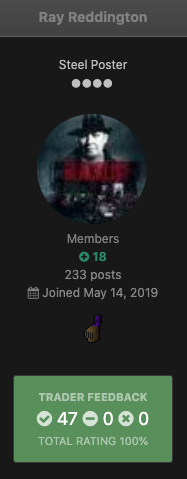
Sorry, completely missed this post! I updated the original thread with someone who tried speaking with me with the chatbot enabled.
-
v1.5: Added #hoverWidget to RS2Widget Added #isMembers to Worlds Added #getLocalTime to Variables Fixed a bug with #hoverWidgetContainingText in RS2Widget Fixed a bug with #changeZoom in Camera Minor fixes
-
Are you using the new mouse handler when you start your client up? I’m having zero issues with the default mouse.
-
Uhhhhhhhh, you mean this?
-
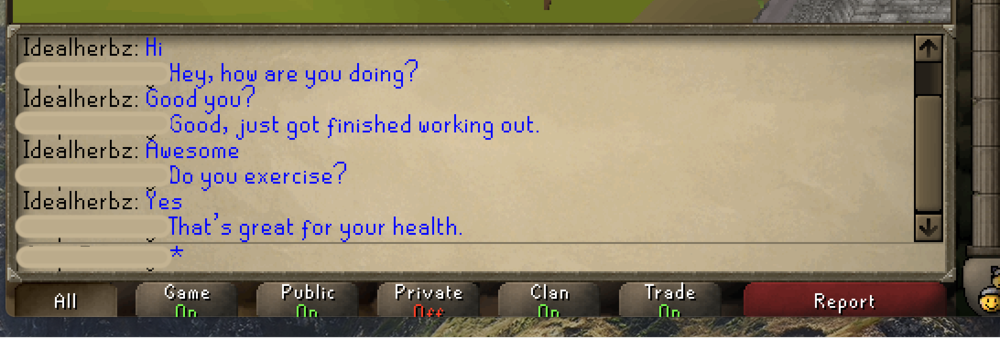
Hi All, Since a few people have been asking how to implement AltChat's API into a script, here you go. What exactly is AltChat? It is an Artificial Intelligent chatbot that replies to in-game conversations for you. It functions the same way as Cleverbot does, except in a more realistic manner. According to their website, each chat created develops its own characteristics and traits. Essentially, no two bots will have the same topics, personalities, personal characteristics, hobbies, or flow. Why add it to a script? I've experienced a noticeable decrease in bans when using a chatbot while botting. Not only does it (1) add another form of human characteristics to your bot, (2) adds more randomness to your play style, but also (3) helps defer other players from reporting your accounts. Player-reported accounts are said to have a higher ban rate than other types of monitored accounts. This is taken directly from RuneScape's Safety Centre: "Although we do not send out confirmation messages or updates, rest assured that all successfully completed in-game reports are processed and reviewed within 24 hours of being submitted." So by increasing the longevity of your accounts, you will directly increase your profits, if gold farming, and levels, if skilling. * Attached is a sample source code of how I implemented it into my scripts. Everything is pretty much straight forward, but if you have any questions please let me know. Also, If you have any suggestions, please let me know as well and I will look over them. Sample Script.zip Example: Notice: Please do not message me if you have any issues with AltChat itself. You'll need to reach out to them directly, as I can't help you.
-
Hi @FastNEasy, Sorry, I was asleep and didn’t see your private message. I assume you’re referring to hooking it up to your script and not just grabbing the source off their site. I’ve actually had a lot of people asking how to add it because Cleverbot is definitely not the move anymore lol. Give me a little and I’ll release a snippet for you so you can add it to your script. EDIT: Here you go @FastNEasy