Jump to content
View in the app

A better way to browse. Learn more.

OSBot :: 2007 OSRS Botting

A full-screen app on your home screen with push notifications, badges and more.

To install this app on iOS and iPadOS
  1. Tap the Share icon in Safari
  2. Scroll the menu and tap Add to Home Screen.
  3. Tap Add in the top-right corner.
To install this app on Android
  1. Tap the 3-dot menu (⋮) in the top-right corner of the browser.
  2. Tap Add to Home screen or Install app.
  3. Confirm by tapping Install.

botme

Trade With Caution
  • Joined

  • Last visited

  1. botme replied to botme's topic in Archive
    SOLD!
  2. botme replied to Furious 7's topic in General Help
    Well I do 3 hours and 20 minutes break. Worked from 72-99 at ghouls with high ban rate :P
  3. botme replied to botme's topic in Archive
  4. botme replied to botme's topic in Archive
    b
  5. botme replied to botme's topic in Archive
    bump!
  6. 45M Without diaries.
  7. botme replied to botme's topic in Archive
    bump!
  8. Mind link it? I'll vote!
  9. Sold me 15m. Was easy and fast.
  10. Well account is good, but people are obviously paying for the fire cape. I'll say between 130-180m
  11. botme posted a topic in Archive
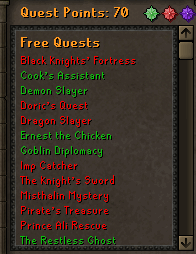
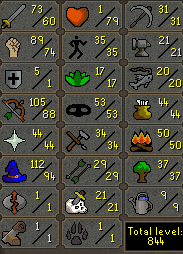
    1. Pictures of the account stats * 81 STR NOW * 80 HP NOW 2. Pictures of the login details https://imgur.com/a/MBy5Q 3. Pictures of the total wealth (if there is any) 4. Pictures of the quests completed 5. The methods of payment you are accepting OSGP 80M - Will take offers though I can do middleman as well. Has to be trusted middelmans! 9. Pictures of the account status https://gyazo.com/198da1737cfdeceedb5c8e7b8a208a24 10. Original/previous owners AND Original Email Address I am the originial owner of this account. E-mail will be placed with yours within the transacation. I couldn't upload galleries, so this will be linked as a gyazo.
  12. I can do this for 13M. Can complete today.
  13. https://gyazo.com/6400e683b4e7faf3d077162cf2114825 has b gloves if u gonna spend more than that. pm me!

Account

Navigation

Search

Configure browser push notifications

Chrome (Android)
  1. Tap the lock icon next to the address bar.
  2. Tap Permissions → Notifications.
  3. Adjust your preference.
Chrome (Desktop)
  1. Click the padlock icon in the address bar.
  2. Select Site settings.
  3. Find Notifications and adjust your preference.