




Jump to content
View in the app

A better way to browse. Learn more.

OSBot :: 2007 OSRS Botting

A full-screen app on your home screen with push notifications, badges and more.

To install this app on iOS and iPadOS
  1. Tap the Share icon in Safari
  2. Scroll the menu and tap Add to Home Screen.
  3. Tap Add in the top-right corner.
To install this app on Android
  1. Tap the 3-dot menu (⋮) in the top-right corner of the browser.
  2. Tap Add to Home screen or Install app.
  3. Confirm by tapping Install.

Deekz

Members
  • Joined

  • Last visited

  1. Deekz replied to Patrick's topic in Combat & Slayer
    Also having the same problem with it not withdrawing food
  2. Deekz replied to Patrick's topic in Combat & Slayer
    Thank you, I will test tonight
  3. Deekz replied to Patrick's topic in Combat & Slayer
    Hello, was just wondering if the script is active and updated with bugs etc? I think i purchased a while back but would love a trial if thats possible to test it again as haven't used it for a long time thanks
  4. Deekz replied to Heiz's topic in Combat & Slayer
    Hello would love to test out the script, any chance of a trial? Thank you 👌
  5. Deekz replied to Patrick's topic in Thieving
    Hello you still looking for testers? Thanks
  6. Deekz posted a topic in Price Check
    Wanted to know the price of pure i built Stats 60 attack 85 str 1 def 99 range 52 pray 95 magic 95 hp QP: 76 DT,MM1,LOST CITY,MITH Gloves,Bear head Thanks
  7. Deekz replied to Token's topic in Others
    Questing like a boss. 10/10 script.
  8. Trial please 👀
  9. Deekz replied to ProjectPact's topic in Hunter
    Worth the buy dude, enjoy
  10. Deekz replied to ProjectPact's topic in Hunter
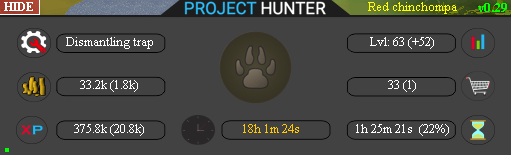
    1-63 hunter in progressive mode yesterday/over night, ran without any problems except buying yellow dye (needs higher buy price in ge). had to reset it a few times because it was first time using the script! look forward to see the progress at chins thanks alot
  11. Deekz replied to Khaleesi's topic in Minigames
    Trial please?
  12. trial please?
  13. Trail please
  14. Hey dude, hit me up on pm and we can look at some prices for you

Account

Navigation

Search

Configure browser push notifications

Chrome (Android)
  1. Tap the lock icon next to the address bar.
  2. Tap Permissions → Notifications.
  3. Adjust your preference.
Chrome (Desktop)
  1. Click the padlock icon in the address bar.
  2. Select Site settings.
  3. Find Notifications and adjust your preference.
