






Protoprize
Members
-
Joined
-
Last visited
Everything posted by Protoprize
-
mirror mode bad
-
send screenshot of both clients open
-
That's a feature of the script. Quests are done as efficiently and as easy as possible using this script., you click start and it does everything And no, this can't be disabled as the script relies on certain items/teleports to get around. Implementing a way to change that would take too long for anyone to be bothered about probably
-
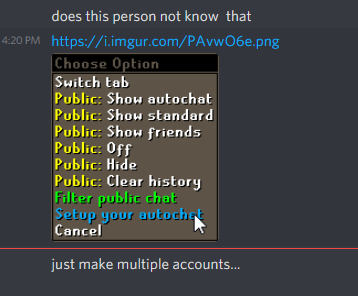
If you do what it says, it will fix it https://oldschool.runescape.wiki/w/Options
-
This ain't 2014. You get banned for literally bankstanding as well sometimes. Delay bans are also a massive thing (i had an account banned a month after I stopped botting on it to play legit) From my point of view and experience, this script ain't shitty, it's just people who don't know how to 'bot'. Get mirror mode as well buddy, your bans will come later than normal
-
Looks cool man, but we already have ProjectPact with his scriptfactory script. If you're gonna learn to make scripts for osbot, you might as well learn the proper way, learn java along the way and be able to put it on your resume. Not only that, the overheard for this kinda script ain't worth it for the majority of people who bot to not get banned (personal opinion ofc) but cool idea otherwise
-
Token runs their proxies apparently so you should be good!
-
You need to chill my dude not sure if satire or not, but stupid idea to bot on your main. You only have yourself to blame
-
You have to buy a private proxy (not use one from your VPN provider or anything like that) and use proxifier if you need mirror mode
-
A dedicated IP from a VPN provider is probably a datacenter ip. These are flagged by jagex Have a look into private proxies if you dont want to bot on your home IP
-
Range isn't supported afaik unless its hardcoded into the quest. Try using a simple mage set up (just mystic + staff of air)
-
This is a botting forum, not a on demand service 😛 Version 2 is coming out soon so project is probably busy
-
-
-
If post your quests/untradeables, people can give better price check also, you'd need 100 post to sell it
-
ranged works fine for me? what are you trying to do?
-
https://adoptopenjdk.net/ and make sure to check to set the PATH variable during install
-
look for java 8. osbot only works using java 8
-
Find java.exe and/or javaw.exe likely found in C:\Program Files\Java\jre(version#)\bin. Right click on it and select -> Properties Go to Compatibility tab Check Override high DPI scaling behavior. Choose System for Scaling performed by: Click OK
-
1m per acc, let me know location and time
-
It's a jagex problem, not osbot
-
you need advertiser rank
-
Can you post an example of what you have done? Just want to get the right idea on what you mean
-
You need to turn off scaling. Either in your display settings (don't recomend that if you have a 4k monitor) or java https://superuser.com/questions/988379/how-do-i-run-java-apps-upscaled-on-a-high-dpi-display
-
install java: https://adoptopenjdk.net/ During install, select to set the java PATH automatically restart pc open osbot



