






Protoprize
Members
-
Joined
-
Last visited
Everything posted by Protoprize
-
if you're using mirror mode, then that's the culprit, not the script, everyone is having issues with it since about a week ago. If you can and willing to test, try one game with injection and everything will be fine. unless ofc you're using injection, then script bugged
-
Doesn't matter, as long as you choose to set the PATH during the install
-
Java 8 hotspot
-
download the one i linked and install it, you can have multiple JDK's JRE's installed be sure to select the option to set the java PATH
-
Have you re-installed java?
-
personally, bans are only a thing if you use broken/bad scripts or bot for too long at a time. Ever since i started making my own scripts and using them, I rarely get bans
-
mirror mode only works on windows and mac (altough I think for mac you need to set up some extra stuff). With linux, still waiting for devs to fix it try reinstalling java https://adoptopenjdk.net/ and make sure to run the official runescape client. https://www.runescape.com/oldschool/download
-
Nice first script! some tips though from personal experience: If you want to do the script the way you have done it, look into this: Having a condition check whether a process can be done could help if the script skips one of the functions/tasks you have created, also splitting up each task for small scripts makes them easier to manage And instead of static sleep times, use conditional sleep This just makes your script run better and seem more human like (not to be confused with antiban) There are a lot more things you can do but someone else could chip in at some point with more help! A lot of this stuff, you just learn from experience, but so far, you got the basic logic down
-
-
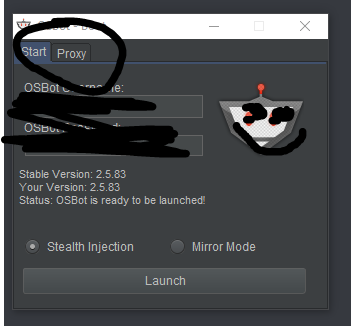
You add the details when you launch osbot
-
You can use socks5 proxies for everything Search for foxyproxy
-
Switch to north korean IP
-
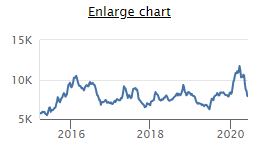
You mean why are they are going back to their normal price?
-
Soon ™️ Thank you!
-
Mirror client version: 5.3.189 / 2.5.83 Console output / terminal output: https://pastebin.com/MERZtUJg Crash report if a crash occurred: https://pastebin.com/MERZtUJg Script that you ran: Local script JVM/Browser bit version (32 / 64) : 32bit Oracle java 1.8.0_251
-
mirror mode currently kinda broken, we all waiting for fix
-
osbot is down / having issues
-
-
mirror mode bad
-
send screenshot of both clients open
-
If you do what it says, it will fix it https://oldschool.runescape.wiki/w/Options
-
This ain't 2014. You get banned for literally bankstanding as well sometimes. Delay bans are also a massive thing (i had an account banned a month after I stopped botting on it to play legit) From my point of view and experience, this script ain't shitty, it's just people who don't know how to 'bot'. Get mirror mode as well buddy, your bans will come later than normal
-
Looks cool man, but we already have ProjectPact with his scriptfactory script. If you're gonna learn to make scripts for osbot, you might as well learn the proper way, learn java along the way and be able to put it on your resume. Not only that, the overheard for this kinda script ain't worth it for the majority of people who bot to not get banned (personal opinion ofc) but cool idea otherwise
-
Token runs their proxies apparently so you should be good!
-
You need to chill my dude not sure if satire or not, but stupid idea to bot on your main. You only have yourself to blame


