Jump to content
View in the app

A better way to browse. Learn more.

OSBot :: 2007 OSRS Botting

A full-screen app on your home screen with push notifications, badges and more.

To install this app on iOS and iPadOS
  1. Tap the Share icon in Safari
  2. Scroll the menu and tap Add to Home Screen.
  3. Tap Add in the top-right corner.
To install this app on Android
  1. Tap the 3-dot menu (⋮) in the top-right corner of the browser.
  2. Tap Add to Home screen or Install app.
  3. Confirm by tapping Install.

Theminis

Do Not Trade
  • Joined

  • Last visited

Everything posted by Theminis

  1. Theminis replied to Fratem's topic in Spam/Off Topic
    hope they are ok
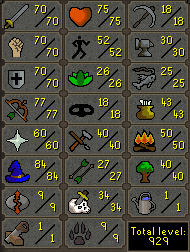
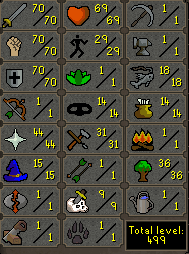
  2. got 1, 70 70 70, rock cake nmz quested, 25m, discord Theminis#5412
  3. Theminis replied to Arctic's topic in Spam/Off Topic
    its still a gud lol
  4. these ROIs look good for start, more than good. are you interested in partnering up? i got decent capital and knowledge. discord Theminis#5412
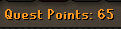
  5. Cooks Assistant Vampire Slayer Fight Arena Fishing Contest The Grand Tree Lost City Tree Gnome Village Waterfall NMZ Ready, Rock cake included - Discord Theminis#5412
  6. no just buy from token i can vouch, dont trust any other proxy sellers ;)
  7. Can find me in chatbox or discord Theminis#5412
  8. shudsy orber u can click my sig to buy best money in the game
  9. bad method don't do it honestly
  10. ls is that u
  11. Theminis replied to Alek's topic in Releases
    petition to implement antiban
  12. our boy @Greengo here bots for months and months with no bans
  13. he just knows, duh
  14. Minimum order: 10 Discord Theminis#5412 or find me in Chatbox
  15. Theminis replied to Rxd's topic in Spam/Off Topic
    chiken for mod
  16. 333333333333333333 quote/reaction when its fixed plz. Ty dad
  17. Theminis replied to merloman's topic in Farewells
    hope to see u back here soon man

Account

Navigation

Search

Configure browser push notifications

Chrome (Android)
  1. Tap the lock icon next to the address bar.
  2. Tap Permissions → Notifications.
  3. Adjust your preference.
Chrome (Desktop)
  1. Click the padlock icon in the address bar.
  2. Select Site settings.
  3. Find Notifications and adjust your preference.