
CSGOslave
Java Lifetime Sponsor
-
Joined
-
Last visited
Everything posted by CSGOslave
-
You buy it and train it. That's a good idea -Thanks for bumps
-
Any ideas on price? I am the original creator of the account.
-
How much would an account like this go for? 1. Pictures of the account stats 2. Pictures of the total wealth (if there is any) 3. Pictures of the quests completed 4. The price you will be starting bids at 5. The A/W (Auto-win) for your account 6. The methods of payment you are accepting - GP 7. Your trading conditions - GP First or offical MM from here, buyer pays fee 8. Pictures of the account status 9. Original/previous owners AND Original Email Address -I am the creator of the account. And have access to the email. It will be changed to yours on purchase.
-
The runescape account can still be from the original game back in 2004
-
Still having trouble using cli with mirror Client starts and use the right account. But never starts the sctips. After some time it times out with "script not startet, no game loaded" or someting similar. java -jar "OSBot 2.6.4.jar" -login -autologin -bot name:pass:0000 -script id:0 -debug 5240 -mirror I use osrs client
-
If placeholders are turned on, the bot tries to withdraw amulets(u) on loop.
-
Seems like it's not supported. But maybe you can use Wine or sandboxie for it.
-
Can i has trial please?
-
I think thats the plan yes.
-
Stronk bumper script
-
Keeps hopping to world 400, then stops script due to it being an invite only world.
-
Will this have any afftect on the cli and mirror issue.
-
Great idea. Would that potentially fix the cli arg for mirror aswell.?
-
1. Pictures of the account stats 2. Pictures of the total wealth (if there is any) 3. Pictures of the quests completed 4. The price you will be starting bids at 200m 5. The A/W (Auto-win) for your account Non at this point 6. The methods of payment you are accepting OSRS gold 7. Your trading conditions We are gonna use Malcom as MM. And hope he will guide us through a smooth transaction. 8. Pictures of the account status 9. Original/previous owners AND Original Email Address I am the original owner of the account and the email it's created on.
-
Avoid doing what eveeyone Else does, think outside the box. Welcone back
-
I d on't like to spend money
-
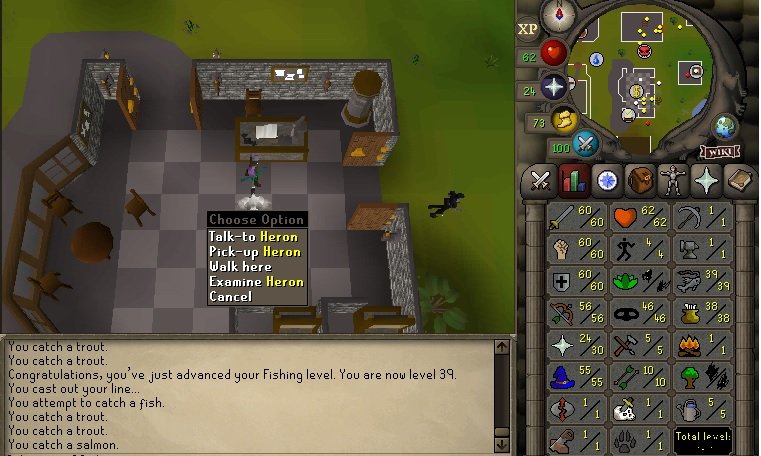
How much would something like this sell for?
-
-
Do you use any remote-desktop tools to access your pc? I had a problem with teamviewer, not being able to launch java app.
-
This would be really nice to use.
-
Cowhides has always been a decent way og making money.
-
You don't need to install it. But you do need java 8 for it. Here are some more info about that.: https://osbot.org/forum/java/
-
So many views no comments
-
Still so many great tips!
-
I made 200k within a few hours friday night in 301