






Gunman
Super Moderator
-
Joined
-
Last visited
Everything posted by Gunman
-
Token Auth me. Can't believe I have to ask and didn't notice till now I didn't have this
-
Probably just bad luck with new accounts.
-
-
@virtusnex I think you have the wrong import. You have this import java.util.concurrent.locks.Condition; Instead of this import org.osbot.rs07.utility.Condition;
-
I think only Sponsors get the limit increased. At least from what I can tell from reading the membership descriptions
-
I know my role as Life Time Sponsor gives me more. Mine says 4.03MB is the limit
-
@ozeki6 I use anti captcha and I only pay like .0022 USD for each captcha.
-
Idk if you can. You might be able to hide the thread in moderation actions at the top of the thread. Also put that shit in here https://pastebin.com/ so it's easier to read please 😄
-
It return an int of your player level. If you combat level is 3 it will return 3. So you can do something like this. if (myPlayer().getCombatLevel() < 20) { //get Combat levels or whatever } else { //other code. } So as long as your combat level is below 20 it won't go past the first if statement. You probably should learn some Java first. Try reading this a bit. https://www.programiz.com/java-programming
-
@mousbros Don't use id's if you can use the String name for starters as ids change more often than Strings. Also just use the bank API method to open it. getBank().open Also look into conditional sleep so you can sleep until the bank is open.
-
https://osbot.org/api/org/osbot/rs07/api/model/Player.html myPlayer().getCombatLevel(); It's in the API section I linked. Try learning how to read the API docs. A lot of questions can be answer by shifting through them and messing around with wording.
-
@roguhanta No idea how either. Try using sandboxie.
-
I am assuming you're asking how to separate ips with Mirror Mode. Use Sandboxie or/and Proxifier
-
Sell it back and go get a nice meal
-
@zchoudha You need to buy VIP, Sponsor, or Life time Sponsor. Vip is a monthly payment. Sponsor is every 6 months, and Liftime is a one time fee. Ignore Advertiser. https://osbot.org/forum/store/category/28-osbot-membership/
-
Oh okay good. Yahoo had a data breach in like 2014 or something and all emails and passwords were leaked. But unless they some how got access to your 2FA I don't know either.
-
When was the last time you changed your passwords? Also do you have a Yahoo?
-
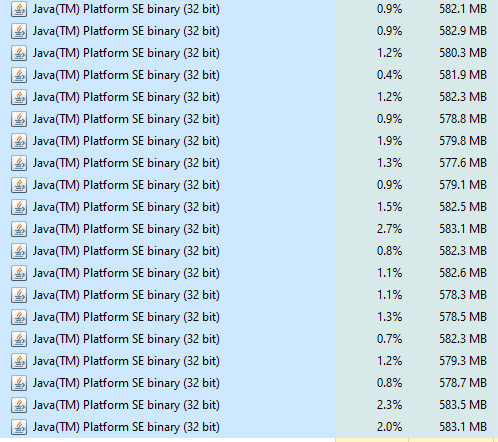
My farm that does tutorial island and then collects shit, then mules isn't using a lot. Been up for 2 days straight now I think. If you're running 64 bit java try 32 bit it will reduce the usage. Another account that has been in NMZ for 74.5 hours now with breaks is also only at 640 with the Jagex client at 275.
-
^This matters too. Mine was more of a general guide line.
-
He already said he doesn't have another account.
-
Min requirements per client for Stealth Injection is 512mb RAM. Mirror Mode is 1024mb, not recommended for farms. CPU I think is like 1 thread per client without low cpu mode. With is like like 1 thread per 4 clients depending on CPU. Something like that I think.
-
-
@Maldesto @Token Idk who does this, but help the OP of the thread.
-
@Luis Duarte Either the scripts were monthly or you have another account that you purchased other scripts on.
-
Scripters don't handle refunds. If the issues was on Mirror Mode then hide the paint. But if you still want to try and get a refund you post a request here https://osbot.org/forum/forum/210-refunds-appeals/ No idea how long it will take to receive an answer but be patient, only the community manager handles refunds.



