
myOSBaccount
Members
-
Joined
-
Last visited
Everything posted by myOSBaccount
-
just to make sure, when you say + nothing else you mean 10hp right?
-
they only allow The Whitelist where i live
-
don't do this if you intend to bot on your main. in fact, just don't bot on your main (especially not a high ban rate activity like zulrah). a private zulrah script would cost a few k so i'm not sure why you'd want to buy one if your goal was just "some extra Coins". if you just want some side cash from botting then make some alt accounts and bot easier money making methods, then transfer the gold to your main
-
i take it you thought up to now that if you didn't get banned until you logged out then you were safe? as people have said it was definitely a delayed ban. you can bot on an account and still get banned 3-4 days afterwards (as in without botting for 3-4 days). some people would say it can even be a 1+ week delay but the longest i ever had was a ban mid wednesday after last botting on a saturday. i actually hadn't logged in after botting it on saturday, just checked the hiscores a couple of times a day to see if it still appears. stopped appearing on my 2nd check on wednesday meaning it was perm banned. delayed bans is why you'd want to have "resting time" after certain services for example, to make sure that the service wasn't botted and that you don't get banned like 1 day after a service had finished as you're playing on your account.
-
mind if i ask you what this massive dump is, also how do you know about it? does that mean it's going to go up sooner or later?
-
how the hell did you even find this 2 year old topic and why would you bother commenting on it
-
this can be closed. i've decided to use this account for myself
-
lowered the auto buy to 30m
-
alright, not exactly enough for me to keep it for you but i'll note it down as the highest offer if no one else bids more by then
-
no problem. depending on the offer and how far away "that time" is then i could hold it
-
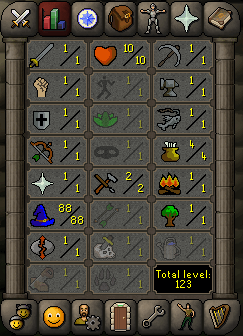
i have an 88 magic (and nothing else) account for sale! 1. Pictures of the account stats: 2. Pictures of the login details: 3. Pictures of the total wealth - nothing 4. Pictures of the quests completed (cook's assistant, sheep shearer, romeo and juliet) 5. Current offer: 6. The A/W (Auto-win) for your account: 30m 7. The methods of payment you are accepting - RSGP only 8. Your trading conditions - either we use a middleman or you go first 9. Pictures of the account status 10. Original/previous owners AND Original Email Address i am the sole original owner/creator of the account. upon payment you will also be given the original email itself used to create the account. post offers here or via pm. i am also available on discord myOSBaccount#3991
-
you don't. since you can only set a proxy upon startup you'd need 2 clients, therefore vip
-
good luck. also, just so you know you don't need to train them to 53 agility. regicide requires 56 agility, but it can be boosted with a pie from 51, so save yourself some time and just get that.
-
looks like a breastfeeding emote
-
with the stats right there you can calculate that by yourself. according to a combat calculator this account is level 56.4, meaning 56 as it's rounded down
-
made me a great private script! went above and beyond to make sure it works perfectly, even smaller (and not too small) details that weren't necessarily included in the original description.
-
my mule has traded with tens of accounts that i've made, almost all of which were banned (at least once). it's still alive now and i have not needed to abandon it ever
-
but there's the question of how much it costs in order to get that 1.6m-1.8m exp. it could be quick, but that's mostly if you pay more for the training/don't afk
-
well now that you've posted it here they can easily connect you to this website and i would guess they wouldn't be too keen on giving back an account to an active botting forum user. that is, unless you've already failed and just decided you'd like to share this heartfelt, tear jerking, absolute cringefest abomination you've created
-
wasn't banned yet. was there anything specific that occurred for you to make a thread?
-
getting 1 account banned on a proxy doesn't mean anything. you'd need to get 100s of accounts banned before it gets flagged
-
welcome! i'm sure you'll find plenty of answers (and trolls) should you need assistance
-
there isn't much more of an opinion to give. it's not a matter of opinion but a matter of facts. the fact is there's a lot of venezuelans on osrs who only play runescape in order to feed their family. sure, there's some other people who do it as well, but they are individuals who don't belong to a specific group. the word "famous" is probably not what you should be using. venezuelans are the only "group" (as in, they are all from venezuela) of people who are notorious of playing runescape for money, and they are usually easy to distinguish from other players.
-
the simple answer is that you can make a lot more money by botting/legitimately gold farming on runescape then selling the gold, compared with the salaries one would get in venezuela
-
raise the alarms! @allthestaff anyway, that's just the regular ban message. in this case you only got temporarily banned so if you value that account i'd suggest you don't bot on it anymore. if you wish to bot then you have much to learn