Jump to content
View in the app

A better way to browse. Learn more.

OSBot :: 2007 OSRS Botting

A full-screen app on your home screen with push notifications, badges and more.

To install this app on iOS and iPadOS
  1. Tap the Share icon in Safari
  2. Scroll the menu and tap Add to Home Screen.
  3. Tap Add in the top-right corner.
To install this app on Android
  1. Tap the 3-dot menu (⋮) in the top-right corner of the browser.
  2. Tap Add to Home screen or Install app.
  3. Confirm by tapping Install.

Bauer428

Members
  • Joined

  • Last visited

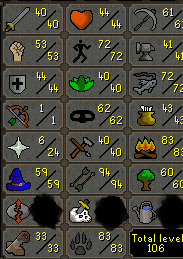
  1. https://gyazo.com/6fa53d0ace7c1cb2d54777da329a3139
  2. PC. Fresh account to eagles peak done. Botted or hand done as long as it's not banned. Need roughly 5 accounts for chins
  3. Lf basic accounts with just eagles peak done so I can use for chins . Send PC ea Botted or hand done. Dont care as long as it's not banned
  4. Need 100$ worth of osgp asap verified PayPal friends and family Discord- Solo Sup Only#9217
  5. Bauer428 replied to Jueix's topic in Requests
    40 gp exp
  6. Bauer428 replied to Alvin's topic in Requests
    26 gp exp
  7. Bauer428 replied to ikos9's topic in Requests
    20gp exp
  8. Bauer428 replied to daamurda's topic in Requests
    40 gp exp
  9. If there is a bot that actually works for rc running let me know. I'll do it for you.
  10. I can do it. My last post got deleted because.it was against osbot. But I can do it
  11. Bauer428 replied to 42Oh's topic in Requests
  12. If you trade in 100-300m amt y will be fine. I've bought 100s il mil and am fine. Make yourself a lvl 3 shitter. Trade thengp from your main to it(same.ips so jagex wont care) Then use the alt to trade to.whoever if your trying to sell. That way IF something happens your alt gets banned
  13. gotta get that post count somehow
  14. ever find one?

Account

Navigation

Search

Configure browser push notifications

Chrome (Android)
  1. Tap the lock icon next to the address bar.
  2. Tap Permissions → Notifications.
  3. Adjust your preference.
Chrome (Desktop)
  1. Click the padlock icon in the address bar.
  2. Select Site settings.
  3. Find Notifications and adjust your preference.