Leaderboard





Popular Content
Showing content with the highest reputation on 10/04/22 in all areas
-
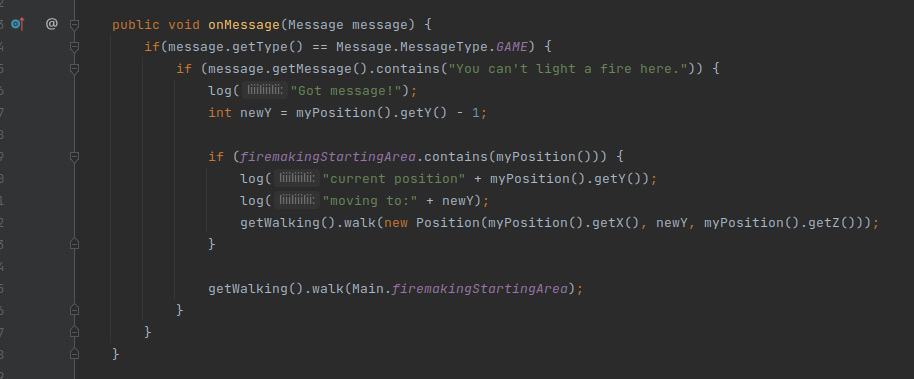
Like Khal said wouldn't recommend doing that in the onMessage. But an alternative to walk a tile that short of a distance you can also just directly interact with the tile new Position(0, 0, 0).interact(getBot(), "Walk here");2 points
-
Reading the documentation usually helps 😉 https://osbot.org/api/org/osbot/rs07/api/Walking.html By default the threshold is set 2 and 5 ^ You will have create your own WalkingEvent and set setMinDistanceThreshold(0) 😉 WalkingEvent event = new WalkingEvent(position); event.setMinDistanceThreshold(0); execute(event); You should never execute any code thats interacts with the game in any way in the onMessage method in my opinion, should only be done in the onLoop. Also mirror mode can skip messages very easily, so checking messages should never affect any script logic 😉2 points
-
1 pointComplete minnows account builder! Starts at level 1 fishing and completes every requirement to fish minnows! $12.99 for LIFETIME access! Click HERE to purchase! Comment and like this thread for a FREE 24 hour trial! [Main Features] Progressively levels fishing 1-82 Supports 23 fishing locations Plays the Fishing Trawler mini game Completes the Fishing Contest quest Supports small net fishing Supports fly fishing Supports barbarian fishing Supports minnow fishing Gets equipment from the bank for each new task Supports ge restocking Supports F2P mode What does it do? - Levels fishing 1-20 at small net fishing spots - Plays the Fishing Trawler mini game until you have the angler outfit - Levels fishing 1-48 at fly fishing spots - Continues fishing from 48-82 at fly fishing spots, or barbarian fishing spots - Completes the Fishing Contest quest - Fishes for minnows at the fishing platform (F2P mode will only level fishing using small net, and fly fishing spots) (TIP) You can re-open the GUI by pressing F2! Required Supplies You must have these supplies in your bank for the script to run every task progressively Fishing Gear - Small fishing net - Fly fishing rod and Feathers Fishing Trawler - Swamp paste Fishing Contest - Spade - 10 coins GE Restocking - Coins, a decent amount (Depends on what supplies you already have) CLI Progress Reports1 point
-
I can not get this to work so it moves one position to the south, it does log all the loggers, but does not move. I have tried putting a conditional sleep after the walk but doesn't work The idea is that when player is standing on a fire in the 'firemakingStartingArea' and tries to light a log, the message pops up, and it moves one tile to the south.
 1 point
 -
1 pointLooks like Jagex have changed this interface recently. I've just fixed this in version 3.21 which I've just pushed. Thanks for raising this! -Apa1 point
-
1 point
-
Hi i like your other scripts that ive purschased! Can i please try out the Runecrafting script1 point
-
1 pointThey changed this like a month ago to only have it go through the account status page1 point
-
1 pointIts not available on store yet, its undergoing testing phase, I've added an auth to you please check your dm1 point
-
1 point
-
1 point
-
1 pointKhal Woodcutter (All in One) updated to 2.42 - Added anti logout when you can chop longer than 5 min at a tree without needing to click it Live soon! Enjoy1 point
.thumb.gif.47695824303ed6357e0a79871a2dda25.gif)