







Apaec
Scripter III
-
Joined
-
Last visited
Everything posted by Apaec
-
As alek mentioned, writing one from scratch is your best plan, but there are a bunch of tools you can use and many IDEs have corresponding plugins. I personally start with a windowbuilder and adjust the code after designing it, as alot of the code generated by the windowbuilders is untidy and/or poorly structured.
-
Depends how fast you solve it I suppose. I've not had a ban while writing this script and that means having solved at least 500 puzzles. I think the randomised order in which this script can solve it also helps, as well as the customisable solving speed. Nevertheless, it is by nature a high risk high reward activity! Cheers -Apa
-
indeed, i'm getting 440k/h
-
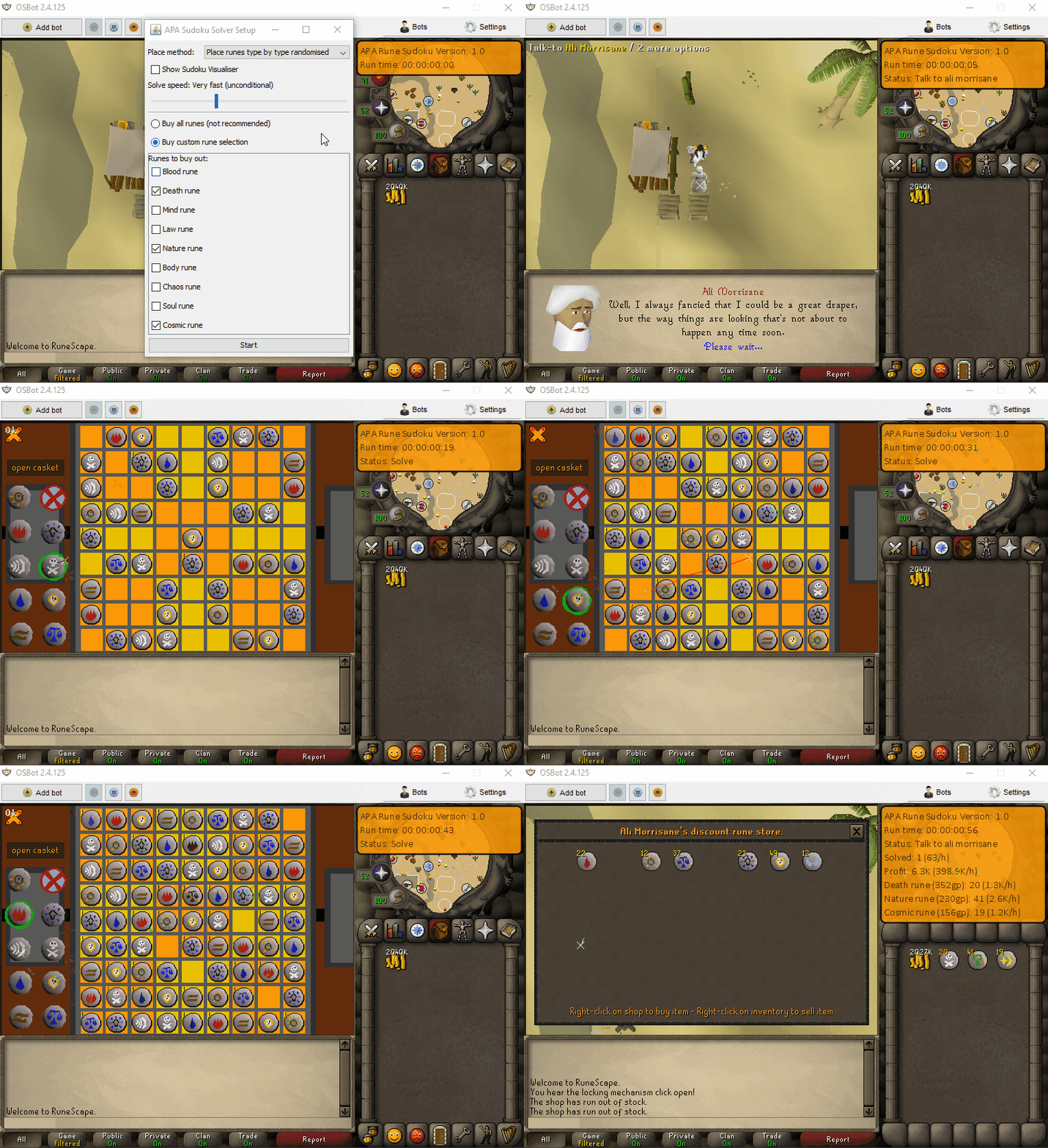
$9,99 for Lifetime use Visit the store HERE! Script Features: Highly customisable solving - continuous solve speed slider and a range of solve order modes Ability to choose exactly which runes to buy (with option to buy all runes without opening store) Real-time profit tracking with live exchange data to accurately model your profit estimates Web-walking - the script can be started anywhere, and will make its own way to Ali Morrisane Quick and easy to configure re-sizeable setup GUI Informative self-generating paint with hourly rate data displayed Smart Sudoku solving logic and board data reading means the script will never fail a Sudoku Error correction - the script can determine and overwrite incorrect rune tiles if necessary Mouse teleportation - If desired, the script can be configured to teleport the mouse between squares to solve sudokus at rapid speeds Optional debug settings show the Sudoku solve process and upcoming generated moves Stops and logs out when out of money to spend Rune Sudoku Requirements: Rune Mysteries Quest The Feud Quest 30 Thieving Start the Rogue Trader Minigame (details below) Before automating the solving process, you will have to start the Rogue Trader Minigame and solve a single Rune Sudoku puzzle. To do this, after the two above quests have been completed, talk to Ali Morrisane, agree to help him, then talk to Aubury in Varrock rune shop. Then, after returning to Ali Morrisane, the script can be started (note that there will be a slightly extended dialogue for the first solve). Things to consider before trying/buying: Due to the nature of this script, it can be considered quite risky to use, especially on the faster solve speed settings - a human would struggle to keep up. However, as we enter the era of third party clients with graphical overlays, the lines between humans and bots for puzzle solving draw closer - provided you use the script carefully with sensible precautions in place, this script should be no riskier than any other. Conditional vs. Unconditional solving - To allow you to personalise your session settings and ensure that the script runs differently every time you start the script, I added a continuous solve-speed slider on the startup interface. This slider, beyond a certain threshold, makes the script run in unconditional mode. This mode means that the script will move on to the next queued action before verifying that the previous action executed correctly. For example, when placing runes, the script will place one then move on to placing the next before ensuring that the previous one was placed correctly/successfully. Why would you want this? Well - when you click to place a rune, that rune appears on the next game tick. As a result, after clicking a rune tile, it can be up to 0.59 seconds before appearing which is 0.59 seconds the script can be doing something productive other than waiting! This means that solve speeds rapidly increase, however there is a very small - but present - chance for error. While this error is not a problem as the script has error-correction (the script will not get stuck no matter what state the Sudoku is in!), this may slow you down based on your latency. Try out different speed settings and see what works best for you! To ensure maximum efficiency, I would highly recommend enabling the 'Esc closes current interface' box in the Keybindings menu: The script uses the OSBot web-walking system. While it has proven very reliable, there are naturally some areas for which the web-walker may struggle. Prior to starting the script, I would recommend manually navigating your player to Ali Morrisane, who can be found here: Script Trials: I believe that trying a script before buying is paramount, however due to the high profitability that this script provides I am limiting the one-time trials to 12 hours in duration. If you're interested in a trial, please follow the instructions on my trials thread which can be found here. Progress reports: Updates: Development process:
-
Hey, i'm going to go out on a limb here and assume that it's my sand crabs script as it has for some reason had some issues with the latest OSBot release. If my assumption is right, Please follow these instructions: Navigate to C:\Users\YOUR_NAME\OSBot\Data\APA_Sand_Crabs Delete the "gui_settings.txt" file found at that location Re-start the script More info should be on the script thread. Cheers, -Apa
-
Hi tanner, are you referring to the whole bot, or a specific script which you are trying to run? -Apa
-
Phew, not sure what happened there. It's rare that code goes unchanged then stops working unexpectedly. Thanks for the help all! -Apa Hey there! The full story is on the previous page, but in short to fix your issue you need to delete your previous gui save file: Navigate to C:\Users\YOUR_NAME\OSBot\Data\APA_Sand_Crabs Delete the "gui_settings.txt" file found at that location Re-start the script Let me know if you're still having problems! -Apa
-
Thanks for the stack traces guys. I've reversed them and had a look, and they seem to be pointing to the gui settings loading. However, no matter what I try, I cannot seem to re-create these issues. It also seems odd that the issue has started today as the code has not changed in at least a week (I have checked the Git push schedule) and the load/save code has not changed since I wrote it almost 6 months ago now (a guess, but you get the idea). This leads me to believe the cause of the issue is client-sided however I have no idea what could be causing it as no other scripts seem to have been affected and it seems to be irrelevant to OS. It may be a long shot, but perhaps you guys could try deleting the gui settings save file that is being loaded? To do this, navigate to: C:\Users\YOUR_NAME\OSBot\Data\APA_Sand_Crabs and move the gui_settings.txt file to your desktop or delete it if you do not mind losing your save file. Then, once deleted, try re-running the script and let me know if that has helped? It's pretty rare that an error like this crops up for seemingly unexplained reasons, but I will do my best to sort it out as soon as possible! Cheers -Apa
-
hmm... unsure what could be causing this issue then. Which operating system are you using? I will investigate the issue now, atleast see if I can recreate it! -Apa
-
Please download the latest version and give it a try here: let me know if the script is still unhappy! Cheers -Apa
-
That's odd, can you paste the whole logger? Also, are you using the latest OSBot version? (.125?)
-
Please can you elaborate? I'm running without any issues!
-
It is quite a common problem for repetitive tasks like cooking, fletching etc! Good luck!
-
Apologies - I should have made it a little clearer. Essentially the issue would be that, if - for whatever reason - your player were to be interrupted while filling jugs, it would wait out the conditional sleep rather than instantly re-using the jugs on the fountain. Solving this issue is a little tricky, and requires you to think about things that change constantly while you're filling the jug. We can then check for these changing features to determine whether or not you have been interrupted. For example, animation. the myPlayer#isAnimating() check lets you know whether you are currently performing any animation. However, on its own, this check is useless - You need a way to call this check concurrently to determine whether the player is still filling jugs. However, since the player is not permanently animating, you need some kind of threshold timer system which resets when the player is animating. This means that you can query the timer and determine how long it was since the player was animating, hence infer a suitable threshold to determine whether the player is interrupted. To implement this, you will need to use both a timing system and a concurrent thread. The timing system is relatively simple, and can easily be achieved solely using System#getCurrentTimeMillis() perhaps in a class. The concurrent system is a little more difficult as if not implemented correctly, it can cause a lot of issues. To add the concurrency, you could create a class that extends Thread, and then override the run method, or you could implement Runnable should you need to make use of inheritance. Make sure you look up some code examples first! If you're not sure what any of that means, don't worry - you could put the check in the onPaint, however this is probably not a great idea - I would highly recommend against putting anything other than paint code in the onPaint loop. It's not an easy problem to solve but hopefully that helped a little! -Apa
-
I wouldn't adjust the timer as you would be sitting there for 30 seconds while the conditional sleep waits if you were to be interrupted. If you're animating while filling jugs, consider an asynchronous animation? -Apa
-
Unfortunately not at the moment, sorry about that! If you're looking for an afk mode crab killer, APA Sand Crabs might fulfil your criteria? Cheers -Apa
-
The bot includes hp exp, so it tracks total xp gained! (: Ofcourse, enjoy! :] -Apa
-
Cheers, I will extend the path for CCI 8! When the mouse move timer hits 0, originally a random mouse event was chosen (e.g move mouse around a bit, or out of screen etc) and executed. However, some of these random mouse moving features were removed from the API and as a result sometimes a random mouse event hits an empty slot in the mouse event table so nothing happens. I plan to add some custom mouse events in the near future so this should no longer happen. In the mean time, the camera should solve your problems! Cheers
-
Hey:) The mouse movement methods were recently removed by the bot so only occasionally when the anti-ban system procs does anything happen, and when this happens the mouse should move out of the screen. The camera movements should keep you logged in, perhaps try setting them to a lower threshold, or remove the delay before resetting if you find yourself being logged out? Although I think being logged out is very common for normal players to and if anything preventing it happening would take away from the 'afk' aspect of things. I wouldn't say the instant reaction time from the OSBot relog solver is a problem though as OSBuddy has logout notifications which have a similar effect! You mentioned CCI8 was having refresh issues, could you expand on this? What exactly goes wrong? Cheers Apa
-
I can certainly add an option to eat up to full hp before/after refreshing, however I don't think i should add a second food option type as i've never known anyone to take more than one food type with them! If there's enough interest though, I am always able to add it. Cheers -Apa Done, enjoy!
-
Hey (: Don't worry about asking questions - that's what i'm here for! The script will drink potions at randomised thresholds based on the boost (with percentage calculated limits) which the potion provides. As for the macro that you mention, i'm not sure if I have control over the pause/play system (I probably do, but would have to check). Either way, this is more or less the functionality that the break manager provides, and alot of the time due to the afk-combat nature of the bot, the breakmanager fails to successfully logout as the player may be under attack. This means the player naturally times out which seems to be what you're going for. I doubt jagex would pick out on clicking that logout button - besides it's a common thing for players to do! However if you're looking for the exact functionality that you mentioned, you're probably best off pausing the bot manually every now and then. Besides, it's probably a bad idea to leave the script on its own for more than a couple of hours per day as that already is a long botting session! -Apa
-
Heyo. While no-one really knows how jagex detects bots (or,for that matter, what data they collect), it seems unlikely that they would gather data from the logging in process. That being said, it would be possible to write a custom login handler, however this would require access to sensitive information such as account usernames/passwords - something which the developers are not willing to release for access via scripts (your account details are locally encrypted). Additionally, in writing a custom login handler, you would lose the stability and efficiency which the built in login-solver provides. As for moving the camera, for APA Sand crabs the camera movements can be disabled altogether. However, since everyone plays differently, it is difficult to cater for all play styles, and it is impossible to 'recreate' these styles. As a result, i've done my best to provide a range of options which allow each user to configure their script setup differently to personalise it (including custom delays, mouse options etc - see gui below for more info) and to try and prevent profiling. Personally, in my experience, I find that the best way to avoid bans is what & how you bot, rather than what the script does. Things like playing legitimately in-between botting sessions and only botting for short periods each day (with generous breaks) go a long way. Here's something that you might be interested in reading for more info about preventing bans: osbot.org/forum/topic/45618-preventing-rs-botting-bans/ Cheers -Apa
-
Good luck:)
-
Not that i'm biased here or anything... buy sand/rock crabs are amazing exp for pures! Let me know if I can interest you in a 24h trial of either of my combat scripts. Cheers -Apa
-
I have deffo pushed! Alek is probably very busy at the moment with these latest client ui changes so that's most likely the reason. Hopefully shouldn't be much longer now, especially since so many push requests will need to be processed following the removal of the mouse move methods! -Apa


