
Jump to content
View in the app

A better way to browse. Learn more.

OSBot :: 2007 OSRS Botting

A full-screen app on your home screen with push notifications, badges and more.

To install this app on iOS and iPadOS
  1. Tap the Share icon in Safari
  2. Scroll the menu and tap Add to Home Screen.
  3. Tap Add in the top-right corner.
To install this app on Android
  1. Tap the 3-dot menu (⋮) in the top-right corner of the browser.
  2. Tap Add to Home screen or Install app.
  3. Confirm by tapping Install.

FeliiTheBot

Members
  • Joined

  • Last visited

Everything posted by FeliiTheBot

  1. I have one 99str, 90+ def att, if it works for you hit me up on pm
  2. Thank you for the reply. Gonna get the acct to 99 and then sell it then
  3. Sent you a pm
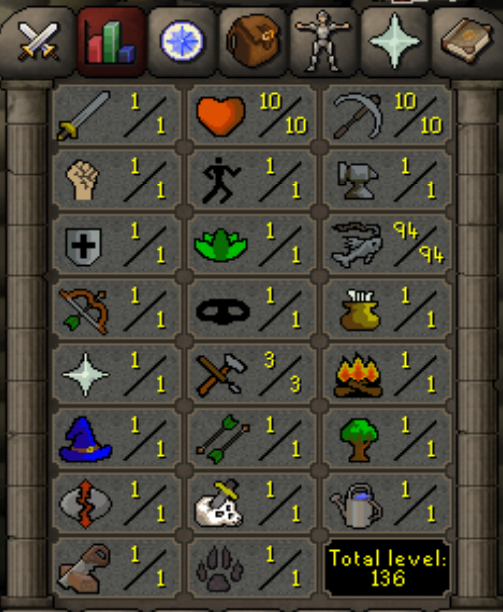
  4. How much is this account worth? Full angler Quests completed: Dorics Goblin Diplomacy Romeo Fishing Contest
  5. Best advice would be "Just start doing it and adapt to what works for you"
  6. FeliiTheBot replied to JMo's topic in Goals
    Hope to see an update today then! Thanks
  7. Expect to get banned when botting...
  8. Will you be trying this again?
  9. FeliiTheBot replied to JMo's topic in Goals
    IS this still going?
  10. FeliiTheBot replied to Mikasa's topic in Spam/Off Topic
    Hi
  11. BMW m3 e30. What a beauty
  12. This guide is amazing, hope I can start writing some scripts soon, thank you
  13. Check out this guide
  14. I keep botting normally until it gets banned
  15. Ive got a few nmz ready account if you are looking to buy
  16. You looking for a worker to do this for you? Edit: Just saw where this was posted. I can do this for 5gp/xp Lmk if you are interested
  17. Okey, thank you!
  18. Do you plan on adding master clues support?
  19. Have you introduced your osbot login info before clicking stealth/mirror?

Account

Navigation

Search

Configure browser push notifications

Chrome (Android)
  1. Tap the lock icon next to the address bar.
  2. Tap Permissions → Notifications.
  3. Adjust your preference.
Chrome (Desktop)
  1. Click the padlock icon in the address bar.
  2. Select Site settings.
  3. Find Notifications and adjust your preference.