
Jump to content
View in the app

A better way to browse. Learn more.

OSBot :: 2007 OSRS Botting

A full-screen app on your home screen with push notifications, badges and more.

To install this app on iOS and iPadOS
  1. Tap the Share icon in Safari
  2. Scroll the menu and tap Add to Home Screen.
  3. Tap Add in the top-right corner.
To install this app on Android
  1. Tap the 3-dot menu (⋮) in the top-right corner of the browser.
  2. Tap Add to Home screen or Install app.
  3. Confirm by tapping Install.

Harley Quiin

Trade With Caution
  • Joined

  • Last visited

Everything posted by Harley Quiin

  1. Harley Quiin replied to Baddies's topic in Requests
    i can do for 20m
  2. add discord
  3. Add discord you need my service
  4. if you have registered mail. forget
  5. With these bad experiences that I have lived, I prefer to charge first or use intermediary before starting a service
  6. 30m Add discord you need my service
  7. Harley Quiin replied to yeeet's topic in Requests
    8m Add discord you need my service
  8. 15m i can do this Add discord you need my service
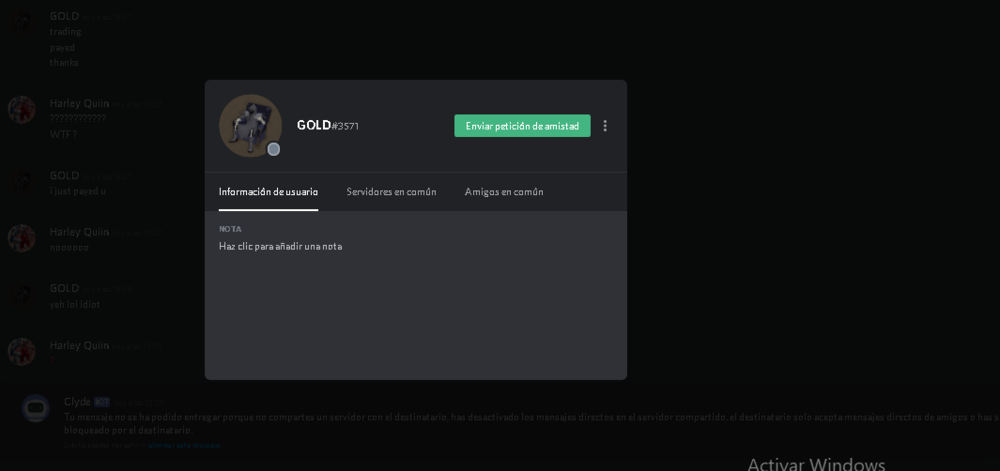
  9. Disputed member: [member=] https://osbot.org/forum/profile/180434-gold-service/ Thread Link: for discord Explanation: I did the statistics + quest for Desert treasure, after having finished the service I blocked without paying Evidence:
  10. 50m for all you pay supplies add you need my service
  11. Still need? Add discord
  12. still need? Go Discord
  13. still need? Add discord still need? add discord
  14. still need?
  15. Harley Quiin replied to 0wne2dk1ll's topic in Requests
    5m done in 2hour Max
  16. i can do start now Add discord you need my service
  17. Harley Quiin replied to daamurda's topic in Price Check
    30-50 for mining

Account

Navigation

Search

Configure browser push notifications

Chrome (Android)
  1. Tap the lock icon next to the address bar.
  2. Tap Permissions → Notifications.
  3. Adjust your preference.
Chrome (Desktop)
  1. Click the padlock icon in the address bar.
  2. Select Site settings.
  3. Find Notifications and adjust your preference.