tarxan
Members
-
Joined
-
Last visited
Everything posted by tarxan
-
thanks brother anything would help send those link my way
-
this is painful we supposed to be a team!
-
wheere would b a good place to start if u wanna learn?
-
-
Yes this script died a long time ago
-
😂💀 I didn't know vpns aren't allowed
-
yeah it rejects pics that are too big
-
i mean mills are about 60c/mill so bond prices arent that high
-
you are right 100% buy residential proxies to get less bans. Datacenter proxies get flagged by the system more
-
or u could repair barricades at pest control and use points to buy str xp
-
Mirror mode is unnecessary to me tbh. A residential proxy shows an ip from a homes and not a datacenter proxy those get banned pretty fast. Dont bot longer than 1hr increments 4 hrs a day
-
Go buy a residential proxy, dont bot longer than 1hr at a time and dont bot more than 4hrs a day
-
-
interesting read with alot of info here
-
unique ID = 209809949167976448 i added u to the message btw Any update on this???
-
Was link #5 not what u were looking for? I'll add u to the pm now
-
https://drive.google.com/open?id=1--Wras4xUWDecaquxcfEMtNDf2mq0uWy https://drive.google.com/open?id=1-ILj1cKljPMj5k20HzLRGofqErMoRifN https://drive.google.com/open?id=1Bb1wX2-EivyEWDfD_ITseas5D13l51aT https://drive.google.com/open?id=1szvcK9j5IIUQ_5FOoA7zR2Gey6tNliKb https://drive.google.com/open?id=1uULh68foiOxe_00DC4rl5BCoYICQBFIF links to more screenshots his discord profile is link 5 ive contacted him on here and he gave me his discord. id like my 100usd refund and some type of punishment for attempting to scam bc he clearly blocked me on discord which cant be justified
-
-
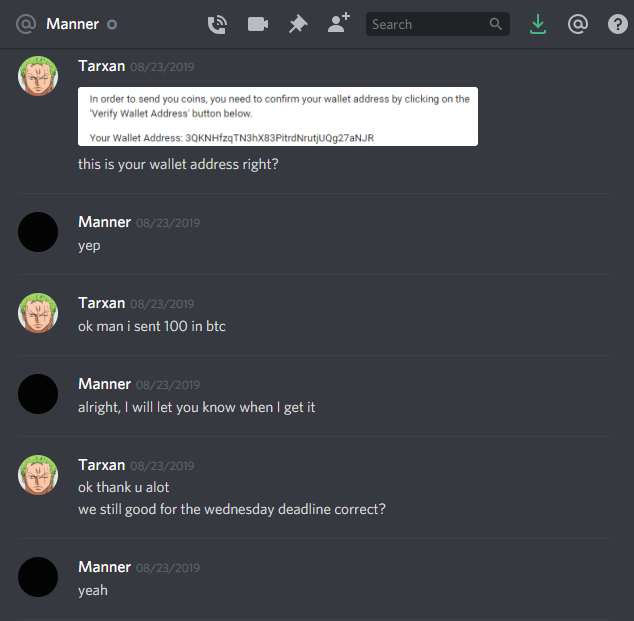
Disputed member: @Manner Thread Link: Explanation: Hi, I've recently discussed a private script i wanted made by @Manner. i explained in full how i wanted it to work. He agreed that i can pay him a down payment of 100usd on 8-23-2019 to get started and the remainder upon delivery of the script. He gave me the date 8-28-2019 would be the date that he would be finished with the script. The day of delivery he gave me an excuse that he was called into work and would need more time so we pushed the deadline back one day. the next day comes and osbot was down so he let me know it would be unlikely that he would be able to finish the next day as well. So to this point he couldnt deliver a product so i gave him a few more days. I waited a few days and messaged him again only to be ignored but he would log on to the osbot website so clearly he was ignoring me and leaving me in the dark. before i paid him i asked him would he ghost me after i've paid bc ive seen a previous dispute against him where he was ignoring someone that purchased a private script from him before. Ive been messaging him just about everyday for an update on the script until today where i noticed hes blocked me on discord. I would like my refund of 100 usd and some type of punishment for scamming. Thanks Evidence: [HIDDEN]

-
would u be ok with a middle man holding funds until services are complete?
-
moneymaking for sure
-
a few days
-
welcome comrade, care for a drink?
-
good stuff m8 will run this and post a proggy here
-
i have a cannon ball farm