






Gunman
Super Moderator
-
Joined
-
Last visited
Everything posted by Gunman
-
Just download the dev build and look for your self. It's completely different. Sometimes it looks like a boomer with parkinson's playing rs 😂
-
Try to appeal all you can do
-
^What he said but it's 20 hours of online game time. Meet ALL reqs or get a bond
-
@mrjday98 Try uninstalling java and deleting osbot folder. Then restart pc, reinstall java, restart again. Download osbot and try to open it and see if it works. Could also try deleting the oldschool files and reinstalling them.
-
-
@Framble If I ever receive 2 bans like that I normally have a good chance of a successful appeal. Try it bro 🙏
-
-
Idk how far back you can go but I know as far back as Java 8 181 works fine. And the latest version should also work fine.
-
@Khaleesi Does stop bot after x minutes include or exclude the break time?
-
You import it all into an IDE and then compile it into a jar file.
-
Normally it's because you didn't compile it with java 8 or you're missing script manifest
-
Mirror Mode is made to be used with the official client. It was never designed to be used with runelite or osbuddy
-
-
Shouldn't you be 🙏 for Corona cure? 🤔
-
I am ready to win again, and only use my winners once or twice again
-
14 to 20. How ever long it takes to get 60's in f2p. That old.
-
We love you too buddy. Some will hate you for this but they will come back around ❤️
-
Gratz on release. Ditto party
-
yes <- Config used. Goes here -> C:\Users\user\OSBot\Data\StealthNmz
-
if (!getInventory().contains("Law rune")) { if (!bankArea.contains(myPOS)) { getWalking().webWalk(bankArea); } } !getInventory().contains("Law rune") <- if this returns true it will forever return true. Since it always returns true it will forever loop the code above^ Just move the banking stuff after the bank area check would probably fix this. Avoid using static sleeps when you can. Static being sleep(1000); or sleep(random (1000, 2000)); <- both are what I consider static. Another thing why is your onloop returning hopTo which is == -1? Change it to return like 500 or something.
-
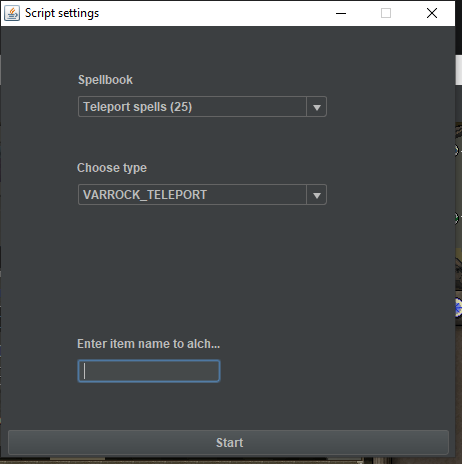
I own the script. I looked and it has tele alching. Pic below of the script
-
No, all sites claiming to be Bogla or Arcus are scams. Alch is the new big one. If I remember right Alch is owned by the original owner of Bogla before he sold it to Arcus.
-
Only one that I know of and could find was Perfect Magic AIO
-
@xnitionI recently ran into this issue. A temporary fix would be using 64 bit java instead of 32 bit. After a while I also assumed it was a client issue, but it wasn't. I would recommend you reboot your system into safe mode. Open a CMD or PowerShell and type "sfc /scannow" . It should say something like "Beginning verification phase" and there should be a another line below it saying "Verification x% complete". Wait till it finishes, then restart your pc and try opening MM again.
-
@obrandso The script will forever be stuck in the first if statement if you don't have law runes.




