





Skip to content
View in the app

A better way to browse. Learn more.

OSBot :: 2007 OSRS Botting

A full-screen app on your home screen with push notifications, badges and more.

To install this app on iOS and iPadOS
  1. Tap the Share icon in Safari
  2. Scroll the menu and tap Add to Home Screen.
  3. Tap Add in the top-right corner.
To install this app on Android
  1. Tap the 3-dot menu (⋮) in the top-right corner of the browser.
  2. Tap Add to Home screen or Install app.
  3. Confirm by tapping Install.

romfan

Members
  • Joined

  • Last visited

Everything posted by romfan

  1. romfan replied to gearing's topic in Price Check
    250m
  2. Nice goodluck!
  3. romfan replied to RDM's topic in Spam/Off Topic
    yes..
  4. romfan replied to Maldesto's topic in Spam/Off Topic
    but why..
  5. romfan replied to politje's topic in Spam/Off Topic
    reeeeeeeeeee
  6. I love my two cats.
  7. Price check on starter rune pure No bans, no void, no firecape. 156 QP. Fully quested defence. EDIT: it has fighter torso, rune defender.
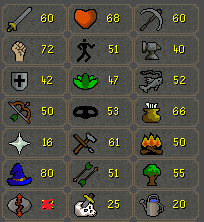
  8. romfan replied to naaiz's topic in Price Check
    Edit: Oh just noticed anchor. So should be 52+ prayer. my bad Around 300M+ i guess
  9. I think a lot of people went from hard to flaccid real fast
  10. romfan replied to Lucki's topic in Runescape 2007
    Pm'd..
  11. romfan replied to Lucki's topic in Runescape 2007
    add my skype: mmmichhaell
  12. That your farm?
  13. romfan replied to Angels's topic in Spam/Off Topic
    ayy memes
  14. Yeah sometimes Weath goes all up my ass and sometimes he doesn't feel like it
  15. romfan replied to bmw1996's topic in Community Discussion
    noice
  16. Are you running them all on your home PC or VPS
  17. close this. Bought from programerz and Rsfly. Would buy again from programerz.

Account

Navigation

Search

Search

Configure browser push notifications

Chrome (Android)
  1. Tap the lock icon next to the address bar.
  2. Tap Permissions → Notifications.
  3. Adjust your preference.
Chrome (Desktop)
  1. Click the padlock icon in the address bar.
  2. Select Site settings.
  3. Find Notifications and adjust your preference.
