




Jump to content
View in the app

A better way to browse. Learn more.

OSBot :: 2007 OSRS Botting

A full-screen app on your home screen with push notifications, badges and more.

To install this app on iOS and iPadOS
  1. Tap the Share icon in Safari
  2. Scroll the menu and tap Add to Home Screen.
  3. Tap Add in the top-right corner.
To install this app on Android
  1. Tap the 3-dot menu (⋮) in the top-right corner of the browser.
  2. Tap Add to Home screen or Install app.
  3. Confirm by tapping Install.

sean258

Members
  • Joined

  • Last visited

Everything posted by sean258

  1. rock crabs trial plz
  2. Botted for an hour got me insta 2-day ban
  3. Looking for a bot that includes teleport alching ;), maybe you could implement it @Czar? Its the best xp for till stun alch ? bought several of your scripts so i dont need a trial ?
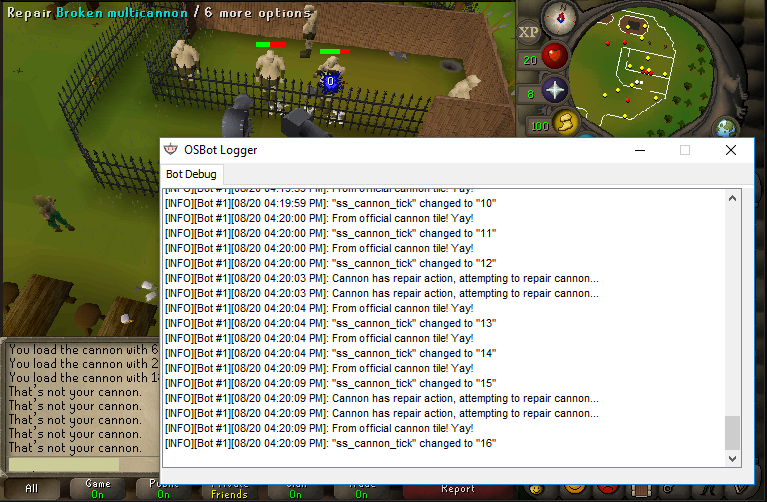
  4. problem with cannon...keeps trying to repair other persons cannon
  5. Script is not really working for me atm. Im doing mahogany tables + demon butler. But he gets stuck so many times :(
  6. just bought the script, but for an ironman there is one major issue. Could teleportation through normal spellbook be added? otherwise there is such a big waste of tabs, and my POH is not advanced enough... greets
  7. sean258 replied to Czar's topic in Agility
    Could i get a trial please?
  8. trial pls
  9. sean258 replied to Fruity's topic in Minigames
    can i have a trial pls?
  10. trial please? looking forward to this one
  11. sean258 replied to Khaleesi's topic in Minigames
    liked , can i have a trial?
  12. sean258 replied to Czar's topic in Thieving
    can i get an auth? liked it ;)
  13. could i get a trial? thanks!
  14. i would like a trail too ;) script looks nice!
  15. sean258 replied to Molly's topic in Thieving
    Liked post, could i get a trial?
  16. sean258 replied to Czar's topic in Thieving
    could i have a trial plz?

Account

Navigation

Search

Configure browser push notifications

Chrome (Android)
  1. Tap the lock icon next to the address bar.
  2. Tap Permissions → Notifications.
  3. Adjust your preference.
Chrome (Desktop)
  1. Click the padlock icon in the address bar.
  2. Select Site settings.
  3. Find Notifications and adjust your preference.
