






jacobbb
Members
-
Joined
-
Last visited
-
I did some testing and I managed to solve this problem. The problem was that I had minimized/toggled off the "sidebar" ( this thing https://imgur.com/a/af32Uka ) and it caused the disconnects/timeouts of the other bots after like (1-3 hours) that weren't shown in the bot preview window. Once I left the sidebar open, all the bots stays logged in (not just the one that show in the big "preview" screen) and everything works well. = client problem
-
This did not help. Woke up today and again other bot has only bot about 1,25h (that duration is about the time it should break) and disconnected. Once i took the OSbot window of that bot active, it logs back in and instantly logs out for break, logger says: [INFO][Bot #1][09/20 07:48:45 AM]: Random solver exited : Auto Login [INFO][Bot #1][09/20 07:48:45 AM]: Started random solver : Welcome Screen [INFO][Bot #1][09/20 07:48:49 AM]: Random solver exited : Welcome Screen [INFO][Bot #1][09/20 07:48:49 AM]: Started random solver : BreakManager
-
Yeah both clients botting the same thing with same script (not in the same server). I did not have that "set active" -box ticked (default settings does not have it ticked), so i ticked it now and hopefully it fixes the problem.
-
Hello, When botting 2 accounts, the other account that is not shown in the bot preview window (= the one that does not have the red border, see picture below), disconnects (time outs) after 1-3 hours of botting, while the one that is "active" in the preview window (red border in the picture below), stays online and works perfectly, why? Once i recognize this and see the "you have been disconnect" -text from the login screen , the bot automatically logs and and continues happily (these are not breaks, it is just random dc from the game and it never logs back in). It looks like the bot have been afk for that long it got kicked for inactivity. I recently started botting again and this has been happening every day. I have tried to minimize the side panel of the previews: does not work, also i have tried to change it to other than the preview panel, like the break handler panel but it does not work either. OSbot 2.6.33, mirror mode, new mouse, very good PC, very good low ping internet. I have been using Perfect Fighter (280.2) from @Czar. Not tried other scripts yet. Looks like it is not possible to upload pictures here so here is a imgur link of the pics: https://imgur.com/a/af32Uka
-
Personally I joined here July 18th, 2014 so winning that 1 year VIP package would be pretty much perfect gift for 7 years of active lurking. Also I'm impressed how Osbot is still active, alive and reliable after all these years, it might be the longest working bot in the RS history? Best of luck everyone.
-
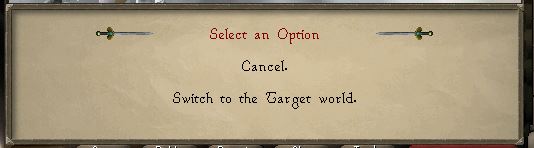
@Fruity This Target world switching problem still exists, bot gets stuck forever when it tries to switch to target worlds. I took you two pictures: Picture 1 above. Bot manages to pass this dialogue, but gets stuck at dialog below (picture 2) Picture 2. This is the dialogue where the bot gets stuck forever, it does not know what to choose from "cancel" or "switch to the Target world". This time luckily i managed to spot when the bot was stuck faster than last time. Thanks alot Fruity. Great script otherwise, gotten tens of millions of xp with it and no bans. EDIT: Using mirror mode 50ms, script version 3.82

-
@Fruity Could you fix this asap, my nearly maxed acc just got stuck for 4 hours when it was trying to switch to Target-world, dialog will pop up and ask something like "cancel" or "Switch to Target world" (you can check if you login). Bot logger says something like "Updating dialogue..." (this message like every 1 hour once) Wish me luck
-
How much for an fire cape via teamviewer? Stats: cb 100+, range 95-99, hp 95+, def 70+, pray 52+ I will buy all required items, blowpipe, etc.
-
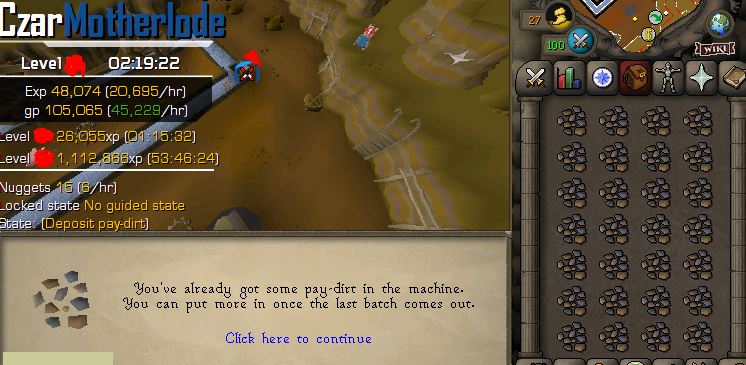
Some more comments about the script below, overall the script is still stable and pretty good if the script settings are set right. Script buyers don't let these comments scare you away. This is the best motherlode script here and 100% stable for long runs (with right settings). 1) See attached picture. Similar problem as in my previous post but not the same problem. The bot does not detect that it should fix struts in this case (happens in empty worlds pretty often, for example), so could you please add automatical "force strut fix when otherwise stuck" to avoid these problems. 2) Using dragon pickaxe special attack. It always uses it instantly when you have 100% specc power, which can cause unwanted attention, because: "Note: Ores are determined when the pay-dirt is mined, NOT when cleaning" = Dragon pickaxe special attack should be used only when in the mining zone (currently it uses the spec everywhere, like when banking etc (not good). 3) At least when in the lower mining zone, the bot uses minimap-click-to-move pretty often when the distance is very short (like 2-6 tiles), even then when you even see the vein or the hopper --> Bot should more often click the target straight away if it sees it (currently it can click the minimap to move 4 tiles and then click the target, even you see the target all the time (not good)) 4) MAJOR: I've tried all the settings the script provides and also with different setting-combinations and I can't figure out how does the "custom sack size: 81 (or any amount)" work. I'm very sure it does not work properly. The bot does not calculate the pay-dirt amounts properly and also causes that 1) getting stuck-thing. Currently the only way to use this stable and for long time is to untick this setting so it banks the ores after every inventory (and also repairs the struts (if needed)), but THIS IS SLOW and also may cause unwanted attention: for example you are mining on the upper zone and clean+bank ores after every inventory = no1 does that. (I'm using the default sack size and nothing in inventory) 5) Also something other shady things going on with the hammer+strut repair settings. For example the "deposit and withdraw hammer"-setting does nothing, should it withdraw the hammer from bank after i've used the "bank all" from the deposit box (it deposits hammer also). So i would suggest you that you consider renaming the script settings and also make sure they don't break each others functions. (like currently i think the "deposit all" setting breaks some of the hammer settings) 6) Overall walking around the bank and hopper and struts could be better. Like it pretty often runs to fix the struts but it does not have hammer yet and it needs to run back to that one box to get hammer and then run back to strut and fix it, this also causes xp waste since you will run out of energy at some point. 7) when strut is repaired, the bot ALWAYS waits the ores to "swim" to the sack, after that it moves to the sack. That is sometimes OK antiban, but it could and should usually pre-run to the sack after the strut is fixed. Part of the 7) but semi 8 ) but the bot also drops the hammer at pretty much always on the same tile. Not maybe so dangerous but FYI that it could be better also.
-
As someone who has tried both of the available paid Motherlode miners (Khal's and this Czar's), this one is the best one. Khal's script lacks mirror mode support: It can't run stable over 2-3 hours before getting stuck forever (Khal blames mirror mode about it, meanwhile this Czar's motherlode miner runs perfectly fine on mirror mode = Khal's talk is bs and he most likely just don't know how to fix it), so this Czar's script is the only motherlode script choice if you are planning running on mirror mode! I'm running this script 50ms mirror mode, fully zoomed out. Script version 134.2. @Czar anyway, there are couple things you could optimize on this script to make it even better (even it is 100% stable atm, which is the most important thing) 1) Depositing pay-dirt into hopper is slow: bot moves near hopper but then always afk's before using it. It is OK sometimes but it could be faster more often (see 4) ). 2) When using deposit box to bank all ores, it closes the deposit box screen always by pressing the "X", no one legit player does that - they click the minimap to move and that closes the deposit box screen, if you could add this it would be great. 3) It is possible to choose settings from this script that causes the bot stuck forever (but this is the botters fault tho): If you disable all strut repairing-settings, it gets stuck for ever trying to deposit pay-dirts into hopper, dialog will open and "sack is full" (or something like that), so it would not hurt to add detection to bot that detects when that happens and forces the bot to repair the strut/wheel (for example), because I think that it is not good idea to be able to fully disable repairings. 4) Overall, the script could and should be faster more often. The idles are great but there are too much of them, like afk(idle/sleep) after every vein mined is too much: there could and should be like 2-4 actions performed normally (fast) in row, for example like mining couple veins fast without any afk's and same applies to walking routes, sometimes (not always) it walks full speed to hopper and deposits fast etc. So overall i would reduce the amount of afk's by like 30-50%. Btw, I'm even running the script without = UNTICKED the "more antiban/afk"-setting. 5) What does the "randomized strut repairing"-setting do? Is it like randomized actions to perform it (good thing) OR does it like sometimes repair the strut even you don't personally need it to be repaired? which one? Thanks Czar, great script.
-
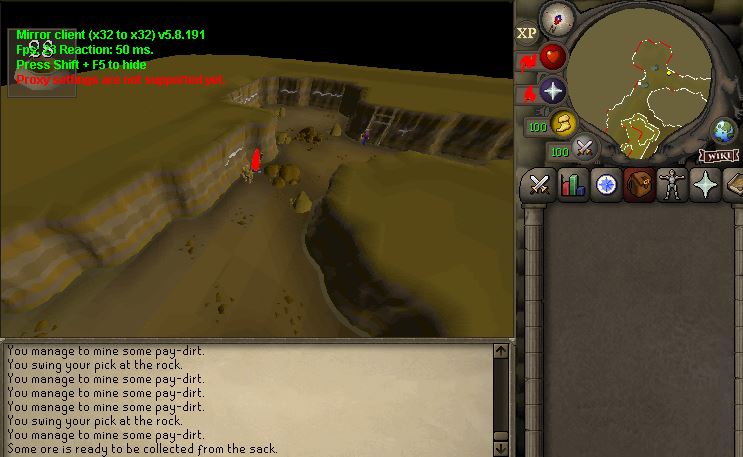
This script still gets stuck forever when using mirror mode (any mirror mode speed, currently tried the fastest 50ms mirror mode setting). It also keeps clicking minimap to move (bot does not recognise the rockfall) (btw, this location is NOT the only location it gets stuck) If you don't have interest of fixing the issue that has been around for at least nearly 2 months and many posts here about it, you should write here that "THIS SCRIPT IS NOT SUPPORTED IN MIRROR MODE" or something if you think that it is mirror mode problem, because right now you are just wasting peoples accounts. Also please, don't say that it is fixed until it is fixed (clean 10 hour run by you in mirror mode). It gets stuck pretty fast in mirror - most likely in 3 hours but my average is around 2 hours of runtime For this reason i will ask for refund and buy this script from your competitor, I hope you understand. So I can't recommend this script. Positive things: this script works well until it gets stuck. Also this test acc i got mining pet in the level 40s mining as you can see in the picture.
-
Slaves does not work in f2p atm. They do perfectly fine for 1 run but once they get back to bank to refill inventory with pure ess, they just freeze and can't withdraw the pure essence, this is the last thing in logger: INFO][Bot #1][09/06 11:12:23 AM]: msg: [you step through the portal...] [INFO][Bot #1][09/06 11:13:22 AM]: WebWalkingEvent; We have reached the final destination! [INFO][Bot #1][09/06 11:13:23 AM]: Option for [Open chest] is [Bank] [INFO][Bot #1][09/06 11:13:23 AM]: Prepare mouse, moving to Open chest at [x=3382, y=3270, z=0] (2) tiles away [INFO][Bot #1][09/06 11:13:25 AM]: .. Clicked (Open chest) successfully: true! [INFO][Bot #1][09/06 11:13:26 AM]: "last_delay_name" changed to "PresetBank: Wait up to 800ms after opening bank 2" [INFO][Bot #1][09/06 11:13:27 AM]: "last_delay_name" changed to "PresetBank: Wait 3s until bank is open until bank/depo open 1.1" [INFO][Bot #1][09/06 11:13:27 AM]: "last_delay_name" changed to "PresetBank: Wait up to 700ms after opening bank 3" This test was with fire and body runes now, they don't work. One week ago i tried air runes and master/slave -mode worked perfectly. Mirror mode, tried with all antiban settings and without all the antiban settings, no effect.
-
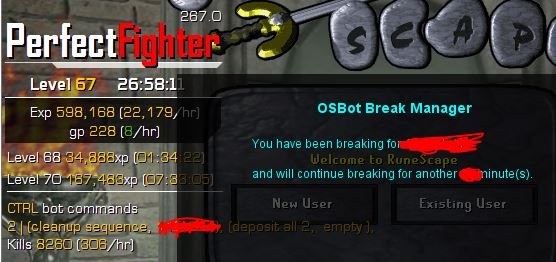
Ran out of VIP so I "have to" keep them running so i can still abuse the Mirror mode 😉 Maldesto pls don't kill. Here is a 27 hour proggy, still running, 600k xp, 100% F2P, 4 accounts at the same time. Done this many times - no bans. If someone is interested how to successfully bot in f2p, i can tell you my secrets for 300m .
-
Hey, Are there ever sales, like -50% off for example on "lifetime sponsor" etc, because i was thinking about buying lifetime sponsor, mainly for lifetime mirror mode. Are there like black friday or xmas sales or anything? Are there any other way to BUY lifetime vip? Thanks.
-
The problem is still there in V1.42, please see new gif below: https://imgur.com/a/U2GaTry Mirror mode with default settings, no matter how far/close i have zoomed, does not matter which normal tree it is. What is it trying to do after the tree is completely chopped? I think you should remove that part and make it go straight to the next tree? Ofc some antiban movement shall be included.



