






Gilles123
Members
-
Joined
-
Last visited
Everything posted by Gilles123
-
Ok great and do you host them or you re-sell. Cause what if they go down, any uptime guarantees? Also would you accept PayPal?
-
What do you plan on doing with it once you have 66def? Just curious :p
-
I might be interested. Could you let me know how much bots run on which specs and how much that would cost?
-
Thanks so much, this is very handy! The only thing I found so far that still might be handy to fix is when I update all the bots 2 times. The script(& I think proxies too but didn't try that yet) will stay the same and the second time the script will be added to the end of the line For example If I do this in script id: 641 Script params: Lumbridge_Swamp-Anchovies-true-false-true It'll be CLI: -script 641:Lumbridge_Swamp-Anchovies-true-false-true When I do it again it'll get added again to the cli list -script 641:Lumbridge_Swamp-Anchovies-true-false-true -script 641:Lumbridge_Swamp-Anchovies-true-false-true Like that, hope you understand what I'm trying to explain :p //Edit: Also maybe add option for random f2p world or p2p?
-
Thanks so much! Will test this out now and let you know if I encounter bugs! //edit: Would be even better if you could make another option to update all bots with world,script and params etc. Cause if I wanna run a certain script on all bots it's easy to auto-set that!
-
Can I have a trial please? (please quote me so I get a notification so I know I have the script)
-
Great! Quote me when you have that finished looking forward to it!
-
Would be even better if you added the ability to import username:passwords so I can generate a lot of bats faster
-
Could I get a trial please? Trying to see if I like the CLI mode, what's the script id?
-
Could you please update this? I'd really appreciate it!
-
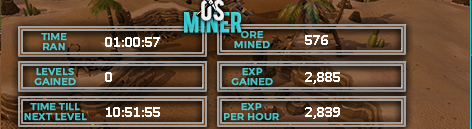
I love how fast it detects new rocks! Small proggy:
-
If you'd like I'd also be willing to test!
-
Would love a trial before I decide to buy !
-
This one does what you are looking for http://osbot.org/forum/topic/91744-advgamblerauto-host1-100-dice-rollssetting-goalspremium-qualityclan-chat-support/page-5
-
Could I get a trial please? (please quote me so I receive a notification knowing I have the trial)
-
For me it says: The chat room key has expired. Please notify the administrator. //edit: it works now
-
Advertising smartly
-
Option to fight without food?
-
I'm in! Goodluck to everyone!
-
Is it possible that I still didn't receive my trial? I checked and refreshed & restarted but nothing pops up?
-
What script did you use?
-
I don't have it yet?
-
Yay finally on the SDN! Can I get a trial please? Btw I was one of the first guys to ask for a trial in the development thread and waited a long time to ask for a trial so a longer trial would be very kind (PS: I own 2 of your scripts atm and would love to expand it with this one )?
-
Wow, nice!
-
Yes! Awesome! I love getting more antiban options! Will these options be available on your other scripts as well? (Perfect Miner & Perfect Fighter for example)?

