






Zackaery
Members
-
Joined
-
Last visited
Everything posted by Zackaery
-
Imagine purchasing a script that should cost $25/month, but only paying it one time, then getting FREE ACCESS to the community scripts that are 100% OPEN SOURCE and available to ANYONE that has access to Script Factory. You download a scripting tool that is used to create any scripts your little pea brain can come up with, yet you're so triggered at the fact the FREE COMMUNITY SCRIPTS aren't being fixed, and you expect the script writers to run them every day to keep it updated for YOU. You're a huge piece of shit, judging by your previous track record with feedback on scripts. You're DOGSHIT. "Got this dogshit user called @iamspecs that just constantly crys about trying to do things he hasnt even attempted." Boy you should changed your name to "I am special". I bet you probably go flame any free script you own when it breaks every game update, minutes after saying some stupid shit like "Was working a second ago, now this dogshit ass script doesn't work, scripter is trash and im the greatest alive, sit kids, i pay good money for this type of stuff". Get a fucking life bro, and dont you fucking dare try to ruin the reputation of this community. You're a terrible person, and genuinely not worth keeping around. I genuinely hope you NEVER use script factory again, because you don't deserve it. Get fucking bent.
-
1. A description of the suggestion It'd be nice to have a feature to "pin/favorite" certain scripts that are often used or be able to "remove/hide" any unused scripts to prevent cluttering the script section when looking for a script to run. 2. How will this suggestion impact scripters and/or botters? Makes it easier for botters to start up scripts without having to use CLI. It's more of a QOL feature than anything, but I personally would love to have it, and have heard the same remarks from others in the community. 3. Post any examples such as code or pictures to supplement your description (optional) Current script side bar: New script side bar:
-
GOAT Thank you for putting in so much effort. This client is starting to get some huge updates that are going to change the scene entirely! Keep up the great work Pat.
-
Now that its a normie, go get 99 fm at wintertodt with all crates banked, then you can sell for $175
-
I'd like to have wildcard support for Player, getPosition.
-
I love my integers, and I'd love to do more with them. Can we get a feature too add/subtract/multiply/divide 2 integers and the result output goes to the 3rd? Example: integerA = 8 | integerB = 10000000 | integerC = NULL operationIntegerToNewInteger integerB, Divide (/), integerA == integerC integerC would return a value of 1250000
-
What are you attempting to remake? Its pretty cut and clear that it produces a script for osbot, and you can't move it to another client. If you can provide some insight on what you want to create, whether it's in pms or publicly, im sure we can get you the information needed to recreate it, or the missing method could potentially be added.
-
I'd like a check for detecting a current config value, then being able to detect if the config changes (dynamically). I don't want to have to input any values other than the config number, It would check the current config value, then when the config changes, it'll either set a boolean true or increase an integer.
-
@AnimalMother Guardians of the Rift on Script Factory has been out since a week after release. There's a lot of great reviews, you should check it out! It's 100% free with Script Factory.
-
Hey there! OSRS Script Factory has a Guardians of the Rift script available right now! No extra cost! Check it out here: https://osbot.org/forum/topic/170279-✅-guardians-of-the-rift/
-
Changelog: * FULLY REVAMPED AND UPDATED * Created a new task based efficiency system. * ADDED - Custom Break Handler * ADDED - User Input support for dropping runes/banking runes/Break handler * ADDED - NPC Contact support for repairing pouches * ADDED - Depositing runes via Deposit pool * ADDED - Dragon pickaxe special support * ADDED - Elemental / Catalytic Prioritization * Fixed - pouches. ALL Pouches are supported. * Fixed - Agility essence location. Correctly identifies the location to mine Guardian fragments. * Fixed - "Game Ending bug". Correctly Identifies if it's currently in the middle of a game, and won't reset mid game. * Fixed - Entering game. Correctly waits until players have left, and enters/waits until available.
-
Hey man! If you have Script Factory, I've released the Temple of the Eye quest, as well as, Guardians of the Rift minigame for free to the community!
-
still looking to have this method added, my previous comment is innacurate.
-
Just like mediaIDs, I'd like to have access to Widget, spriteIDs Methods: If Sprite ID is:

-
I'm currently using a boolean to set this value true or false, but it'd be nice if it was just a method. We have a compare strings method, But it'd be nice to just have a true/false boolean check Variables, getString, {false}, 1:STRING, 1:STRING VALUE
-
All user inputs show on one GUI Menu dynamically. Option to generate a profile based on the user input loadout.
-
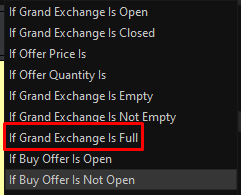
Can we get a method for If Grand Exchange Is Not Full?
-
The ability to have multiple webhooks, so scripts aren't flooding the same channel with different info. I want to have the ability to have my corp drops webhooks sent to one channel, then have another webhook that shows progress on my corp account builder.
-
This is a guide on how to use webhooks for discord, to allow your script to send information to your discord server. Step 1 - Creating a server: You need to create a discord server that you will want to have your discord webhooks sent too. If you don't have one already, follow the pictures below: Now give your server a name, and click create! Step 2 - Creating a channel for your webhooks: Create a new channel for your webhooks to be sent to. If you want this channel to only be seen by you, and there's other people in your discord, I'd advise you to set this channel to private. Your username of the account will be sent in the webhook, so only allow people you trust to see these. Step 3 - Creating your webhook: Now to create the actual webhook link via discord, you will need to add the integration to the channel. You can easily do so by following below: Step 4 - Adding your webhook to Script Factory: Now navigate to Script Factory, and open up the settings, we will paste the webhook there. DO NOT SHARE YOUR WEBHOOK WITH ANYONE YOU DO NOT TRUST. - Anyone that has access to your webhook will be allowed to use it and send anything they want to that channel, so make sure to only share it with those you trust! Step 5 - Creating your webhook action on Script Factory: Now, on Script Factory, we will go ahead and link up our webhook to a method, so we can get a discord notification in real time of what's going on with our script. Firstly, create your method that you want to trigger the webhook. I will be using an example for equipping a Dragon scimitar. After you create the method, now you can add an action to that method to send your webhook, you can add the webhook by adding the action below via Other > Variables > Send Discord Message: Fill in the message you want to send, you can use Discords special characters to bold text / quote / italic / etc. You can't use [ : Colon] or [ , Comma] unfortunately. Step 6 - Testing your webhook: Now press play, and watch your discord message get sent! Congratulations, you've successfully set up your discord webhooks, and can now see stuff in real time, while you're away from your bots!
-
Hello, zBarrows and zFightCaves is not available for free to the community, those are private scripts that I've made my self, and am currently selling to those interested. I won't do any further discussion about that here though. As for being worried about it being to complicated, It is very very easy to use! We have a lot of tutorial videos, and do classes all the time to help aid new people in learning how to properly use SF. I would highly recommend this script over anything else any day of the year. It's amazing, and you can honestly do pretty much anything you want with it.
-
@ZeVo Open up cmd prompt and do: java -version If it comes back as anything other than Java 1.8.0_XXX, then you have the wrong Java version installed. If you've set your java version to 1.8, then your default loading java for osbot may be loading through a newer version. To test this out, create a batch file by opening up notepad and pasting in the following code: java -jar "osbot 2.6.41.jar" Save this file as "OSBot.bat" and place the file wherever you load your osbot client, e.g. if your osbot.jar file is on your desktop, place the OSBot.bat file on your desktop. Run the batch file, and see if that allows you to run mirror mode.
-
TitheFarm was a separate expansion script. Expansion was a limited time deal, and is no longer available to anyone, if you want a copy of tithe farm, you can contact me via discord for more info! @Zackaery#3475
-
Dope GFX
-
Reach out to me on discord Zackaery#3475. I'd be happy to help you out! If you ever need help, feel free to reach out on discord Zackaery#3475. Or join the discord server! https://discord.gg/qfcgHsgNsy
-
Yes, the Fatigue mode for Pro users is incredible. I haven't had a ban with Script Factory. It's the best thing I've ever came across.



