Jump to content
View in the app

A better way to browse. Learn more.

OSBot :: 2007 OSRS Botting

A full-screen app on your home screen with push notifications, badges and more.

To install this app on iOS and iPadOS
  1. Tap the Share icon in Safari
  2. Scroll the menu and tap Add to Home Screen.
  3. Tap Add in the top-right corner.
To install this app on Android
  1. Tap the 3-dot menu (⋮) in the top-right corner of the browser.
  2. Tap Add to Home screen or Install app.
  3. Confirm by tapping Install.

Proton

Java Lifetime Sponsor
  • Joined

  • Last visited

Everything posted by Proton

  1. Proton replied to qlael50's topic in General Help
    I didn't even know there was a lifetime VIP, unless you meant lifetime sponsorship. Anyway staff are usually good with this stuff, I think only certain staff have access to access to sensitive information like proof of purchase which might be why it's taking a little longer than usual. You could try messaging @Decode, he's really helpful with this stuff.
  2. 👍
  3. Proton replied to Peaj's topic in Introductions
    Hey, welcome!
  4. Oo thanks
  5. Welcome friend
  6. Discord is great imho, providing you know how to use it (unique IDs).
  7. Proton replied to Evesy's topic in Introductions
    Welcome!
  8. I don't know about sites, but individual sellers will usually sell at a lower price. I'm selling 290m atm for $0.67 per M
  9. Hey, add me on discord: Proton#8570 Can sell you via BTC
  10. Sup

    Proton replied to Knuckolls's topic in Introductions
    Welcome back!
  11. Welcome back!
  12. Welcome back!
  13. I can sell you 215m for $0.67 per M
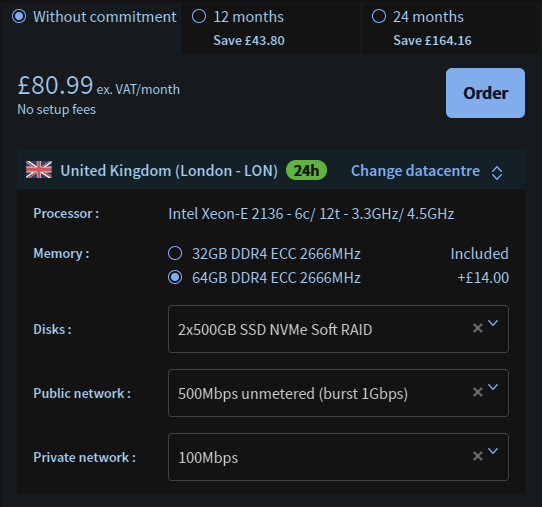
  14. Thanks for the replies, in regards to network and disk space, they come free with the VM.
  15. @asdttt By what you plan on hosting on the server, I assume you mean how many accounts? If so, hopefully 40 accounts.. And I'm using OVH, most likely with windows.
  16. Looking to buy my first dedicated server, to anyone who's got experience with them what do you think about these specs?
  17. Think it's happening to everyone, just gotta wait
  18. Proton replied to Hoots's topic in Introductions
    Welcome!
  19. Ooooo, lovely.
  20. Welcome
  21. Does you method involve world hopping?

  22. Proton replied to Mojo's topic in General Help

Account

Navigation

Search

Configure browser push notifications

Chrome (Android)
  1. Tap the lock icon next to the address bar.
  2. Tap Permissions → Notifications.
  3. Adjust your preference.
Chrome (Desktop)
  1. Click the padlock icon in the address bar.
  2. Select Site settings.
  3. Find Notifications and adjust your preference.