






The Operator
Members
-
Joined
-
Last visited
Everything posted by The Operator
-
99 farming now
-
-
wanted to get a pc on this if anyone is interested

-
-
send me what u have
-
Looking for zulrah accounts fully quested preferred with decent stats
-
Bought the account, thank you pandi
-
Happy holidays
-
awesome, thank you
-
sent you a pm
-
Just find a trusted user to do the service for you. You won’t have to worry about getting a ban for botting.
-
has 99 herb now
-
Are you serious? did you really?
-
Still selling?
-
-
Wanted to see how much my pure would be worth, @Sibbernskiis the OO
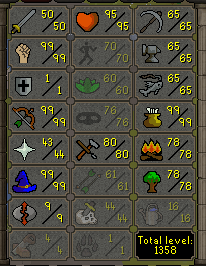
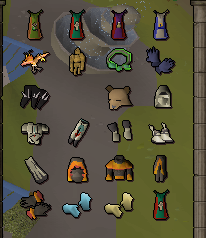
-
Just use a auto clicker and high alch, you should be fine.. I've auto clicked alched to 99 on all my accounts with no problems
-
-
I honestly believe more tests should be done before making people get vaccinated. A bunch of medical field workers basically got fired because they refused to get the vaccinated where I'm from. I think it's really sad forcing people to get the vaccine.
-
Just use someone that's really trusted for the services you may want. @Lost Pandais really good
-
If you're the original owner of the account, I don't think u should have any problems recovering your account back. Hate that happened to you
-
Anything is possible but eventually you might get banned. Happened to me once
-
-
This looks really cool, can't wait for the updates
-
i'd say 5-10m


