Hussain1e
Members
-
Joined
-
Last visited
Everything posted by Hussain1e
-
Thank you for the actual reply. I'm so sad that I've read this to late. I just finished mining it myself yesterday
-
Hello, I'm looking for an estimation for getting 70k buckets of sand on my gim via mining sandstone in the desert. I got a r pickaxe, varrock armour 3 and I have the circlet of water.
-
I tried to buy last week and I saw that the options said "Back next week". So here I am, a week later. And I still see this: Why am I unable to buy for such a long time?
-
Wow, thank you so much!
-
My main (bot free and rs3 only) got banned after I was botting simultaneously on a OSRS account. I was playing both accounts on the same IP and my main had never any bans or warnings whatsoever.
-
Thank you, I've already got some semi-ideas in work. However I cannot help but think that the way webWalk is walking, is quite "botlike". Is there a way to customize his walking behaviour. For example not only using the mini-map to click but also using the normal surroundings to click for walking. Or increase the intesity of clicking (maybe that he'll sometimes spamclick). Or make it so that he does unnecessary mouse movements while walking and clicking....
-
Thank you very much. Which import do I need to use for webWalk? And where can I find documentation on all osbot import?
-
So I decided to do some scripting in my spare time. And as a first step to check some things out, I wanted the bot to walk to a certain position from any location (starting position should be variable and the ending position should be contant). So somewhere I read that you could use this piece of code to walk somewhere(lumbridge general store coords): public Position GeneralStore = new Position(3199, 3245, 0); getWalking().walk(GeneralStore); However when running this, nothing really happends (nog even a log that I've made).. "Complete" code:
-
-
Which furnaces are supported for this script?
-
Can you add clockwork making?
-
Does it also has a feature to create accounts and tracks the names?
-
Is a void setup for all styles adviseable vs tank when low def stats?
-
Thank you I'm trying it out
-
COuld I have a trial?
-
Hahha idiot, maybe babysit a bit next time if you are botting
-
It already has all void sets
-
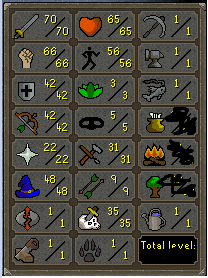
How much for this handmade account?
-
Hey could you tell me what settings I need to place if I want to afk train sand crabs at the crabclaw isle? Because when I do it the script is malfunctioning. The script is running fine until the crabs need to be re-aggro'd, it clicks on the map for reset but stops midway and hovers the mouse on Sandicrahb or keep running up and down until I stop the script.
-
Can I have a trial?
-
How do you create a barrows alt in just 19 hours?
-
So I just purchased the script and everything seems to working fine. Only I have a few questions: - How does the script determine which skill (att/str/deff) it wants to train, - Can you update the prayerflicking (rapid heal) so that it is more randomised on which intervals it will flick?
-
Can someone tell me if this script goes to nieve independantly, ask for task, does task and repeat?
-
Could I have a trial?
-
Works well, got full void with all helms in 23-25 hours.