
Jump to content
View in the app

A better way to browse. Learn more.

OSBot :: 2007 OSRS Botting

A full-screen app on your home screen with push notifications, badges and more.

To install this app on iOS and iPadOS
  1. Tap the Share icon in Safari
  2. Scroll the menu and tap Add to Home Screen.
  3. Tap Add in the top-right corner.
To install this app on Android
  1. Tap the 3-dot menu (⋮) in the top-right corner of the browser.
  2. Tap Add to Home screen or Install app.
  3. Confirm by tapping Install.

dunnolf

Trade With Caution
  • Joined

  • Last visited

Everything posted by dunnolf

  1. Im not trusted or no feedback, but i pmed you
  2. 275m?
  3. dunnolf replied to 353234543's topic in Price Check
    Go for 200m and upwards
  4. 70m with feedback
  5. dunnolf replied to dunnolf's topic in Price Check
    Thanks! I will work on the stats and quest it later on!
  6. dunnolf replied to dunnolf's topic in Price Check
    Anyone??? Price checks?
  7. dunnolf replied to dunnolf's topic in Price Check
    Can anyone reply a rough estimate?
  8. dunnolf replied to dunnolf's topic in Price Check
    Thanks!
  9. dunnolf posted a topic in Price Check
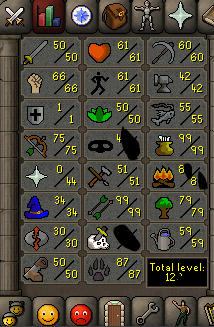
    Hey, So i would like a price check on my pure account, im the OO, and the account has NO Blackmarks. (1 farm run away from 60 farming)
  10. Nice man!
  11. Nice man!
  12. what quest did it need?
  13. Looking good
  14. nice man
  15. dunnolf replied to Apaec's topic in Others
    If theres 0 bans, i might use this!
  16. dunnolf replied to Tom's topic in Fishing & Cooking
    s hift dropping support?
  17. s hift dropping support?`?
  18. Hope it goes well when i try it on my pure..
  19. dunnolf replied to Apaec's topic in Thieving
    rogue chest support? with antipk??
  20. dunnolf replied to Molly's topic in Thieving
    Works in every place?
  21. TRIAL PLZ
  22. Does it look like AHK? since they are banned now
  23. Trial please?

Account

Navigation

Search

Configure browser push notifications

Chrome (Android)
  1. Tap the lock icon next to the address bar.
  2. Tap Permissions → Notifications.
  3. Adjust your preference.
Chrome (Desktop)
  1. Click the padlock icon in the address bar.
  2. Select Site settings.
  3. Find Notifications and adjust your preference.