



GaetanoH
Members
-
Joined
-
Last visited
-
 Hi Kal, you adding Hunter Rumours in this script as well in the future or will that be a different one?
 -
Also having issues regulary that the bot stops withdrawing/clicking the item to craft. I am making black d'hide bodies and every few hours I have to manually help the bot withdraw from a bank or click in inventory.
-
Also having lots of withdrawal issues lately. Has been searching for Bronze axe and a Staff but both have been in bank.
-
Hey Fruity, I’ve had a few times the bot was trying to deposit the items dropped from Zulrah but was just stuck doing it. Me manually depositing it fixed it and the bot took over. Any idea how to fix this?
-
Hey frost, is there any chance you'll add rigour/augury?
-
if you offer 700 ish for my account thats fine by me?
-
Yeah, he is right, 500M is just too low for these kind of accounts
-
And no, I didn't had any already selected at quick prayers, log doesn't say anything ...
-
i have this account with defender, all prayers, just no infernal cape
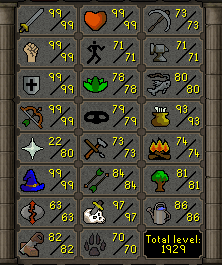
-
Hey Frost, My bot is setting quick prayers and keeps getting stuck selecting Piety then selecting Augury/Rigour. I have put the hotkeys to default and I'm playing on fixed mode.
-
You didn't check good enough 😉
-
BUMP AW AT 350M
-
BUMP
-
BUMP
-
BUMP


