NAMES COAL
Members
-
Joined
-
Last visited
-
How do i open runelite without it automatically trying to use osbot? it wont let me use either jagax launcher o runelite without using osbot, it automatically pops up every time and wont launch the game.
-
-
yeah i have also had a problems with red/black salamders in which it will only set up 3 instead of 4 nets and when you catch, it doesnt even collect it. it lets it fall then gets rope and resets it. also would be helpful it the script priotized caught salamders over fallen traps. chins,falconry, bird, and trap hunting works flawless thanks
-
looking for an account with 60-70 smithing please dm me if you have anything, no other stats are needed.
-
65m number 3
-
-
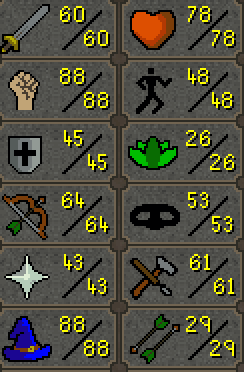
account has fighters torso, fire cape, rune defender and rune gloves currently working on barrows and 94 magic. thanks- coal
-
Required Skill(s) & Starting Level(s): range - 67 Target Level(s): 80 Would you like; Premium Hand Done Powerleveling or fast botting service: depends on price difference Would you like to use a trusted middleman from OSBOT with your order(They will hold payment until service is complete): yes Have you read ToS below and do you agree: yes Additional info/questions: ETA of time finished
-
title says it all, please assist thank you
-
-
http://imgur.com/a/MDVvk working on mith gloves rn, will have by friday
-
-
20m
-
Just would like a quick price check on my pure 50 attack 76 str 85 range 74 hp 1 prayer has mithril gloves and 99 fletching thanks -coal
-