minewarriors
Scripter II
-
Joined
-
Last visited
Everything posted by minewarriors
-
Hi @Czar I wondered how the progress is going on tasksupport fishing. Could you give us a little update?
-
#howToGetBannedInstant
-
-
@Czar Do you know when taskmode will be released? like lvl 1-10 do this 10-20 do this etc?
-
@Czar Could you add in a task menu you think? Like from 1-15 fish shrimps in lumbridge 16-30 trout if items in bank etc?
-
I am having the same problem. When I pre select rocks and bank here it gets stuck and does not walk back
-
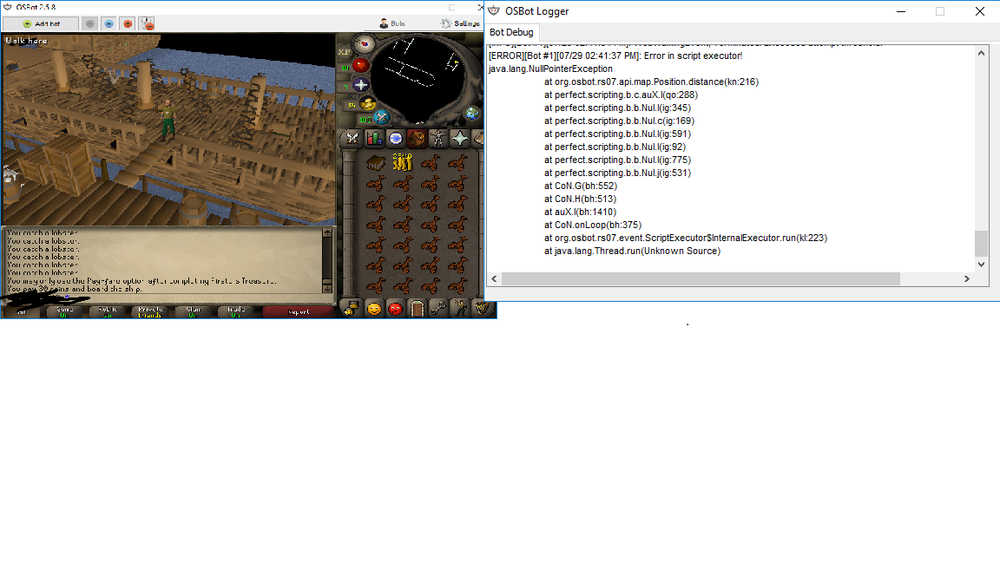
Got 2 monitors indeed. btw got this nullpointer when trying to leave karamja boat. I had to help it after to get off.
-
Woodcutting ?
-
When I minimize the bot, the paint disappears. Anyway to get it back to show? @Czar P.S. could you look your pm. Have send a suggest for perfect miner
-
So I have te remove the declaration and initialisation of worlds? let me try. ow damn it worked!!!! thank you so much!!!
-
Hello y'all, I just started making my first private script and it is close to finished however worldhopping is not working for me for some reason. Worlds worldhop = new Worlds(); store.close(); if(worldhop!=null) { worldhop.getWorlds().hopToF2PWorld(); this.x = x - x; } This is the code and I get this in the logger: [ERROR][Bot #1][07/01 08:30:41 PM]: Error in script executor! java.lang.NullPointerException at Main.onLoop(Main.java:51) at org.osbot.rs07.event.ScriptExecutor$InternalExecutor.run(kl:223) at java.lang.Thread.run(Unknown Source) line 51 is worldhop.getWorlds().hopToF2PWorld(); The problem has nothing to do with store.close(); I already tested this. Does anybody have a clue why I get this error? If I fix this my first script is finally done ? Thanks in advance for all the help!
-
hmmmm tried it on 2 accounts. one got banned from it. Maybe it got banned because it was a fresh account dunno. A bit in doubt how it got banned.
-
Hi @Tom could I have a trial ? In doubt between Perfect Miner and this one.
-
Did you use breaks? And anti bot pattern? IF you bot 6 hours straight then it is obvious you get banned
-
Yeah nearly every spot freezes at the bank. It puts the fish in the bank and then says "Fishing spot not found" In the logger. The whole walking back part of the script is a bit broken I think. @Czar
-
Request Template: - Script name Wintertodt - trial length 2 days if possible would be nice since I am quite busy atm with work etc - Reason for trial want to get 99 firemaking with some money. If I like the script I'll buy it - Are you ging to give feedback on the script? sure why not ^_^
-
@Khaleesi Could I get a trial of this?
-
@Czar Czar Thiever Would like to try it ^_^
-
@Czar Could I have a trial on perfect thiever please
-
@Czar Could I get a trial for perfect fisher?
-
I have got the same problem, you run the script and it just logs out
-
When I start the script of fishing is shuts down immidieatly , am I the only one with this issue???
-
with your new menu the banking mode is not working it will still drop the logs. Are you able to fix this?
-
I do not see any map mode in the menu : O I only have : banking , pc, afk, hide, anti, hop, check, old, avoid and loot. btw can you also make the world hop mode so that it chooses between p2p and f2p because I am not member and it keeps sleecting member worlds
-
ey czar I bought the script but I noticed that the yew chopping area at the grand exchange is not working that well . he does not cut all the three the trees , only two of them, and he is frozen or stuck somehow.