






tomimikaelll
Members
-
Joined
-
Last visited
Everything posted by tomimikaelll
-
aren't u the ditto guy + wales gonna get ze dik
-
Already got the answer, no need to reply. idk how to lock the topic
-
ok, thanks for info
-
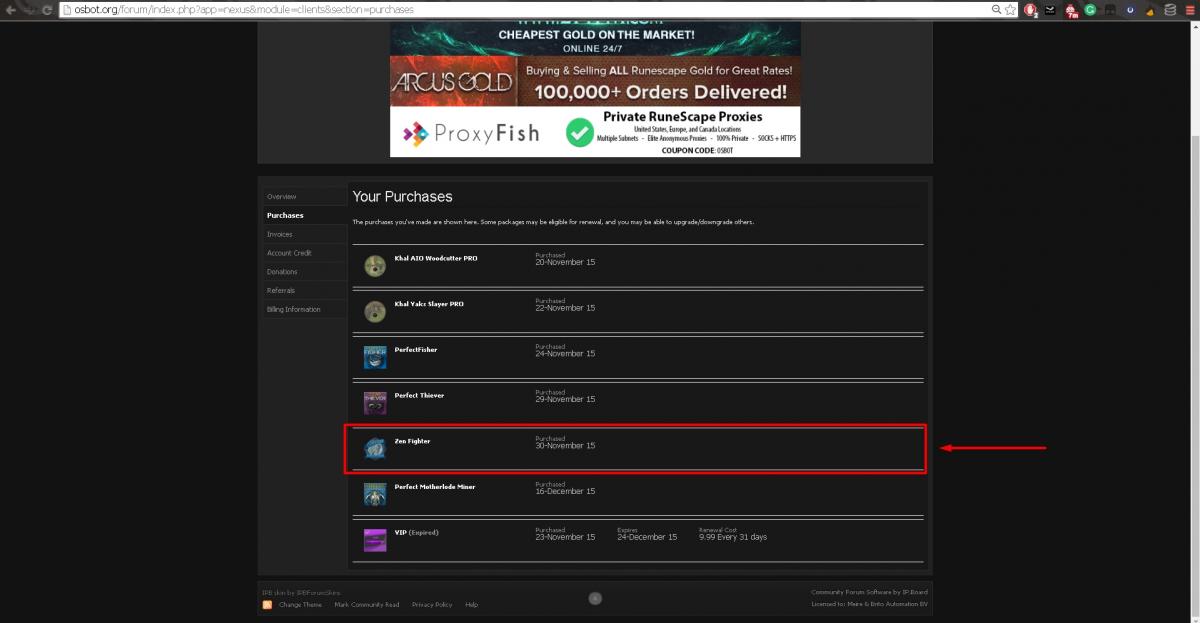
Hello, I purchased Zen fighter like a year ago. Now I'm coming back to botting and I see it´s not being updated or discontinued for some reason? Any reasons for this? + possible way to get money back if he removed the script?
-
Heres 100hr proggy i got long time ago. Got like 9k logs.
-
Advertisements ran out7/11Fear ?http://osbot.org/forum/index.php?app=nexus&module=clients§ion=purchases90 QP 5-10m? u wot m8Im stupid. Nice.Im Blessed, no needFind method and ab00se itMe pls Special 4thHey, This improvement would be great. For example when cutting yews, when one tree goes down, then 2nd, then 3rd, it would walk to the 1st tree stump and wait untill the tree re-spawns there, not waiting on the 3rd tree stump. If that makes sense. + Great release. Edit: Seems to be relatively large file...@OP This bug still active, any idea when fix? Walks here for some reason, and doesnt know how to walk back. Happened before like month ago at varrock yews aswell. + Heres long ass proggy powerchopping willowsBy not using public/free scripts.Doesnt work for me anymore. Clicks once, then stops. Edit : Same thing happened on PerfectFisher aswell.




Account
Navigation
Search
Configure browser push notifications
Chrome (Android)
- Tap the lock icon next to the address bar.
- Tap Permissions → Notifications.
- Adjust your preference.
Chrome (Desktop)
- Click the padlock icon in the address bar.
- Select Site settings.
- Find Notifications and adjust your preference.
Safari (iOS 16.4+)
- Ensure the site is installed via Add to Home Screen.
- Open Settings App → Notifications.
- Find your app name and adjust your preference.
Safari (macOS)
- Go to Safari → Preferences.
- Click the Websites tab.
- Select Notifications in the sidebar.
- Find this website and adjust your preference.
Edge (Android)
- Tap the lock icon next to the address bar.
- Tap Permissions.
- Find Notifications and adjust your preference.
Edge (Desktop)
- Click the padlock icon in the address bar.
- Click Permissions for this site.
- Find Notifications and adjust your preference.
Firefox (Android)
- Go to Settings → Site permissions.
- Tap Notifications.
- Find this site in the list and adjust your preference.
Firefox (Desktop)
- Open Firefox Settings.
- Search for Notifications.
- Find this site in the list and adjust your preference.