Leaderboard
-

Czar
Global Moderator6Points23787Posts -
Khaleesi
Developer5Points27843Posts -
Mreaper999
Members3Points21Posts -
Jaison17
Members2Points49Posts




Popular Content
Showing content with the highest reputation on 09/27/23 in all areas
-
1 pointWant to buy with OSGP? Contact me on Discord! Detailed feature list: - Supports most NPCs (Still adding more every day!) - Gem Crab support - Supports most locations (Still adding more on request) - Supports melee & ranged (magic coming soon) - Inventory profile setups - Loot when out of combat - Loot only own kills - Custom loot list profiles - Can be configured completely by hand - Can be imported from OSRS Wiki and modified to your needs - Easy to use loottracker - Eat food to loot items, bury bones or scatter ashes - Create a progressive level order profile - Setup food type and amount - Setup Boost potions(Attack, strength, ...) - Setup Misc potions (Prayer, anti poison, ...) - Create progressive gearing tasks - Withdraws new gear - Banks old gear - Equips new gear - Prayer support by prayer profiles - Quick prayer setup - Prayer flicking - Special attack weapon - Menu invokes - Task based monster fighting, level from 1-99 in one go on multiple npcs with a few clicks - All profiles you create are modular and can be used in any new task you create, the possibilities are endless. Custom Breakmanager: - Setup Bot and break times - Randomize your break times - Stop script on certain conditions (Stop on first break, Stop after X amount of minutes, Stop when skill level is reached) - Worldhopping - Crucial part to botting in 2023! Script queueing: - Support queueing multiple script in a row - All Khal scripts support flawless transitions in between scripts - Start creating your acc in a few clicks from scratch to multiple 99's - Flawless CLI support - Learn more here: How to use CLI parameters: - Example Usage: -script 1195:ScriptFile.BreakFile.DiscordFile SAVEFILE = Saved Filename BREAKFILE = Breakmanager Filename - SAVEFILE: Save file can be created in the GUI. Navigate to the tab you want to run and press "Save As CLI file". Please choose your filename wisely (No special characters) - BREAKFILE (Optional): Breakfile can also be create in the GUI, set the breaksettings you wish to use and press "Save new CLI BreakFile". Please choose your filename wisely (No special characters) - Final form (Note that with some bot manager you do not need to specify '-script 1195'): -script 1195:TaskList1.4515breaks (With breaks) -script 1195:TaskList1.4515breaks.discord1 (With breaks & discord) -script 1195:TaskList1..discord1 (NO breaks & discord) Proggies:1 point
-
1 pointNEW: Released Chop & Firemake plugin Added 8 Forestry events!!!!!!!! Easy 99, Next! Map Chooser System Progress Results! Help How to use this with Bot Manager? Script ID is 631, and the parameters will be the profile you saved in the setup window, e.g. oak15.txt I want a new feature added? Make a post below and I am always listening, within reason! The bot is doing something I don't like? Make a post below and I will adjust the code to match your play style!1 point
-
1 point
-
1 pointWant to buy with OSGP? Contact me on Discord! Features: - Recently added: Strength pumping - Supports every Bar available - Potion support (Optional) - Restocking coffer (Optional) - Coal bag support - Use a bucket too cool bars (If no ice gloves available) - Ice/gold gaunlets swap when making gold bars for the extra Experience - A clean and easy interface to start and track the script. - Custom webwalking using A* pathfinding algorithm - Randomized pathing system, humanlike paths, no repetitive clicking. - Script will never idle, start script and let it run forever! Antiban / Anti-pattern: - Randomized clicking positions - Random actions to break the pattern - Pathing is andom and close to human behaviour - Random/dynamic sleep times for humanlike interactions How to use CLI parameters: - Example Usage: -script 630:SAVEFILE.BREAKFILE SAVEFILE = Saved Filename BREAKFILE = Breakmanager Filename - SAVEFILE: Save file can be created in the GUI. Navigate to the tab you want to run and press "Save As CLI file". Please choose your filename wisely (No special characters) - BREAKFILE (Optional): Breakfile can also be create in the GUI, set the breaksettings you wish to use and press "Save new CLI BreakFile". Please choose your filename wisely (No special characters) - Final form: -script 630:SteelCoalBag.4515breaks Frequently asked questions (FAQ): Q: Where can we find this script? A: This can be found at the store here Q: How and where do I start this script? A: Simply start the script at Blastfurnace Q: Why does the script pays the Foreman A: If your smithing level is below 60, you have to pay 2500gp every 10min Will also pay the foreman after every restart Proggies: Blast Furnace Guide:1 point
-
1 pointRUNNING 4 SESSIONS PER NODE NODE [2] WITH 4 MORE BOTS Showcase: 8 bots same time generating ~2.8m/hr which equals to roughly ~67m/day! 1 MULE PER MACHINE FAQ What is the script ID? 782 Can I run this bot with the Bot Manager? Yes, the parameters will be the saved file name in the setup window, you will see once you run the bot. Can I request features added to this bot? Yes, I am always listening to requests and adding new features all the time!1 point
-
1 pointFeatures: Support custom combat tasks Support better armor detection Support multiple equipment presets Support f2p foods and strength potion Support loot your own grave after death Support smart healing when fighting Obor Support Hill Giants and Chickens with custom looting Coins, Kill count and Combat Xp per hour information Example CLI: Parameters: Preset name (text) java -jar "OSBot.jar" -login login:pass -world 301 -bot username:pass:bankpin -script 1170:Preset name Example GUI: GUI Explanation: Settings Farm Giant keys in Hill Giants: Mark this option if you want to farm items on Hill Giants instead of killing Obor (When this option is not checked, and the Giant keys run out, the bot switches to it automatically). Giant keys per run: Defines how many keys the bot will take to Obor's lair (in case of multiple kills without restock). Random delays between actions: If this option is checked, the script will perform small random delays of 1-5 seconds after killing a Hill Giant and will perform longer delays of 30-120 seconds every 10-15 minutes. Climb lair rocks to heal: Obor's max hit is 26, so when the player has 27 or less health, if this option is marked, the bot will climb the rocks to recover all his HP. Hill Giants Kill chickens before the Hill Giants: Mark this option if you want to kill chickens before you are level enough to go to Hill Giants. [New] Min. keys needed to start a run: Defines how many Giant keys in inventory or bank (in this case it will be checked in the restock), the player must have to stop farming Hill Giants and start killing Obor. Chickens Leave when: Select the skill and level needed to stop killing chickens and go kill Hill Giants. [New] Consumable Food used in Obor: Defines the food that will be used in the fight against Obor. Food used in Hill Giant: Defines the food that will be used when farming the Hill Giants. Minimum food to enter in lair: Defines the minimum amount of food the player must have in the backpack to enter Obor's lair. Use strength potions against Obor: Mark this option if you want to bring strength potions to Obor's lair. Change non-Obor loot settings: Click this button to open the menu containing the loot settings for Hill Giants and Chickens. [New] Loot Settings Load Template: Some predefined loot options. [New] Loot list: List of items that will be looted. [New] Remove selected item: Select multiple loot items using ctrl or shift and then press this button to remove them. [New] Add item to Loot list: Add the item writed in the "Item name" field to the Loot list. [New] Bury inventory bones: Bury all bones that appear in the player's inventory. Eat food to loot Hill Giants: When finding a desirable loot on the ground, the bot will consume a food to free up inventory space (When finding Giant keys, the bot will always free up space, regardless of this option). Equipments Use current worn equipment as preset: If this option is checked, when starting the bot, it will set the player's current equipment as a preset, that is, when it dies it will equip the same items that were before after looting the grave. At each restock, the bot checks if the player is using the equipment defined in the preset. So if any item disappears, the bot will shut down for safety. Check for best usable equipment: If this option is checked, after each new level gained, the script will check if there is better usable equipment in the inventory to be equipped. In addition, when the script goes to the bank, it will check if there is any equipment better than the one currently used, where there are requirements for its use. Example: If the player is wearing mithril armor, and he has adamantium armor on the bank, after reaching level 30 defense, the script will automatically equip the adamantium armor when performing a bank resuply. [New] Set equipment preset: You can use a previously configured equipment preset. Save current equipment preset: Give a name to the preset that represents the player's equipment at the time he started the script, and save it in "OSBot\Data\HeizObor\Equipments". Tasks Load Template: Some predefined combat task options. [New] Remove selected task: Select multiple tasks using ctrl or shift and then press this button to remove them. Add combat task: Add the training selected in the "Train" and "Until level" fields in the Combat tasks list. Save Preset name: give a name to the preset that represents the current settings. Save current settings preset: Save the preset settings in "OSBot\Data\HeizObor\Settings". Load Preset name: You can use a previously configured settings preset. Load selected settings preset: All bot settings will be changed to the same setting as the selected preset. Delete selected settings preset: Delete the selected preset. [New]1 point
-
1 pointProgamerz AIO Prayer Buy now($6.99): Store Or Like the post and comment below to get 12 hours trial Discord Support Server Features Simple and easy to use GUI Supports 4 different modes(Bury, Gilded altar, Chaos Altar, Ectofuntus) Supports burying bones available in bank Supports looting bones around and burying Supports using gilded altar in Yanille OR Remmington Supports multiple banking methods for gilded altar Supports "Personal Host" mode, in which the script will light up the incenses when needed Supports "Friend Host" mode, in which the script will go to, and use the bones on altar Supports auto detection of gilded altar host, when having the option "Auto find host" enabled Supports logging out when host is not found and option "Auto find host" is not enabled Chaos altar supports travelling using Burning Amulet and dying from the wine of zamorak to get out of wilderness with druid support Chaos altar supports Anti-PK, it will try to hop worlds whenever a player appears Ectofuntus supports with using ectophial to teleport to ectofuntus or going by walking to ectofuntus Ectofuntus supports filling buckets with slime or using a bucket of slime available in the bank If you have any suggestions or features you would like to see in the script, comment on the thread! Screenshots CLI(Command line interface)1 point
-
1 pointWant to buy with OSGP? Contact me on Discord! Detailed feature list: - Finishes the game flawless - Stamina + super energy potion support - Lvl 80 shortcut support - Stop on achieving 5 crates - Use menu invokes for flaswless interactions and no fails - CLI support for goldfarmers Custom Breakmanager: - Setup Bot and break times - Randomize your break times - Stop script on certain conditions (Stop on first break, Stop after X amount of minutes, Stop when skill level is reached) - Worldhopping - Crucial part to botting in 2023! Script queueing: - Support queueing multiple script in a row - All Khal scripts support flawless transitions in between scripts - Start creating your acc in a few clicks from scratch to multiple 99's - Flawless CLI support - Learn more here: How to use CLI parameters: - Example Usage: -script 1130:ScriptFile.BreakFile.DiscordFile SAVEFILE = Saved Filename BREAKFILE = Breakmanager Filename - SAVEFILE: Save file can be created in the GUI. Navigate to the tab you want to run and press "Save As CLI file". Please choose your filename wisely (No special characters) - BREAKFILE (Optional): Breakfile can also be create in the GUI, set the breaksettings you wish to use and press "Save new CLI BreakFile". Please choose your filename wisely (No special characters) - Final form (Note that with some bot manager you do not need to specify '-script 1130'): -script 1130:TaskList1.4515breaks (With breaks) -script 1130:TaskList1.4515breaks.discord1 (With breaks & discord) -script 1130:TaskList1..discord1 (NO breaks & discord)1 point
-
1 point
-
1 point
-
1 pointUse local coordinates instead of world coordinates as it's always on the same place ina certain region To go from local to world again, script.getMap().getBaseX() and Y1 point
-
1 point
-
1 pointThe best way would be to interact with a tile or to use getWalking().walk to the tile. I personally prefer: Position yourTargetTile = new Position(…,…,…); and then in your onLoop do yourTargetTile.interact(“Walk here”); or the easy way is just getWalking().walk(yourTargetTile) and to find the coordinates for the tile you must use entity debugger tool in osbot right-side panel and hover over the tile you want to explore. if the area is instanced then you will need to find an anchor object (any object that is always there for every game e.g. ladders), get its x/y and then find the difference in x/y to the tile you want to walk to.1 point
-
1 pointThe best bot is from Czar, it works well, they really are perfect friends, I recommend it.1 point
-
1 point
-
1 point
-
1 point
-
1 point
-
1 point
-
@Czar I've purchased 6 of your scripts and want the collection. Do you do a bulk purchase discount by chance?1 point
-
1 point
-
1 point
-
1 pointim having a problem with the script running lavas, the first inventory always comes out fires, any fix?1 point
-
1 pointgreat script; only thing if I may suggest or request is allowing for different versions of the dragon pickaxe to be able to use special. I noticed when I had my Dragon Pickaxe with the Zalcano shard the bot wouldn't recognize it as a dragon pickaxe and wouldn't perform the special attack. soon as I reverted the dragon pickaxe to its default version the bot immediately used the dragon pickaxe special.1 point
-
1 pointI definitely just tried some more wraths, tried lobsters, set it to 80%, doesn't eat after the first initial top up and inevitably end up dying again. Lava runes also still being lame, first inventory always just makes fires, regardless of having earths in invent and all settings appropriately set.1 point
-
1 point
-
1 point
-
1 pointIs the script able to collect and spin flax? And if so can it spin via the lunar spell?1 point
-
Trial for Perfect Agility script please1 point
-
1 point
-
1 pointHey there, been loving this script but noticed that infernal pickaxe and infernal pickaxe (or) aren't added. Could you please fix that?1 point
-
1 pointHI Czar, I love this script! Pest control is such a life saver, I've always hated that minigame. One suggestion for improvement is that sometimes the character gets stuck behind one of the brawlers and just stands there afking and losing participation. I'm not sure if that is the intended behaviour of the script. Perhaps a way to check if the character is attacking something every 10 seconds? EDIT: I was babysitting the bot and saw that when we won the game, the bot got into the congratulations dialogue box and got stuck standing there. I had to pause and unpause the script before it started working again.1 point
-
1 point
-
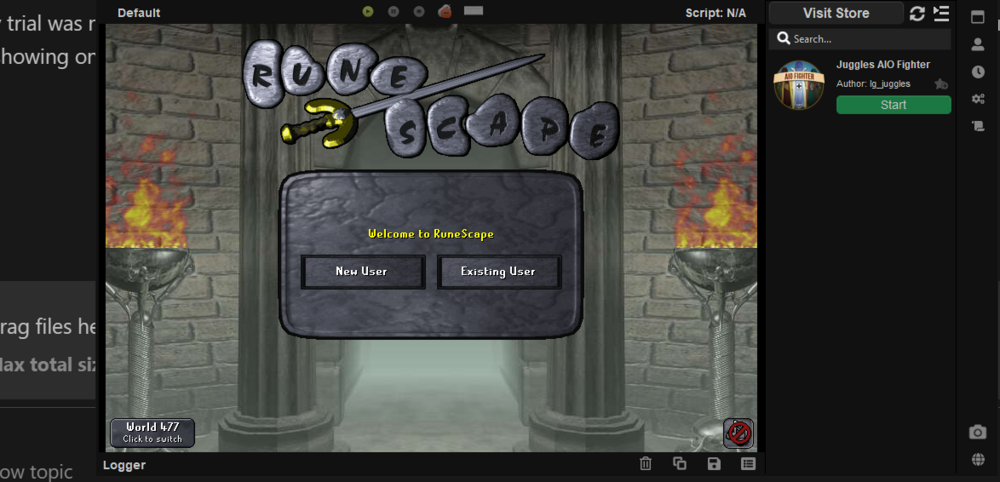
1 pointCzar my trial was never added? To verify what I'm saying you can look right now on your backend and I've also included a screenshot of the scripts showing on the osbot client. Maybe it was a bug... I'm posting this reply at what was 21 hours after it was activated so it should still even be showing up. Please correct this for me and try adding the trial again, because honestly it really never got added.... hope you believe me
 1 point
 -
1 pointUnfortunate, that was one of the main things I was looking for in this script; will check back1 point
-
1 pointSounds good, great script as usual! also could u add herblore sack support 👀1 point
-
1 pointFor taverly tasks could u add support for teleporting back to falador to bank?1 point
-
1 pointCan I trial this? Mining hands down worst skill outside of agility to train lol1 point
-
1 point@catdaddyzach1 which ores you using, I'll test and release an update if something broke. Added all trials gl guys enjoy! Guys I been running this bot from 1-81 no ban on my f2p account GE restocking is supported yes, I highly recommend smelting bars on new f2p accounts it's a decent moneymaker with low reqs.1 point
-
1 point
-
1 point
-
1 pointAiriel Fishing in this script seems to be busted. The script has a problem clicking the knife and then clicking the fish. It takes 5+ attempts on average of clicking knife to fish before finally getting it correct. Averaging 9k xp at hour at lvl 85 fishing and 85 hunter. Please address this issue soon.1 point
-
1 point
-
1 pointScript works great and have no problems using it. Only thing i found that might be a bit botlike is that for amulets it takes 13 of each from bank with one left click. But it right clicks to deposit all when it's putting the amulets in the bank (when it can be done with just a left click). Loving the script so far, keep it up! Doesn't really help but here's a screenshot of the deposit all right click situation: https://imgur.com/a/U4BM3pw1 point
-
1 point
-
1 point
-
1 point
-
1 point
-
1 pointDoes this have CLI Support and Do you see yourself adding coal bag and full prospector support? (purchasing automatically)?1 point
-
1 pointHey, quick question. I've been doing some barb fishing and it seems that when I select the afk, wait after fish move, etc options don't seem to work. Not sure if it's a bug or it just happens very sporadically. Thanks in advance! Great script otherwise.1 point