Leaderboard



Popular Content
Showing content with the highest reputation on 12/19/21 in all areas
-
👑CzarScripts #1 Bots 👑 👑 LATEST BOTS 👑 If you want a trial - just post below with the script name, you can choose multiple too. 👑 Requirements 👑 Hit 'like' 👍 on this thread1 point
-
1 pointWant to buy with OSGP? Contact me on Discord! Detailed feature list: - Account builder mode to level your firemaking to level 50 or even higher. - Equips pyromancer gear option - Chopping and burning logs (base Option) - Relights brazier - Fletch option - Fix brazier option - Make potion and heal pyromancer when down option - Tons of food supported - Brazier swicthing when pyromancer is down - Advanced game settings to skip games, smart caluclate points, afk at certain points, ... - Bank or Open crates - Dragon axe special attack - Fletch at brazier option - Chop in safespot option - Worldhopping - CLI support for goldfarmers Custom Breakmanager: - Setup Bot and break times - Randomize your break times - Stop script on certain conditions (Stop on first break, Stop after X amount of minutes, Stop when skill level is reached) - Worldhopping - Crucial part to botting in 2023! Script queueing: - Support queueing multiple script in a row - All Khal scripts support flawless transitions in between scripts - Start creating your acc in a few clicks from scratch to multiple 99's - Flawless CLI support - Learn more here: How to use CLI parameters: - Example Usage: -script 909:ScriptFile.BreakFile.DiscordFile SAVEFILE = Saved Filename BREAKFILE = Breakmanager Filename - SAVEFILE: Save file can be created in the GUI. Navigate to the tab you want to run and press "Save As CLI file". Please choose your filename wisely (No special characters) - BREAKFILE (Optional): Breakfile can also be create in the GUI, set the breaksettings you wish to use and press "Save new CLI BreakFile". Please choose your filename wisely (No special characters) - Final form (Note that with some bot managers you do not need to specify -script 909): -script 909:TaskList1.4515breaks (With breaks) -script 909:TaskList1.4515breaks.discord1 (With breaks & discord) -script 909:TaskList1..discord1 (NO breaks & discord) Proggies:1 point
-
1 pointI must say i'm really impress by this script with the trial you gave , works really well! going to buy it for sure in this week. Thanks!1 point
-
1 pointyup exactly what i was about to post. Fantastic script as always. i have a few scripts and Khal is the best in the business. I can't use internet that well... but do you happen to have a hunter script?1 point
-
1 point
-
1 pointCurrently looking for people to beta test this script! DM me if you are interested in trying it out and providing feedback.1 point
-
If anyone is interested in buying feathers, I sell them for 3gp each0 points
-
When I launch the OSB launcher it wont let me click mirror mode. The button appears greyed out as if its unavailable. I can't find anything that says it wont be working so I cant figure out what the issue is?
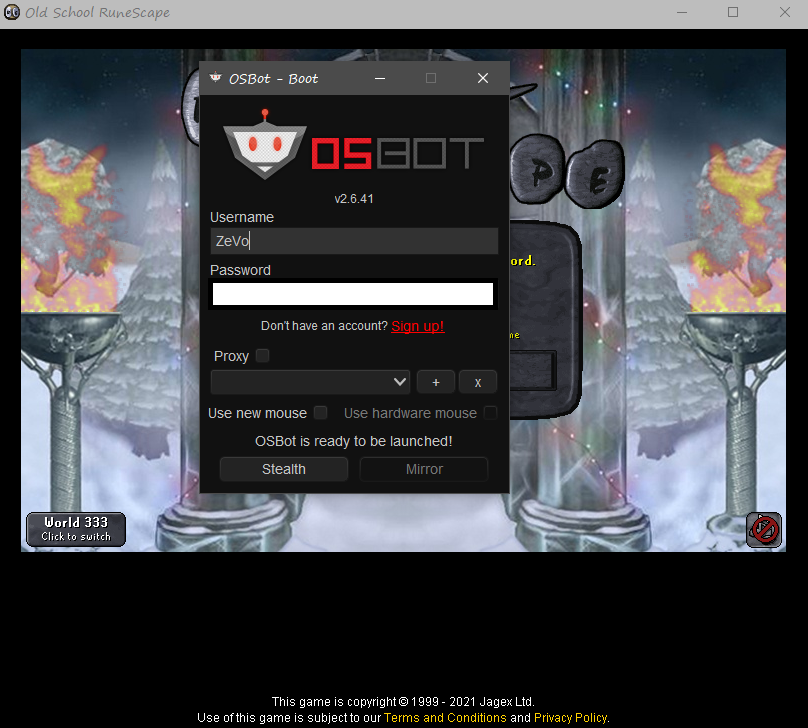 0 points
 -
0 points
-
0 pointsUser - @bigNsmall Evidence is overwhelming, so I will be proceeding with his ban. Evidence - Open dispute on Sythe. https://www.sythe.org/threads/got-scammed-by-bignsmall/ Admin in his discord Worker Statement0 points
-
0 points