LaxBros
Members
-
Joined
-
Last visited
Everything posted by LaxBros
-
Hey Eagle, could I please get a trial? How are ban rates for this script BTW?
-
Inspect element is incredible! I cannot believe I never knew about this. Thanks again.
-
Wow, you guys are amazing. I was unaware of what you could do with google chrome, and am going to try to do this myself now. I will let you know how it goes...
-
Hello, Im willing to pay $3 paypal to whomever can complete, and guide me what the steps you took on how to photoshop my GPA(ATTACHED) from 3.40, to 3.55. This is for personal use, and not for illegal or unethical intentions. Every time I tried, it came out completely botched. Thank you. http://s28.postimg.org/sqmhae765/ssss.png
-
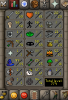
99 magic,roving elves done, regicide done, all god staffs and books
-
100 USD
-
Great script, thank you for the trial
-
Could I please receive a 24hr trial? Thank you =)
-
-
What service would you like? 95-99 magic Are you going first or will a MM be used? Will go first Do you agree with the ToS? Yes What is your skype? do not have skype Will you leave feedback once the service is complete? Yes of course, I always do.
-
Thank you for the trial Khal! Your script was flawless and amazing, I will definitely be buying. Thank you for the trial Khal, amazing script! I will be buying.
-
Hey Khal! Could I please get a trial of this script?
-
There are many people who figured out how to get the chocolate chicken to follow them, im trying to figure out how.
-
Does anybody know how people are getting the chocolate pets out of the easter event , and as their companions?
-
Skill: Kendrick Kanye Cole Fun: Chief Keef Young Thug A$AP
-
do it for the vine
-
This is actually slightly funny
-
been using this script for a while now, thank you =)
-
-
I think that OSRS is a pretty decent representation of what 2007scape was all things considered. I do believe that the real 2007 had a much more friendly and welcoming atmosphere, and Jagex was so much less strict when it came to messing around. The player base on real 2007 was also far more active. Well never get the real days back, but this is good enough for me.
-
This happened to me back in 2009, they did in fact delete my account.
-
Today I was in Lumbridge and saw about 100 flax bots, goldfarmers are in abudance.
-
I think I would actually cry.
-
who do i find the source of a .jar?
-
Awesome thank you for the input! I'll get on the banking thing right away, and also about the paint! I'm still waiting to implement a GUI toggle, so your able to turn the paint on and off, still looking in how to do this properly, but hopefully should be done soon! I have to thank and applaud you for actually taking the time to listen to members input towards your script. Not only do you listen, but you quickly take action and improve your product. Thanks for being an awesome scripter, Kyle. EEdit: I've downloaded the new script but it still says v0.09 on the paint?