




Jump to content
View in the app

A better way to browse. Learn more.

OSBot :: 2007 OSRS Botting

A full-screen app on your home screen with push notifications, badges and more.

To install this app on iOS and iPadOS
  1. Tap the Share icon in Safari
  2. Scroll the menu and tap Add to Home Screen.
  3. Tap Add in the top-right corner.
To install this app on Android
  1. Tap the 3-dot menu (⋮) in the top-right corner of the browser.
  2. Tap Add to Home screen or Install app.
  3. Confirm by tapping Install.

GoodMan

Members
  • Joined

  • Last visited

Everything posted by GoodMan

  1. Can I have a trial of this before I purchase?
  2. Can I have a trial before I buy?
  3. GoodMan replied to Khaleesi's topic in Minigames
    trial please!
  4. Hey can I have a trial before I buy it? Thanks in advance!
  5. May I have a trial of the script before I go ahead and buy it?
  6. GoodMan replied to Molly's topic in Thieving
    Can't get help on a paid bot.. Must be outdated.
  7. GoodMan replied to Molly's topic in Thieving
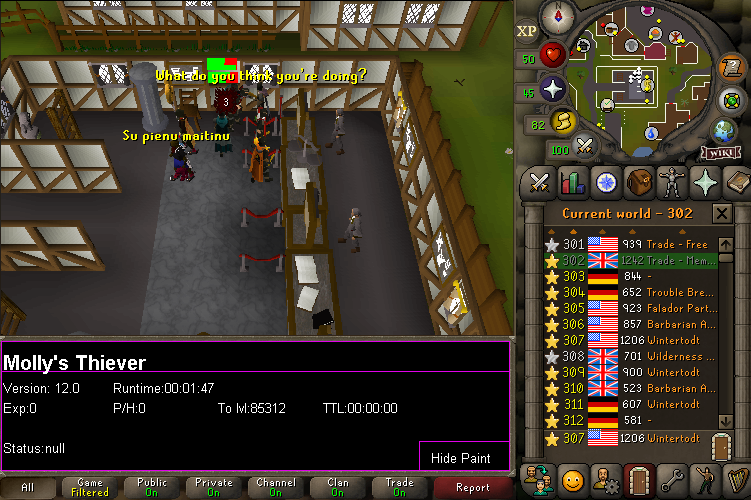
    Why does my bot's status keep saying "null"? The bot is doing this with every option I try to choose.
  8. GoodMan replied to Molly's topic in Thieving
    May I have a trail before I purchase this? Thanks in advance!
  9. GoodMan replied to Czar's topic in Thieving
    Hey bro, Can I get a trial before buying the script?
  10. May I have a trial?
  11. GoodMan replied to Token's topic in Minigames
    My current nmz program isnt working correctly Looking to upgrade Can i have a trial please?
  12. Happy holidays everyone! I bought my daughter tons of toys for the holidays and seeing her face when she seen them was just priceless!

Account

Navigation

Search

Configure browser push notifications

Chrome (Android)
  1. Tap the lock icon next to the address bar.
  2. Tap Permissions → Notifications.
  3. Adjust your preference.
Chrome (Desktop)
  1. Click the padlock icon in the address bar.
  2. Select Site settings.
  3. Find Notifications and adjust your preference.