




Jump to content
View in the app

A better way to browse. Learn more.

OSBot :: 2007 OSRS Botting

A full-screen app on your home screen with push notifications, badges and more.

To install this app on iOS and iPadOS
  1. Tap the Share icon in Safari
  2. Scroll the menu and tap Add to Home Screen.
  3. Tap Add in the top-right corner.
To install this app on Android
  1. Tap the 3-dot menu (⋮) in the top-right corner of the browser.
  2. Tap Add to Home screen or Install app.
  3. Confirm by tapping Install.

valis

Members
  • Joined

  • Last visited

  1. Hi I have forgotten my password and the domain for my e-mail account has expired. However, I have my account autosaved on my computer and I am still logged into the forums (obviously). How can I recover the plaintext version of my password? The password has not been "saved" in a sense, pretty sure it's just using a cookie to keep me logged in to the forums. I also have my password saved on my client and can login.
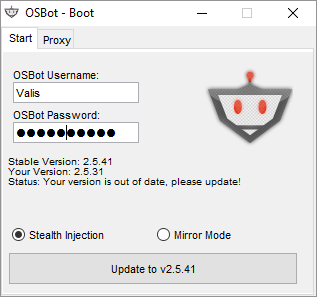
  2. Any suggestions to fix this?
  3. Getting this too.. running the JAR on Ubuntu 18.04.
  4. Purchased Stealth Quester and certainly not what I expected for $20. Haven't been able to complete much of the quests due to bugs, I finally manage to get it to work with 3 quests and account gets disabled. Developer isn't responsive either.
  5. valis replied to Token's topic in Others
    Removed.
  6. valis replied to Token's topic in Others
    Kind of ridiculous really, can you please review the Demon Slayer quest? It's not wielding the relevant weapon to complete the quest. Got this script a few hours ago and haven't been able to use it properly.
  7. valis replied to Token's topic in Others
    Removed
  8. Possible to receive a trial? Thanks
  9. valis replied to Tom's topic in Mining & Smithing
    Can I receive a free trial of this too?
  10. valis replied to Tom's topic in Fishing & Cooking
    Can I receive a trial please? Thanks
  11. Looking to earn maximum GP as a skiller which is p2p, any suggestions?

Account

Navigation

Search

Configure browser push notifications

Chrome (Android)
  1. Tap the lock icon next to the address bar.
  2. Tap Permissions → Notifications.
  3. Adjust your preference.
Chrome (Desktop)
  1. Click the padlock icon in the address bar.
  2. Select Site settings.
  3. Find Notifications and adjust your preference.