






Pegasus
Java Lifetime Sponsor
-
Joined
-
Last visited
Everything posted by Pegasus
-
-
make osbot be able to control robot arm with 5 fingers hand to produce human-like mouse movement XD https://www.google.com/search?q=Design of a low-cost five-finger anthropomorphic robotic arm with nine degrees of freedom Joking
-
u supply bond and starter gold?10m each Skype: edwas.fas Discord: Pegasus#0464Do you provide bond and supply?Loading only GUI for now. Cannot save profile via GUI now. Support custom area/poly area. How to use: 1. Download this script and the sample profile rar. 2. Run this script first, it will create a "Pegfighter" folder in your C:\Users\user\OSBot\Data. Then close the script. 3. Extract and put the simple profiles to C:\Users\user\OSBot\Data\Pegfighter 4. Run this script again, load the sample profile in GUI. 5. Try this script or copy profile in C:\Users\user\OSBot\Data\Pegfighter and edit yourself. You can get area/poly area from : https://explv.github.io/ Pegfighter001.023.jar Pegfigher_sample.rar
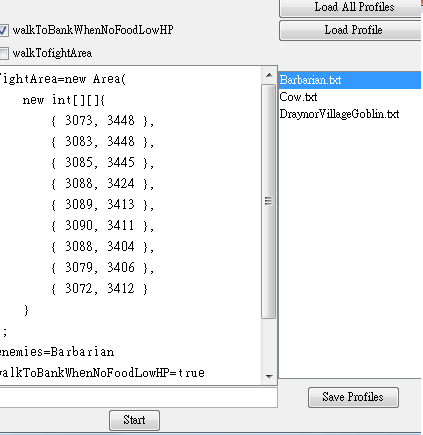 Skype: edwas.fas Discord: Pegasus#0464what is your hp level?10m per account nowSkype: edwas.fas Discord: Pegasus#0464zulrah quests(Regicide, underground pass, Biohazard, Plague City) : 10m each account Discord: Pegasus#0464When I run it, it shows NullPointerException immediately. Script doesn't start if account hasn't logined / I turned off client auto login? onstart not being called before user is logged Uncaught exception! java.lang.NullPointerException at org.osbot.rs07.event.ScriptExecutor$3.run(kl:211) at java.awt.event.InvocationEvent.dispatch(Unknown Source) at java.awt.EventQueue.dispatchEventImpl(Unknown Source) at java.awt.EventQueue.access$500(Unknown Source) at java.awt.EventQueue$3.run(Unknown Source) at java.awt.EventQueue$3.run(Unknown Source) at java.security.AccessController.doPrivileged(Native Method) at java.security.ProtectionDomain$JavaSecurityAccessImpl.doIntersectionPrivilege(Unknown Source) at java.awt.EventQueue.dispatchEvent(Unknown Source) at java.awt.EventDispatchThread.pumpOneEventForFilters(Unknown Source) at java.awt.EventDispatchThread.pumpEventsForFilter(Unknown Source) at java.awt.EventDispatchThread.pumpEventsForHierarchy(Unknown Source) at java.awt.EventDispatchThread.pumpEvents(Unknown Source) at java.awt.EventDispatchThread.pumpEvents(Unknown Source) at java.awt.EventDispatchThread.run(Unknown Source)bot or hand done? Would you put some starter gps in these accounts?It doesn't work in Stronghold of Security (narrow area). AND, webwalk doesn't work well in Stronghold of Security too.My IDE shows Cannot resolve symbol 'FilterPredicate' How to use it? @BotreIt works in 95% fighting area but it doesn't work in special fighting area.InteractionEvent e = new InteractionEvent("Cow", "Attack"); e.setHover(false); e.setOperateCamera(false); this.execute(e); I set setOperateCamera() to false, but it still moves camera when attack enemies. What can I do now?I can do it now! Skype: edwas.fas Discord: Pegasus#0464bump



Account
Navigation
Search
Configure browser push notifications
Chrome (Android)
- Tap the lock icon next to the address bar.
- Tap Permissions → Notifications.
- Adjust your preference.
Chrome (Desktop)
- Click the padlock icon in the address bar.
- Select Site settings.
- Find Notifications and adjust your preference.
Safari (iOS 16.4+)
- Ensure the site is installed via Add to Home Screen.
- Open Settings App → Notifications.
- Find your app name and adjust your preference.
Safari (macOS)
- Go to Safari → Preferences.
- Click the Websites tab.
- Select Notifications in the sidebar.
- Find this website and adjust your preference.
Edge (Android)
- Tap the lock icon next to the address bar.
- Tap Permissions.
- Find Notifications and adjust your preference.
Edge (Desktop)
- Click the padlock icon in the address bar.
- Click Permissions for this site.
- Find Notifications and adjust your preference.
Firefox (Android)
- Go to Settings → Site permissions.
- Tap Notifications.
- Find this site in the list and adjust your preference.
Firefox (Desktop)
- Open Firefox Settings.
- Search for Notifications.
- Find this site in the list and adjust your preference.