






Joliter
Members
-
Joined
-
Last visited
Everything posted by Joliter
-
I remember playing this with my buddies in grade 8 or 9 in computer class, was so addicting.
-
31:12 "I had to hire a Russian snitch"
-
@Apaec Get that error when the bot walks to anvil from bank, doesn't seem to affect how the script works though.
-
@Eagle Scripts Thanks for the update. It's been running smoothly!
-
Script seems to work flawlessly as long as you follow set up instructions. Will definately add this to my collection soon. Thanks for the trial!
-
@Eagle Scripts Could I have a trial please?
-
Yes, it can shift drop.
-
@Czar Version 217 Looting while safespotting and using a cannon to fight alongside doesn't seem to work. I have "loot my items", "prioritize loot" both selected and it still doesn't pick up anything at all. Version 218 Still getting the same looting problem when fighting alongside cannon.
-
Read a couple of posts above...?
-
Must be a problem with the script on mirror mode then. I'm using Stealth Injection and never had any problems with it.
-
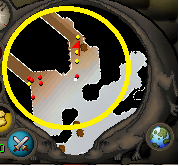
@Czar How do I increase the radius of the bot to search for monsters? I usually change the player check radius which works fine, but in some instances, I need a bigger area. For example the minimap below I would like to have the radius as big as the yellow circle. I tried increasing player check radius to 1500, but it doesn't seem to be enough because it reaches "edges of the radius" so it attacks monster, then runs back then tries attacking again.
-
Have you tried using the option "Wait for loot to appear"?
-
No, I'm not using it there now. All you need to do is go to Hill Giants, have key in inventory, select "Hill Giant" on the monster selection screen, and if you're using range, select that. I don't see what the problem is? Works the same as all the other monsters.
-
I just used it at Hill Giants with no problems. What isn't working? Post your settings.
-
@Charlotte Never had VIP before, and I'm a broke college student. Would be nice to try it out.
-
What do you mean it tries to attack a different NPC? Does the cannon aggro the other npcs? You could set fighting boundary with F7 and select the area in which it will attack.
-
Can you post some pictures of the settings?
-
Did you enable range mode in the first menu tab? Once you hit F6 in game, a green box should appear around your tile.
-
F6, then go through settings to choose what's appropriate for the safe spot you are at.
-
@Czar The fixes on safe spotting are awesome! Safe spotting works so smoothly now.
-
Received email that someone was trying to access my OSbot account, and I was wondering if it's a real email or a phishing attempt. @Maldesto https://imgur.com/a/fVOXT4i EDIT: can't figure out how to just display image on the post instead of link
-
@Czar On Canifis course, after it finishes the course and it clicks on minimap to go beside the tree (start of course), then it tries to immediately click on the tree, sometimes the click on the tree doesn't register, so it just sits there for about 10-15 seconds until it realizes the click didn't go through and it finally clicks the tree again. Are you able to improve this? you could click directly on the tree after finishing the course if you move the camera so the tree is visible. Also, can you add alching support please?
-
Botting will never die, but whether it'll be public or not is a different question.
-
Comments are misleading sometimes. People say things don't work, but sometimes they actually didn't set something up right or they are doing something wrong. Nothing wrong with wanting to trial something before committing to purchasing it, unless you are doing it to abuse the system.
-
I bet legits would want to "bot" just for this haha. GUI looks very nice!


