
Mainio
Trade With Caution
-
Joined
-
Last visited
Everything posted by Mainio
-
I'm sorry if it did sound mean. Was just a tip
-
Google.com is your friend as it seems you are here everyday asking for advice of something that you can google in 2 seconds. Just use void
-
Feel free to mail him L0L
-
If you don't mind, add my Skype so I can discuss price with you! live:mainiors
-
I recommend @DoraTheExploda He did the feud and took 14-53 thieving very fast for me !
-
Does the account have mith gloves if yes, you should mention that in the post. Also if there are any other untradeables on it. But I don't have any price quote on this, haven't seen these type of accounts that have been sold.
-
Doing 96-99 def atm for @x3li, it will be finished within next 2 and half hours. Is this needed to be done by hand or able to use FruityNMZ script?
-
I definately do know this guy, he has done few quests&skilling for me earlier! So yeah, I've trusted him.
-
I'd say atleast 5m but for example if the buyer is looking for bot accounts for magic guild, he could probably pay even more
-
Ask from this guy, he asked for price checks last week. @Koont
-
Ripperino. Well time to make/buy more fresh accounts
-
Basically it costs you nothing. All you need is the very first round that you are doing, grab ROCK CAKE (THIS IS A MUST IN 1 DEF PURE) + 24 prayer potions + 3 super combat potions; this setup inventory + BEST PRAYER bonus gear you can have equipped go and do Hard Dream and just use melee pray all the time + super combat potions. After the first dream, you should have tons of points and then you will buy overloads from the coffer and absorb potions. EDIT: When you are doing the first run with prayer potions, YOU DON'T need rock cake - but when you go in with overloads + absorb pots, then you first overload then guzzle the rock cake until you are 1hp - then just drink full absorb points. And with 1 def, you should constantly eat/guzzle rock cake to keep your hp at 1.
-
Chinned range and bursted magic yea
-
-
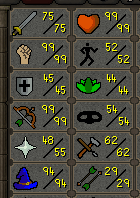
You can copy stats of my zerk + if you have time go for 99 magic + YOU NEED THE FUCKING 99 HP I myself prefer 75 over 60 *Sotd *Elder maul -*Ags -*Bss And i deep wild pk a lot so the staff is a must If you are planning to deep pk, you may also get 55 prayer for spirit shield.
-
-
Long story short he says
-
Wtf you do with my car?
-
You have to do sand crabs also. You can't go nmz with those stats or the xp rates are terrible
-
Lol this is not first time in 5 years its bugging like a fuck But you are pretty much right, usually it works just fine.Now i have good reason to go out and take a walkIs it just me or is this piece of shit application down? Shows everyone offline and messages does not go thru