






white ride
Members
-
Joined
-
Last visited
-
thank you bro i got it working
-
Id really appreciate that. I've sent you a dm on discord.
-
can we have a developer look into this if its a common problem
-
its not worked either do i need to patch the client to runelite i get this error message when i try to patch can you help? thanks
-
tried again using jagex launcher still no luck.
-
i am using stealth and no proxy and still got the same error message
-
is yours working now?
-
hi i took a long break from botting and i have just come back. i got the newest client and just tried to start a default bot and got the error message 'bot initialization error' bnefore it loads up the game. how do i fix this thanks
-
i have a 70-70-70 account if you're interested
-
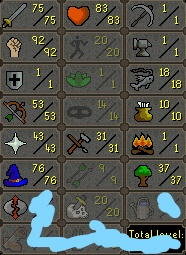
75 attack pure comes with sotd. never been banned. has 25 quest points including avas device and bear head. also no email attached
-
-
Hi , could you auth me please? Thank you.
-
i always pay with bonds and sometimes its a 2 day ban, i think it will depend more on how old the account is and what you were botting. if they think youre gold farming its perm ban, if they think youre a semi legit player trying to get some easy lvls its a 2 day ban. thats just my opinion
-
also banned on some accounts today, havent checked if its 2 day or perm banned yet, but i was kinda expecting it anyways. the last 2 week was fun lol
-
gg bro, what were you botting before the ban? gl on new account if you make one



