







Scotty
Members
-
Joined
-
Last visited
-
 @vapaxyownzhey let me know if you want a change of colour or anything, my creativity isnt great today had a bad sleep
 -
ok noted i will be doing it tomorrow morning as that is when my creativity is at its peak
-
for @Mordred @vapaxyownz please tell me what you want me to draw and whether it's an avatar or a signature
-
yo it's big 2020 7 years after i first made the thread - anyone want a limited edition version??? 5 avatars or signatures available
-
anyone know if there are users with those avatars still??? nevermind found my thread https://osbot.org/forum/topic/13636-scotty-sigs/
-
thanks guys really wanted the vip!!! @Charlotte, @Malcolm @Sara
-
were the winners announced?
-
sold thanks for your bids good people of osbot
-
$75 bid noted thanks ez
-
it's username login, so no original email
-
this is a sick account for a sick price why are there no bids??!?!
-
bidding starts at $75 now
-
nice account man
-
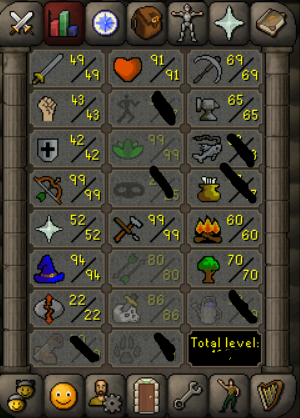
Stats: Wealth: about 1m worth of random shit in the back Quests: https://i.imgur.com/b5FbwhA.gifv Bids start at $75 A/w: $250 I only take cryptocurrency account status: ] i am the original owner and it's a username login
-
bump sorry i realize it's old but i never sold either account and the gold price has changed a lot



